

You want to freelance with AI skills — but you have no portfolio, no clients, and no idea where to start. This guide breaks the whole thing down so that by the end, you’ll know exactly what to create, how to present it, and where to put it. No tech background required.
Here’s the thing nobody tells you when you decide to start freelancing with AI: you don’t actually need clients to build a portfolio.
I know that sounds backwards. The advice everywhere online seems to assume you already have a client list, years of experience, and a polished website to point people to. And if you’re sitting there with none of those things, it’s easy to feel like you’re already behind before you’ve even started.
But that feeling is based on a myth. And I want to clear it up right now.
A portfolio isn’t a museum of your past work. It’s proof that you can do the work. And in 2026 — with AI tools available to anyone with an internet connection — you can create that proof starting today. From scratch. No clients needed.
Many people discover AI freelancing through AI side hustles, but building a portfolio is what turns occasional income into a sustainable freelance business.
Let me show you exactly how.
Why the “No Experience” Problem Is Easier to Solve Than You Think
If you’ve ever felt stuck in the classic freelancing loop — you need a portfolio to get clients, but you need clients to build a portfolio — you’re not alone. It’s one of the most common frustrations beginners share.
But here’s what most people get wrong: they define “experience” far too narrowly.
When potential clients look at a portfolio, they’re not scanning for famous company logos or a long list of paying customers. They’re asking one question: Can this person actually help me?
And that question can be answered with self-created projects, fictional case studies, personal experiments, and real demonstrations of skill — none of which require a single client.
Freelance platform Fueler puts it clearly: when most people say they have no experience, what they really mean is they have no paid client experience. But experience is much broader than that.
This matters a lot in the AI space especially. The numbers make it clear just how much demand exists for people with practical AI skills right now:
2,100+ Open automation jobs on Upwork alone as of early 2026
61% Of Gen Z freelancers already use generative AI in their daily work
75%Of freelancers earn as much or more than in traditional employment
The AI industry in 2026 has a genuine talent shortage at every level — including the entry level — and it’s actively creating onboarding pathways for people coming from non-technical backgrounds. Many employers and clients now care more about what you can demonstrate than what you have a certificate to prove.
So the question shifts from “how do I get experience?” to “how do I create evidence of my ability?” That’s a much more solvable problem — and the rest of this guide is your roadmap.
Step 1 — Pick One Specific AI Service to Lead With
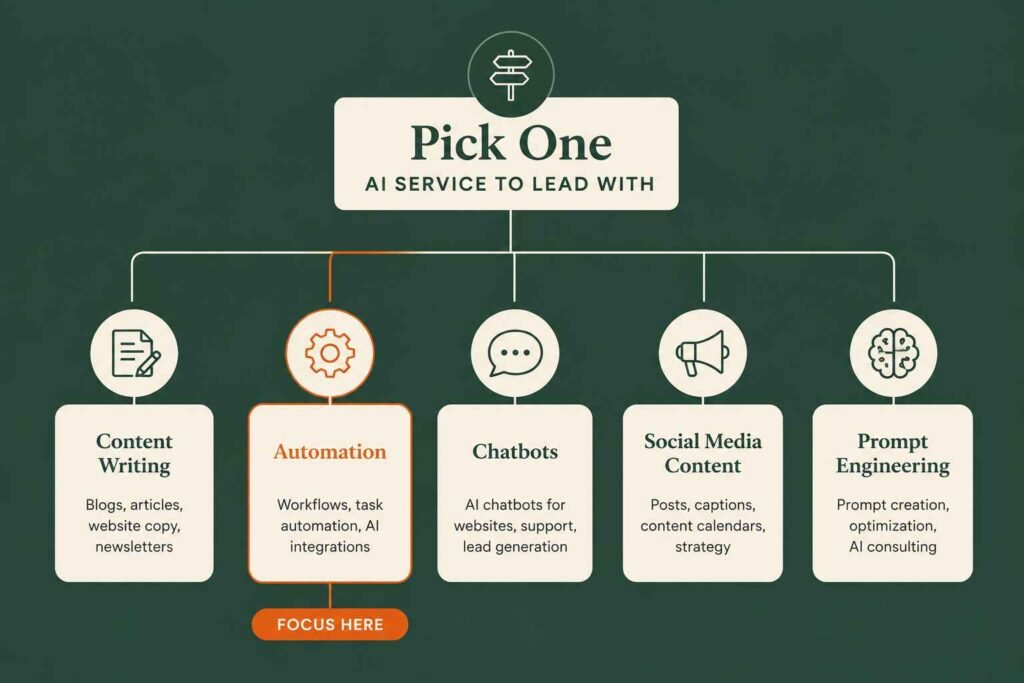
Before you build anything, you need to decide what your portfolio is actually for. This is the part most beginners skip — and it’s also the part that makes the biggest difference.
The instinct when you’re starting out is to be as broad as possible. “I offer AI services!” sounds like a wider net. In reality, it’s a muddy one. A focused portfolio that clearly says “I help small businesses write better content using AI” will land clients far more reliably than one that vaguely gestures at everything AI can do.
Here are some of the most beginner-accessible AI freelance services worth considering right now:
- AI-assisted content writing — blog posts, social captions, email newsletters, product descriptions. If you’re interested in this path, see our guide on how to become an AI content writer in 2026.
- AI prompt engineering — building, testing, and documenting reusable prompt systems for businesses. If you’re new to the field, start with our beginner’s guide to prompt engineering.
- AI workflow automation — setting up no-code automation using Make.com, Zapier, or n8n. This is one of the fastest-growing opportunities for freelancers, especially if you’re interested in becoming an AI automation specialist.
- AI chatbot setup — creating and configuring chatbots for customer service or lead capture
- AI video or visual content creation — using tools like HeyGen, Synthesia, or Canva AI for branded content
- AI-powered social media management — content calendars, scheduling, and caption writing using AI tools
Pick the one that genuinely interests you, overlaps with any skills you already have, and serves an audience you understand. That last part matters more than people realise. If you’ve spent ten years in customer service, you’ll create far more convincing AI chatbot portfolio pieces than someone with no service background. Your life experience is a legitimate head start.
Quick tip: Not sure which service to lead with? Ask yourself: “What kind of business would I genuinely love to help?” Then pick the AI service most useful to that business. Starting with clarity beats starting with breadth every time.
Step 2 — Create Three to Five “Spec Projects” That Prove Your Skill
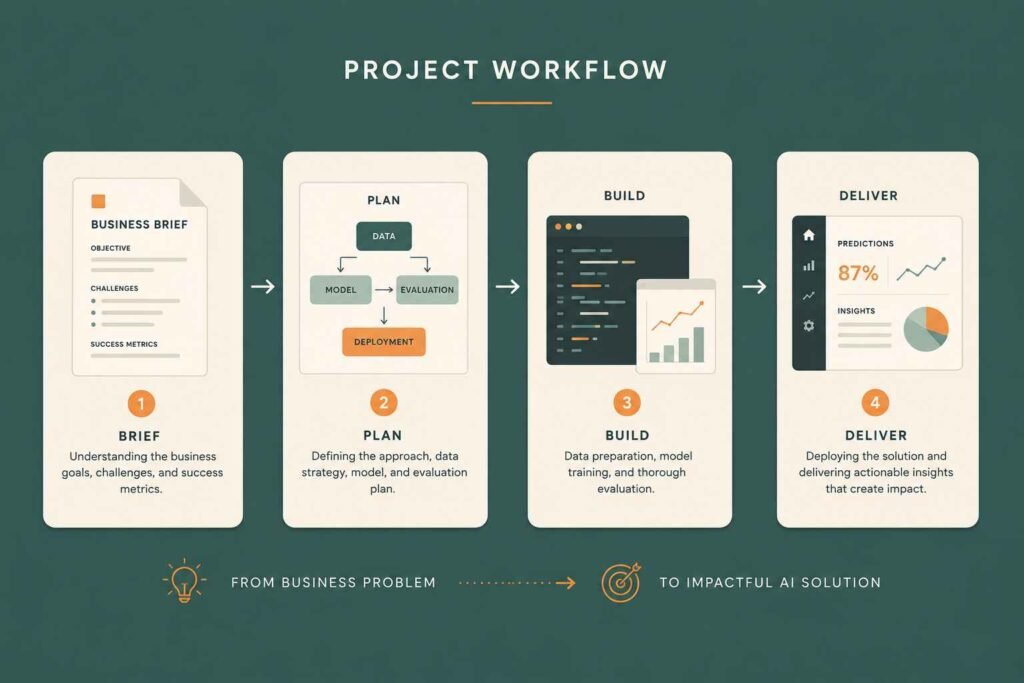
Spec work is exactly what it sounds like — work you create for the purpose of showcasing your skills, not because a client paid for it. And in the freelance world, it’s been an accepted portfolio strategy for decades. Graphic designers do it. Copywriters do it. Developers do it. Now AI freelancers can do it too.
The idea is simple. You pick a fictional (or real) business, define a problem they might have, and then create the kind of AI-powered solution you’d deliver as a freelancer. Then you document it properly and present it as a case study.
Three to five well-made spec projects is genuinely enough to get you hired. Quality beats quantity here — always.
What a Spec Project Looks Like in Practice
Let’s say you want to offer AI content writing services. Here’s how you’d build a spec piece:
Fictional business: “Bloom & Ground” — a small sustainable plant shop in Bristol that wants to grow their online presence.
Problem: They post inconsistently on Instagram because writing captions takes too long.
Solution: You create a month of AI-generated Instagram captions tailored to their brand voice, complete with hashtag strategy and a content calendar.
Presentation: A short PDF or webpage showing the brief, your process, the finished captions, and a note on the time saved compared to writing manually.
That’s a portfolio piece. You didn’t need Bloom & Ground to actually exist. You didn’t need to get paid. You just needed to demonstrate that you can think like a freelancer, understand a client’s problem, and deliver a real-looking output.
Here’s a quick list of spec project ideas across the most popular AI freelance services:
- Write three AI-assisted blog posts for a fictional business in a niche you understand
- Build a sample prompt library for a hypothetical e-commerce brand
- Create a documented Make.com automation flow that shows how you’d connect a contact form to a CRM
- Set up a basic Notion AI workspace for a fictional freelance consultant
- Design a content calendar and 30 social media captions for a fake local café using AI tools
- Record a short Loom walkthrough of a simple AI workflow you built — narrated and explained
The key is to treat every spec piece as if a real client paid for it. Proofread it. Format it properly. Give it a title that describes the outcome. That professional presentation is what separates a spec project from a rough draft.
Step 3 — Turn Your Projects Into Case Studies (With a Simple Formula)
This is the step that most beginners skip — and the one that makes the biggest difference in how seriously clients take your portfolio.
A raw work sample says “here’s a thing I made.” A case study says “here’s the problem, here’s how I thought about it, here’s what I did, and here’s why it worked.” That second version is what actually builds trust.
The good news? You don’t need to be a professional writer to do this. You just need a simple framework. I call it the Problem → Process → Proof structure.
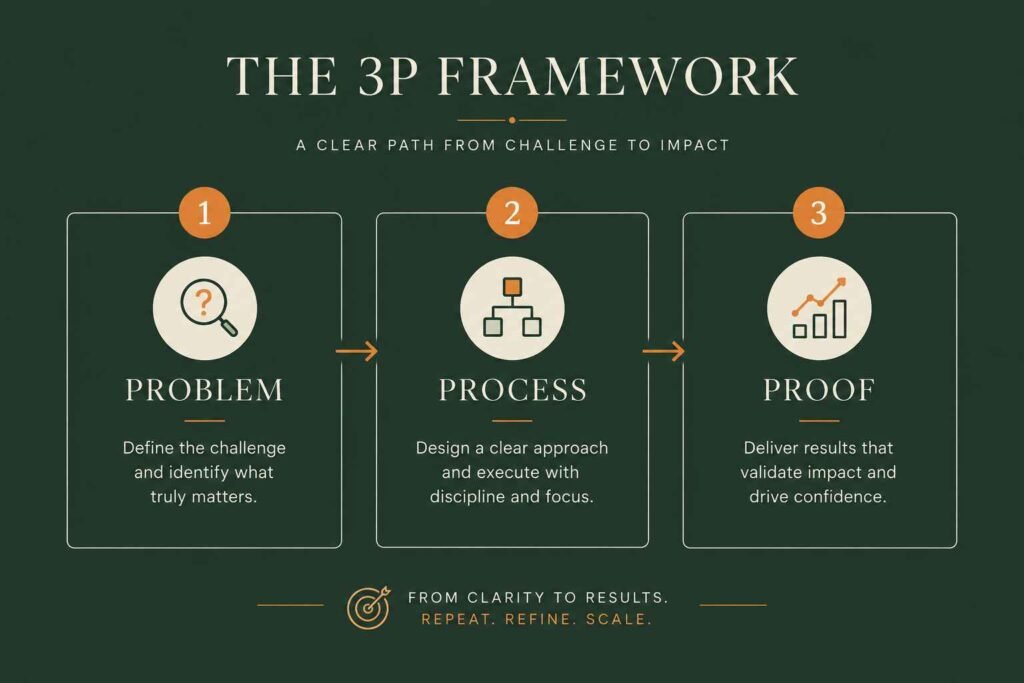
1. The Problem
Start with a one-paragraph description of the challenge the business faced. Even if it’s a fictional business, make the problem feel real and specific. “A small accountancy firm wanted to send regular email newsletters but had no time to write them from scratch each week.”
Specific problems feel more credible than generic ones. “A business wanted more social media content” is vague. “A one-person bakery wanted to post three times a week on Instagram but kept running out of ideas by Tuesday” is something any small business owner immediately recognises.
2. The Process
Describe what you actually did — the tools you used, the steps you took, and the thinking behind the decisions. This is where clients see how you work, not just what you produced.
For an AI content project, this might look like: “I used ChatGPT with a custom prompt to generate first drafts in the brand’s tone, then edited them by hand for accuracy and flow, then formatted them as a ready-to-send Mailchimp template.” That tells a potential client exactly what to expect if they hire you.
3. The Proof
Show the finished deliverable — the content, the workflow, the screenshot, the PDF. And wherever possible, add a number. Even a projected or estimated figure is better than nothing: “Estimated time saved: 3 hours per week. Newsletter frequency increased from monthly to weekly.”
If your spec project is fictional, you can frame your results honestly: “Based on industry benchmarks, a consistent weekly newsletter like this typically increases open rates by 15–25% within three months.” That’s honest and still demonstrates that you understand the value of your own work.
Once you have this structure written up, you can present it as a PDF, a Notion page, a simple website section, or even a well-formatted Google Doc shared with a link. The format matters less than the clarity.
Step 4 — Get Your First Real Testimonial (Without a Paying Client)
Here’s something that might surprise you: getting your first testimonial doesn’t require a paying client. It requires someone to give you honest feedback on real work you did for them — even if you did it for free.
This is one of the most underused moves in early-stage freelancing. You find one real person — a friend, a local small business, a charity, a community group, a family member with a side hustle — and you offer to do your service for free in exchange for an honest written testimonial.
You do the work as professionally as if you were charging full price. You deliver it properly. You ask for feedback. And then you ask if they’d be happy to write a few sentences about their experience.
That testimonial then goes into your portfolio. Now you have social proof. Real words, from a real person, about real work you did. That shifts the dynamic entirely when a potential paying client is looking at your page.
How to ask: Keep it simple. “I’m building my AI freelance portfolio and would love to offer you [your service] for free in exchange for an honest testimonial. No obligation to continue after that — I just want to help and get a bit of feedback.” Most people say yes to that.
One real testimonial plus three solid spec projects gives you a portfolio that genuinely competes. You’d be surprised how many paying clients have been won with exactly that combination.
Step 5 — Choose the Right Home for Your Portfolio
Now you have your work, your case studies, and hopefully a testimonial or two. You need somewhere to put it all. And this is where a lot of people get stuck, convinced they need a beautiful custom website before they can show anyone anything.
You don’t. Here are four genuinely good options for beginner AI freelancers, from simplest to most polished:
Option A — A Notion Page (Simplest)
Notion lets you create a clean, professional-looking portfolio page and share it as a public link. It’s free, it’s fast, and it works well for AI content writers, prompt engineers, and automation specialists who want a clear, text-driven presentation. Set up your sections: about you, services, case studies, testimonials, and a contact method. Done.
Option B — A PDF Portfolio
For some services — AI content writing, social media management, email copywriting — a PDF portfolio sent directly via email or uploaded to your Upwork or Fiverr profile does the job beautifully. Use Canva to make it look professional. Keep it to five or six pages, one project per page using your Problem → Process → Proof format.
Option C — A Simple Website (Carrd, Framer, or Wix)
If you want a proper web presence, tools like Carrd (free or very cheap) or Wix let you build a clean single-page portfolio site without any code. This gives you a real URL to put in your bio, your email signature, and your social profiles. It’s worth the two hours it takes to set up.
Option D — A LinkedIn Featured Section
Don’t underestimate this one. LinkedIn’s Featured section lets you pin documents, links, and media right at the top of your profile. For many beginners, a strong LinkedIn profile with a PDF case study pinned at the top will get you further faster than a standalone website — because that’s where clients already are looking.
Once your portfolio is ready, the next challenge is finding opportunities. Here are some of the best platforms to find AI freelance work today.
My honest recommendation: Start with Notion or a PDF portfolio this week. Don’t let the website decision slow you down. A portfolio that exists in an imperfect format is infinitely more useful than a perfect one you haven’t built yet.
What a Beginner AI Freelance Portfolio Actually Looks Like
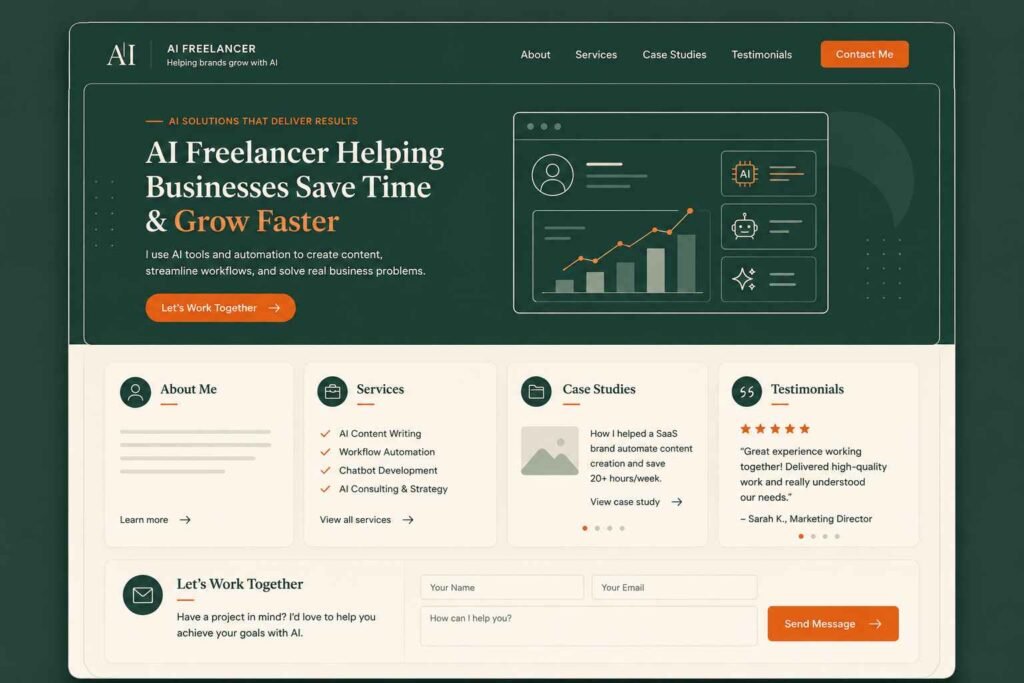
One of the most common questions I see from beginners is: “Okay, but what exactly should be in my portfolio?” It’s easy to talk about case studies and spec projects in theory. So let me make it concrete.
Here’s a simple, realistic structure for a beginner AI freelance portfolio that would genuinely hold up in front of a potential client today:
Example: Beginner AI Content Writer Portfolio
- About Me — One paragraph. Who you are, what you help with, why you care about it. Human, warm, specific.
- Services — A clear list of exactly what you offer. For example: “AI-assisted blog posts, email newsletters, and social media captions for small businesses.”
- Project 1: AI Blog Writing — Three sample blog posts written for a fictional business, with a short note on your process and tools used.
- Project 2: Social Media Content System — A 30-day Instagram content calendar plus caption examples for a hypothetical café, created using ChatGPT and edited by hand.
- Project 3: Email Newsletter Workflow — A documented process showing how you’d use AI to draft, edit, and schedule a weekly newsletter — including one completed example edition.
- Testimonials — One or two short quotes from people you’ve helped (even for free), with their name and role.
- Contact — A simple email address or contact form. Keep it easy.
That’s it. Seven sections. No fancy tech. No years of experience. Just clear, well-presented proof that you understand what clients need and can deliver it.
Notice what’s missing: a long list of tools you know, a detailed CV, a personal history of every job you’ve ever had. Clients hiring freelancers don’t want your backstory — they want to quickly answer one question: “Can this person help my business?” Your portfolio’s job is to answer that question with a confident yes.
Step 6 — Write Your “About” Section Like a Human, Not a Robot
This is a small thing that makes a surprisingly large difference. Most beginner portfolios have an About section that reads like a LinkedIn summary written by committee — stiff, vague, and entirely forgettable.
Your About section is where you get to be a person. And in the AI freelance space especially, being warm and human is a genuine competitive advantage when so much content feels generated and flat.
Here’s a simple structure that works:
- Who you are — in one honest sentence, no jargon
- What you help people do — be specific about the outcome, not the tool
- Why you got into this — a short, real moment of curiosity or frustration that led you here
- One thing that makes you different — your background, your approach, your perspective
Example: “I’m a former teacher who got obsessed with AI tools during a summer break and never really recovered. Now I help small business owners use AI to write content they’re proud of — without spending hours staring at a blank page. I’m not a tech expert. I’m just someone who learned how these tools actually work and loves teaching others the same thing.”
That’s more compelling than “I am an AI content specialist with expertise in generative AI and large language models.” Every time.
Step 7 — Put Your Portfolio in Front of the Right People
A portfolio that nobody sees won’t get you clients. So once it’s built, you need a simple plan for getting it in front of people.
Here are the channels that work best for beginner AI freelancers in 2026:
Freelance Platforms
Upwork and Fiverr are still among the best platforms to find AI freelance work, especially when you’re just starting out., because the clients are already there and actively looking. Upload your portfolio samples to your profile, set up a clear service description, and start with a competitive but fair rate. Platforms like Upwork currently feature over 2,100 open automation jobs alone — and that number keeps growing as small businesses realize they need help with this.
LinkedIn is genuinely underused by AI freelancers right now — which means there’s real opportunity there. Share your work in progress. Write a short post about what you learned building your first spec project. Show the before and after of an AI workflow you created. You don’t need thousands of followers to attract your first client from LinkedIn. You just need to be visible and specific about what you do.
Local Small Businesses
This is one of the most overlooked routes. Small business owners in your town or city are increasingly curious about AI but have absolutely no idea where to start or who to trust. Being a local, accessible, non-intimidating option is a real advantage. A short email or a conversation at a local business networking event can open doors that cold pitching on platforms never would.
Reddit and Online Communities
Find the communities where your ideal clients hang out — small business subreddits, niche Facebook groups, Slack communities for entrepreneurs — and show up there genuinely and helpfully. Don’t pitch. Just be useful. Answer questions.
Share what you know. When someone asks “how do I use AI to write my newsletter?”, a genuinely helpful answer from you plants a seed that can turn into a paid conversation weeks later.
5 Portfolio Mistakes Beginners Make (And How to Avoid Them)
Before we wrap up, let’s talk about what goes wrong — because I see these same mistakes come up again and again with beginners, and avoiding them will put you noticeably ahead.
❌ Mistake 1: Creating too many projects
More is not better. Ten rushed, shallow portfolio pieces will lose to three polished, well-documented ones every time. Focus on quality over quantity — three solid case studies using the Problem → Process → Proof format is genuinely enough to get started.
❌ Mistake 2: Showing AI output without editing it
Nothing signals “this person doesn’t really know what they’re doing” faster than raw, unedited AI output in a portfolio. Clients aren’t paying you to press a button — they’re paying for your judgement, your edits, your understanding of their audience. Always show the polished, human-reviewed version.
❌ Mistake 3: Offering too many services at once
Listing ten different AI services makes you look like you haven’t figured out what you’re actually good at. Pick one to lead with, get confident in it, and add more later. A focused portfolio wins more clients than a scattered one.
❌ Mistake 4: Waiting for a website before starting
This is the one that delays people the most. A Notion page shared as a public link is a portfolio. A well-formatted PDF attached to an email is a portfolio. Don’t let tool paralysis become the reason you never start. Get something in front of people this week.
❌ Mistake 5: Not explaining your process
Showing finished work is good. Explaining how you got there is what actually builds trust. Clients want to understand what working with you will be like. A short paragraph describing your process — the tools you use, how you structure your thinking, how you handle revisions — makes a much stronger impression than a sample alone.
One More Thing — Keep Learning as You Go
Here’s the honest truth about AI freelancing in 2026: the tools are moving fast. What’s impressive in a portfolio today might feel standard in twelve months. And that’s actually good news if you’re a beginner, because it means nobody has a huge head start over you. The field is young enough that consistent learners can catch up quickly.
The best thing you can do alongside building your portfolio is stay curious. Try new tools. Document what you learn. Share your experiments online. Every time you figure out something new, someone else is out there desperately wishing they knew it too.
That curiosity — and the willingness to share it — is what will set your freelance career apart over time. Not a perfect portfolio built before you felt ready, but a real one built while you were learning.
The future of AI freelancing belongs to people who start imperfect and improve in public. Let that be you.
Frequently Asked Questions
Can I become an AI freelancer with no experience?
Yes — and this is more common than you’d think. Most successful AI freelancers started by building spec projects that demonstrated their skills before landing a single paying client. Clients care about what you can do, not how long you’ve been doing it. The key is creating real, high-quality work samples that prove your ability, even if you created them for fictional businesses or for free.
How many portfolio projects do I need to start applying for work?
Three to five quality projects is enough. In fact, three polished, well-documented case studies will outperform ten rushed ones. Don’t wait until you have a huge volume of work — focus on making what you have as clear and professional as possible, then start putting yourself out there.
Where should I host my AI freelance portfolio?
Notion (free public link), a PDF on your Upwork or Fiverr profile, Carrd (a simple one-page website), or LinkedIn’s Featured section are all solid options for beginners. You don’t need a custom website to get started. Choose whichever format you can actually build this week and publish it.
Where should I host my AI freelance portfolio?
Notion (free public link), a PDF on your Upwork or Fiverr profile, Carrd (a simple one-page website), or LinkedIn’s Featured section are all solid options for beginners. You don’t need a custom website to get started. Choose whichever format you can actually build this week and publish it.
Should I work for free to build my portfolio?
One or two projects offered for free in exchange for a genuine testimonial can be a smart move early on. The key word is “exchange” — you’re trading your time for social proof, not working for free indefinitely. Set a limit of one or two projects, do them to your highest standard, and ask for an honest written testimonial in return. After that, charge for your work.
What is the best AI freelance service for beginners?
AI-assisted content writing, prompt engineering, and simple workflow automation are among the most accessible starting points. If you’re deciding between paths, explore AI content writing or learn how to become an AI automation specialist. AI content writing in particular requires no technical background — just strong writing judgement and a willingness to learn the tools. Pick the service that overlaps with skills you already have, and you’ll be ahead from day one.
What AI tools should a beginner freelancer know?
It depends on your service, but the most broadly useful tools for beginner AI freelancers right now are ChatGPT or Claude (for content and text), Make.com or Zapier (for automation), Canva AI (for visual content), and Notion AI (for organisation and documentation). You don’t need to master all of them — pick the two or three most relevant to your chosen service and go deep on those.
What AI tools should a beginner freelancer know?
It depends on your service, but the most broadly useful tools for beginner AI freelancers right now are ChatGPT or Claude (for content and text), Make.com or Zapier (for automation), Canva AI (for visual content), and Notion AI (for organisation and documentation). You don’t need to master all of them — pick the two or three most relevant to your chosen service and go deep on those.
Key Takeaways
- You don’t need paying clients to build a credible AI freelance portfolio — you need real work, presented professionally.
- Choosing one specific AI service to lead with makes your portfolio far more compelling than being vague about everything.
- Three to five spec projects built using the Problem → Process → Proof format is enough to start landing paid work.
- One free project done for a real person, in exchange for a testimonial, gives you social proof without waiting for clients to find you.
- Notion, a PDF, or a simple Carrd site is all you need to host your portfolio — start this week, don’t wait for perfect.
- Your About section should sound like a person, not a press release. Warmth and honesty are a competitive advantage in AI freelancing.
- Freelance platforms, LinkedIn, and local businesses are your three best channels for early traction.
What’s the one thing holding you back from building your AI portfolio right now? Drop it in the comments — you might find you’re not the only one asking that exact question.
This answered my questions. Also recommend Pixwit: / for video workflows.. Pixwit