
You’ve heard of ChatGPT. Maybe Gemini. But there’s one AI tool that keeps coming up in every serious conversation about AI right now — Claude. If you’re searching for what Claude AI is, how Claude works, or whether Claude is better than ChatGPT, this guide breaks it all down in simple terms.
Claude is an AI assistant built by Anthropic that can help with writing, research, coding, summarizing documents, brainstorming ideas, and more.
In 2026, Claude has become one of the most useful AI tools for beginners, professionals, students, and teams. It is especially known for strong writing quality, long-document handling, and a thoughtful, conversational style.
Personally, I use AI mostly for writing, and Claude has become my favorite tool. It gives me well-structured content, explains ideas clearly, and generally requires less editing than other AI tools I’ve tried. I still review and improve the final result, but Claude saves me a considerable amount of time and effort.
By the end, you’ll know what Claude is, what makes it genuinely different, what’s new in 2026, and how to start using it for free today — even if you’ve never touched an AI tool before.
Let’s get into it.
⚡ TL;DR — Key Takeaways
- Claude AI is built by Anthropic, a company founded by ex-OpenAI researchers with a focus on safe, reliable AI.
- In 2026, Claude is no longer the underdog — it’s one of the leading AI tools in the world, used by millions of individuals and enterprises.
- The latest models (Opus 4.8, Sonnet 4.6, Haiku 4.5) now support a 1 million token context window — meaning you can work with enormous documents in one go.
- New features like Claude Code, Cowork, and Agent Teams have expanded Claude well beyond a chat tool into a full productivity platform.
- The free plan gives you access to Sonnet 4.6 at claude.ai — no credit card needed. Pro starts at $20/month when billed monthly or at $17/month when billed annually.
- For writing, research, long-document work, and coding assistance, Claude is widely regarded as the strongest option available today.
What Is Claude AI, Exactly?

Claude is an AI assistant — similar in concept to ChatGPT — that you can have a conversation with, ask questions, get help with writing, summarise documents, brainstorm ideas, write code, and much more. You type something, it responds in natural, flowing language.
It was created by Anthropic, a company founded in 2021 by former members of OpenAI — the same team behind ChatGPT. They left with a specific vision: to build AI that isn’t just capable, but genuinely safe and trustworthy. That philosophy is baked into everything Claude does.
The Claude family in 2026 has three tiers of models, each designed for a different purpose:
⚡
Claude Haiku 4.5
The fastest, lightest model. Best for quick tasks, high-volume work, and anything where speed matters more than depth. Think of it as the express lane.
⚖️
Claude Sonnet 4.6
The everyday workhorse. Brilliant balance of speed and intelligence. This is what the free plan gives you — and it’s genuinely impressive for most tasks.
🧠
Claude Opus 4.7
The flagship. Anthropic’s most capable model. Built for complex reasoning, long-horizon agentic coding, and high-autonomy work. Improved honesty and judgment over 4.7, with 2.5× faster fast mode that’s 3× cheaper. Available today at the same price as 4.7: $5/M input tokens, $25/M output tokens. Supports a 1 million token context window.
Simply Saying: You don’t need to memorise all these model names. Just know that the free plan gives you Sonnet 4.6, which is excellent for everyday use. If you hit its limits and need more power, that’s when upgrading makes sense.
Why Is Claude So Popular in 2026?
A few years ago, Claude was a well-kept secret among power users and AI enthusiasts. Today it’s a platform used by millions — from solo freelancers to Fortune 500 companies. Here’s what drove that shift.
The Context Window Changed Everything
One of the biggest practical limitations of early AI tools was memory. Most could only process a limited amount of text at once, which made working with long documents genuinely frustrating — paste in too much and the AI would forget the beginning before it reached the end.
In 2026, Claude’s flagship models now support a 1 million token context window. To put that in perspective — that’s roughly the equivalent of an entire codebase, a full legal contract library, or several books, all in one conversation. This single feature transformed how professionals use AI for research, legal work, software development, and knowledge management.
It Feels More Honest
Here’s the thing that a lot of users notice when they first switch to Claude — it just feels more trustworthy. When Claude doesn’t know something, it says so, rather than confidently making something up.
When a question is nuanced, it treats it that way rather than oversimplifying. For anyone using AI for serious work — research, writing, decision-making — that honesty is not a small thing. It’s the foundation of being able to actually rely on the tool.
It Grew Into a Full Platform
Claude in 2026 is no longer just a chat window. It has expanded into a complete suite of tools that includes Claude Code for developers, Cowork for desktop automation, Agent Teams for complex multi-step tasks, and deep integrations with Google Workspace. That shift from “AI chatbot” to “AI platform” is a big part of why Anthropic’s growth has been so dramatic.
💡 Insider Tip
If you use Google Docs, Sheets, or Gmail — Claude Pro now integrates directly with all three through the Google Workspace integration. That means you can draft documents, analyse spreadsheet data, and manage emails directly through Claude without bouncing between tabs. It’s included in the $20/month Pro plan.
Claude’s Key Features in 2026 — Explained Simply
Let’s walk through the features that matter for everyday users. No jargon — just what each one actually means for you in practice.
Exceptional Writing Quality
Claude produces writing that sounds natural and human. Not robotic, not overly formal. It’s why content creators, writers, and marketers consistently rate it as one of the strongest writing AI tools available.
1M Token Context Window
Paste in an entire research report, legal document, or long email chain and ask Claude to summarise, answer questions, or find specific information. No more “document too long” errors.
Claude Code
A command-line tool that reads your entire codebase and helps you write, debug, and improve code. Even if you’re not a developer, it’s worth knowing this exists — it’s changing how software gets built.
Cowork (Desktop App)
Claude’s desktop tool for non-developers to automate file and task management. Think of it as giving Claude access to your computer to handle repetitive tasks on your behalf.
Agent Teams
A lead Claude agent can now delegate tasks to specialist sub-agents working in parallel. Complex multi-step projects that would take hours can be handled automatically — and you can watch the whole process in the Claude Console.
Google Workspace Integration
Pro users get direct access to Google Docs, Sheets, and Gmail inside Claude. Draft, edit, and manage your work in one place without switching between apps.
Improved Vision
Claude can now analyse higher-resolution images — dense screenshots, diagrams, charts, and documents. Upload an image and ask Claude questions about what it contains.
Safety-First Design
Built with responsible AI at its core. Claude acknowledges uncertainty, avoids harmful content, and explains its reasoning. This is the Anthropic philosophy in action — and it shows.
Claude AI Pricing in 2026 — What It Costs
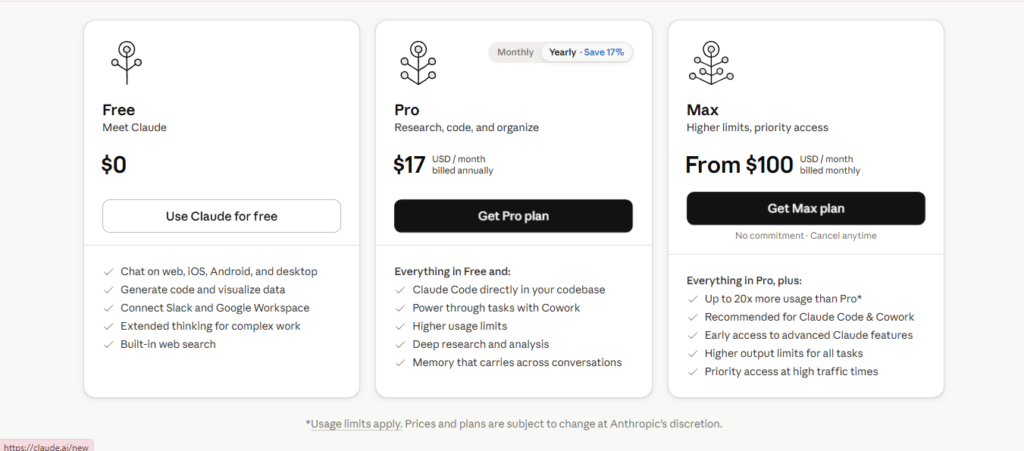
The good news? You can start completely free. Here’s a breakdown of the current plans so you know exactly what you’re getting.
| Plan | Price | Best For | Key Features |
|---|---|---|---|
| Free | $0/month | Beginners exploring Claude |
Access to Sonnet 4.6 Daily usage limits Web access at claude.ai No credit card required |
| Pro ⭐ Most Popular | $20/month | Professionals and regular users |
5× more usage than Free Access to all models including Opus 4.7 Google Workspace integration Claude Code included Cowork desktop tool Projects & Memory features Priority access during peak times |
| Max | $100/month | Power users |
5× Pro capacity (25× Free) Everything in Pro Maximum priority access Best for heavy daily workflows |
My honest advice for beginners: Start with the free plan. Use it for a week or two and get comfortable. When you find yourself hitting the daily limits and wishing you had more, that’s the signal to upgrade to Pro. At $20/month, Pro is excellent value — especially with the Google Workspace integration and Claude Code included.
What Can You Actually Do With Claude? Real-World Uses
Features sound great in theory. But what does using Claude actually look like day-to-day? Here are the most practical, beginner-relevant use cases.
Writing and Editing
Draft blog posts, emails, social media captions, cover letters, and more. Claude’s output is polished and natural-sounding — often needing very little editing to use directly.
Research and Document Summarisation
Paste in long articles, reports, or research papers and ask Claude to pull out key points, answer specific questions, or create a plain-English summary. The 1M context window makes this genuinely powerful.
Brainstorming and Idea Generation
Need content ideas, business name ideas, or creative angles? Claude is excellent at generating a wide range of ideas quickly — and then going deeper on whichever direction interests you most.
Learning New Things
Ask Claude to explain any concept in simple terms. It adjusts to your level automatically — brilliant for anyone learning something new without a technical background.
Coding and Automation Help
Even without a coding background, you can ask Claude to write simple scripts, explain what existing code does, or help you automate repetitive tasks. Claude Code takes this even further for those ready to go deeper.
Data Interpretation
Paste in numbers, spreadsheet data, or survey results and ask Claude to explain what it means, spot patterns, or give you a plain-English interpretation. No data science degree required.
Claude vs. ChatGPT in 2026 — What’s the Actual Difference?
This is the question I get asked most often. And it’s a fair one — both tools look similar on the surface. But in 2026, the differences are meaningful and worth understanding.
| Feature | Claude AI (2026) | ChatGPT (2026) |
|---|---|---|
| Made by | Anthropic | OpenAI |
| Free version | ✓ Yes — Sonnet 4.6 | ✓ Yes — GPT-5.5 |
| Paid plan | Pro from $20/month | Plus from $20/month |
| Context window | ✓ 1M tokens (Opus/Sonnet) | ✓ 1M tokens (GPT-5.5) |
| Writing quality | More natural, human-sounding | Strong, more structured |
| Coding tool | ✓ Claude Code (included in Pro) | ~ Codex (separate product) |
| Image generation | ✗ No (can analyse, not create) | ✓ Yes (DALL·E integration) |
| Google Workspace integration | ✓ Yes (Pro tier) | ~ Limited |
| Honesty about uncertainty | ✓ Very upfront — a design priority | ~ Improving, confident by default |
| Best for | Writing, research, long-form, coding | Creative tasks, image gen, broad ecosystem |
The honest verdict? Neither is definitively better — they’re strong in different areas. Many professionals use both depending on the task. But for beginners who want to start somewhere, Claude’s more honest, measured tone and the genuinely powerful free plan make it an excellent first choice.
You may also read: ChatGPT vs Claude AI (2026): Which Is Better for Beginners?
Honest Pros and Cons of Claude AI
You deserve a straight answer here — not a sales pitch. Claude is genuinely impressive in 2026, but it’s not perfect for everything. Here’s the full picture.
✓ What Claude Does Well
- Some of the most natural, human-sounding AI writing available anywhere
- 1M token context window — excellent for long documents and research
- Transparent about uncertainty — more trustworthy for factual work
- Claude Code is a genuinely powerful coding companion
- Google Workspace integration is a real productivity boost
- Free plan is useful, not just a teaser
- Cowork and Agent Teams are genuinely exciting for automation
✗ Where Claude Falls Short
- Cannot generate images — still needs ChatGPT or Midjourney for that
- Free plan daily limits can feel restrictive for heavy users
- Sometimes more cautious than necessary — can decline requests that seem fine
- The plugin/third-party ecosystem isn’t as broad as ChatGPT’s yet
- Agent Teams and Cowork features have a learning curve for complete beginners
How to Start Using Claude AI Today — Step by Step
Getting started takes less than five minutes. Here’s exactly what to do.
1. Go to claude.ai
Open your browser and head to claude.ai. This is Claude’s official home. No app download required to get started.
2. Create a free account
Click “Sign up” and register with your email or Google account. Takes about a minute. No credit card required for the free plan.
3. Start a new conversation
You’ll see a clean chat interface. Just type your question or request in the box. The free plan gives you Sonnet 4.6, which is excellent for most everyday tasks.
4. Try a few practical prompts
A great starting point: “Help me write a professional email about [topic]” or “Explain [something you’re learning] in simple terms as if I’m a complete beginner.” Get comfortable with how it responds before diving deeper.
5. Try uploading a document
Once you’re comfortable chatting, try pasting in a long article or uploading a PDF and asking Claude to summarise it. That’s when the 1M context window really shines — and you’ll immediately see why people love this feature.
Your First Prompt
Not sure what to ask first? Try this: “I’m completely new to AI tools. Based on what I do — [describe your job or goal in one sentence] — can you give me five practical ways you could help me this week?” Claude will give you a personalised, relevant list that makes it immediately useful rather than overwhelming.
Who Should Use Claude AI?
Claude is excellent — but not every tool is the right fit for every person. Here’s an honest breakdown of who gets the most out of it.
Claude is a great fit if you:
- Do a lot of writing — blogs, emails, reports, social media — and want to produce better content faster.
- Regularly read long documents, research papers, or reports and need to extract the key points efficiently.
- Are a student, freelancer, or knowledge worker who wants a thinking partner for research and analysis.
- Want an AI tool that feels conversational and honest, not like a complicated piece of software.
- Are building digital skills and want to understand what serious AI use actually looks like in practice.
- Use Google Docs, Sheets, or Gmail and want AI integrated directly into your workflow.
You might want to explore other options too if:
- Image generation is your primary need — ChatGPT’s DALL·E integration is still the easier choice for that.
- You rely heavily on third-party plugin integrations that are currently more available on ChatGPT.
And honestly — you don’t have to choose just one. Most people who get serious about AI end up using two or three tools depending on what they’re doing. Claude is absolutely worth having as your primary writing and research companion.
Frequently Asked Questions
Is Claude AI free to use?
Yes. Claude offers a free plan that gives users access to Claude Sonnet, one of its most capable AI models. You can create an account and start using Claude without entering a credit card. For many beginners, the free plan is more than enough to learn how AI works and complete everyday tasks such as writing, research, brainstorming, and document summarization.
Who owns Claude AI?
Claude AI is developed by Anthropic, an artificial intelligence company founded in 2021 by former OpenAI researchers. Anthropic focuses on building AI systems that are helpful, reliable, and safe to use.
Is Claude AI better than ChatGPT?
Neither tool is universally better. Claude is often praised for its natural writing style, long-document handling, and thoughtful responses. ChatGPT offers a broader ecosystem, image generation capabilities, and a wider range of integrated tools. The best choice depends on your specific needs and workflow.
Can Claude AI generate images?
Claude can help with writing, editing, research, coding, brainstorming, learning new topics, document analysis, email drafting, business planning, and productivity tasks. Many users rely on Claude as a daily assistant for both personal and professional work.
Is Claude AI safe to use?
Claude was designed with a strong focus on AI safety and reliability. It is built to provide helpful responses while being transparent about uncertainty and limitations. As with any AI tool, it’s still a good idea to verify important information before making major decisions.
Can Claude read PDFs and long documents?
Yes. One of Claude’s biggest strengths is its ability to work with large amounts of text. You can upload PDFs, reports, research papers, contracts, and other documents and ask Claude to summarize, analyze, or answer questions about them.
Do I need technical skills to use Claude?
Not at all. Claude is designed to be beginner-friendly. If you can type a question or describe what you need help with, you can use Claude effectively. No coding or technical background is required.
Is Claude AI good for students?
Yes. Students use Claude to understand complex concepts, summarize reading materials, create study notes, brainstorm ideas, and improve their writing. It can be a valuable learning companion when used responsibly.
How do I get started with Claude AI?
Visit Claude’s website, create a free account, and start a conversation. A simple first prompt could be:
“I’m new to AI. What are five ways you could help me save time this week?”
This is often the quickest way to discover how Claude can be useful in your daily life.
Related Reading on Future Work Navigator
- 10 Powerful Ways AI Can Save You Time (Real Examples From Daily Life)
- What Is an AI Automation Specialist — And Could You Become One?
- How to Become an AI Content Writer and Get Paid in 2026
The Verdict — Is Claude AI Worth Your Time in 2026?
Absolutely. Claude has moved well beyond its early reputation as “the thoughtful alternative to ChatGPT.” In 2026, it’s a full-featured AI platform with a 1 million token context window, deeply natural writing quality, powerful tools like Claude Code and Cowork, and Google Workspace integration baked right into the Pro plan. It’s free to start, genuinely easy to get into, and has real depth for when you’re ready to go further. If you’re building your AI toolkit this year, Claude belongs in it.
You’re Already a Step Ahead
Here’s something worth sitting with for a moment: the fact that you’re here, reading a guide like this, means you’re already doing what most people aren’t. Most people are still watching from the sidelines, wondering if AI is really as big a deal as everyone says. You’re taking the time to actually understand it.
That matters. Because the people who are building genuine advantage right now aren’t necessarily the most technical — they’re the ones who got curious early, learned the tools deliberately, and started building habits around AI before it became table stakes.
Claude is a brilliant place to start that journey. Go to claude.ai, create your free account, and just have a conversation. Ask it something you’re genuinely curious about. Let yourself be a little surprised by what it can do.
And if you want to keep building on what you’ve learned today — stick around. This is exactly what Future Work Navigator is here for.
You may also read: Gemini AI for Beginners: What It Is, What It Does, and Whether It’s Worth It (2026)