
TL;DR — Quick Summary
- n8n is a free, open-source automation tool that lets you connect apps and build workflows — without writing code.
- It’s genuinely powerful, but it has a steeper learning curve than tools like Make.com or Zapier.
- If you’re brand new to automation, start with Make.com first. Come to n8n once you’ve got the basics down.
- If you’re comfortable with tech and want to save money long-term, n8n’s free self-hosted option is hard to beat.
You’ve probably been doing some research on automation tools — maybe you’ve seen Make.com or Zapier come up, and then suddenly this other name keeps appearing: n8n. And the first thing you probably thought was, what even is that, and how do you pronounce it?
I was right there with you. When I first came across n8n (it’s pronounced “n-eight-n,” by the way — the “8” replaces the eight letters between the two n’s in “nodemation”), I wasn’t sure if it was a serious tool or just something developers used to feel cool. Turns out, it’s a genuinely powerful automation platform — and it’s free. But whether it’s right for you is a very different question.
Here’s the thing: not every tool that’s powerful is the right tool for every person. And when you’re just starting out in the world of AI automation, picking the wrong starting point can leave you feeling frustrated and ready to give up before you’ve even had a win.
So let’s break this down honestly. By the end of this post, you’ll know exactly what n8n is, how it compares to the other tools you’ve heard about, and — most importantly — whether it makes sense for you to start learning it right now.
Related post: 10 Best AI Careers You Can Start Today (No Degree Required)
So What Exactly Is n8n?
n8n is an open-source workflow automation tool. That’s the technical definition, but let me translate that into something that actually means something.
You may also read: How to Become an AI Automation Specialist in 2026 (Even If You’re Starting from Zero)
Think of automation like building a set of digital dominoes. You set up a chain of actions so that when one thing happens — say, someone fills out a form on your website — a whole series of other things happen automatically without you lifting a finger. The email gets sent, the spreadsheet gets updated, the Slack message goes out. You set it up once, and it runs on its own.
n8n lets you build those chains — those workflows — by connecting different apps and services together using a visual drag-and-drop interface. You don’t need to write code to get started. Instead, you create a visual map of your automation: “When this happens in App A, do this in App B, then this in App C.”
Quick definition
Open-source means the software’s underlying code is publicly available for anyone to see, modify, and use freely. For you, it means n8n can be used at no cost — which is a big deal in a world where most automation tools charge monthly fees.
What makes n8n stand out from tools like Zapier or Make.com is that it’s self-hosted. That means you can run it on your own computer or server instead of relying on a company’s cloud platform. You’re in control of your data and your costs. There’s also a cloud-hosted version of n8n if you don’t want to deal with the technical setup — but we’ll get into that.
How Does n8n Actually Work?
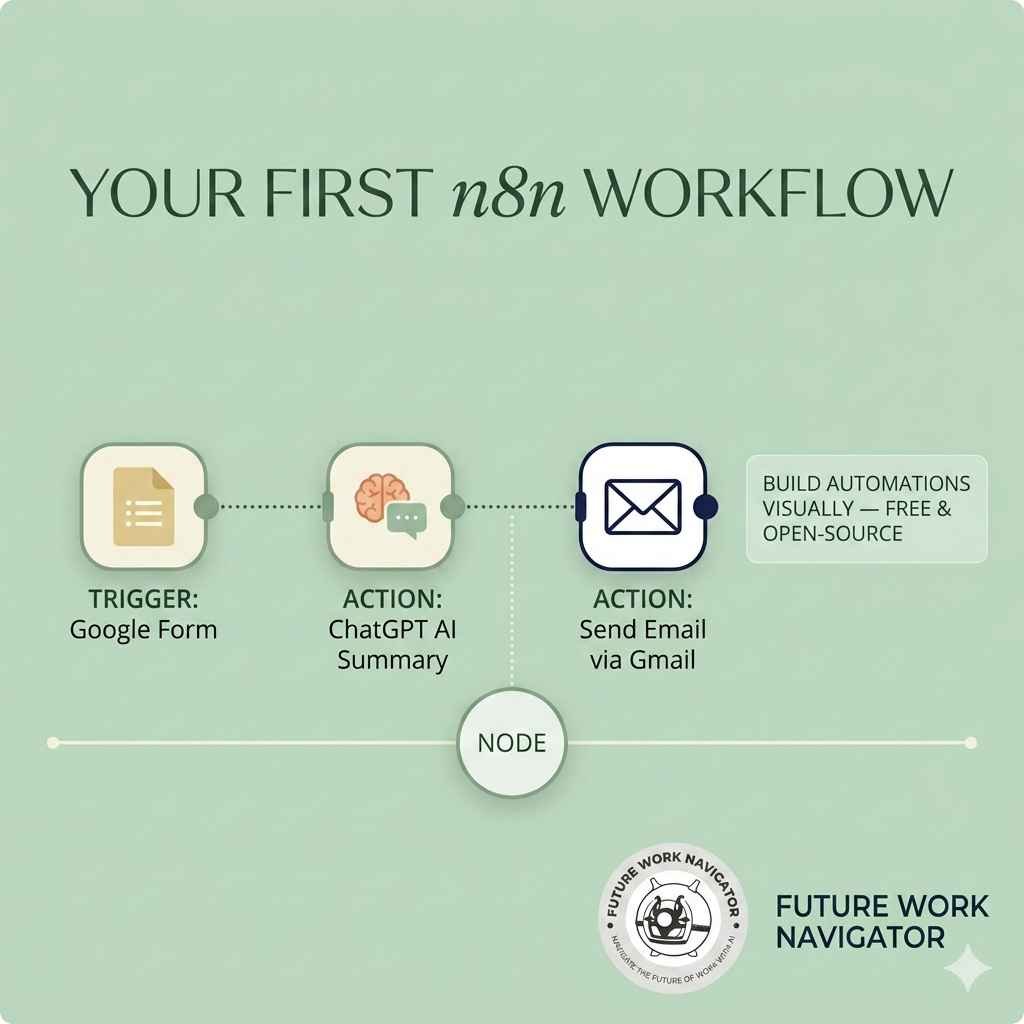
When you open n8n, you see a visual canvas — a blank workspace where you build your automations using something called nodes. Each node represents a step in your workflow. One node might be “a new row is added to Google Sheets.” The next node might be “send an email via Gmail.” Connect them together and you’ve got an automation.
n8n has hundreds of pre-built nodes for popular apps and services: Gmail, Slack, Notion, Airtable, Google Sheets, Stripe, HubSpot, and many more. It also has an HTTP Request node — which lets you connect to basically any service that has an API, even if there isn’t a dedicated node for it yet.
Here’s where it gets interesting for anyone building with AI. n8n has native nodes for tools like OpenAI (the company behind ChatGPT), allowing you to slot AI directly into your automations. You could build a workflow that receives a customer email, automatically summarises it using ChatGPT, and sends that summary to your team on Slack — all without you reading a single email.
Insider tip
One of the most popular beginner workflows in n8n is the “AI email assistant” — where you connect your inbox to an AI model, and every incoming email gets automatically categorised, summarised, or even drafted a reply. It sounds advanced, but with n8n’s visual builder, it’s more achievable than you’d think once you’ve learned the basics.
n8n vs Make.com vs Zapier — What’s the Difference?
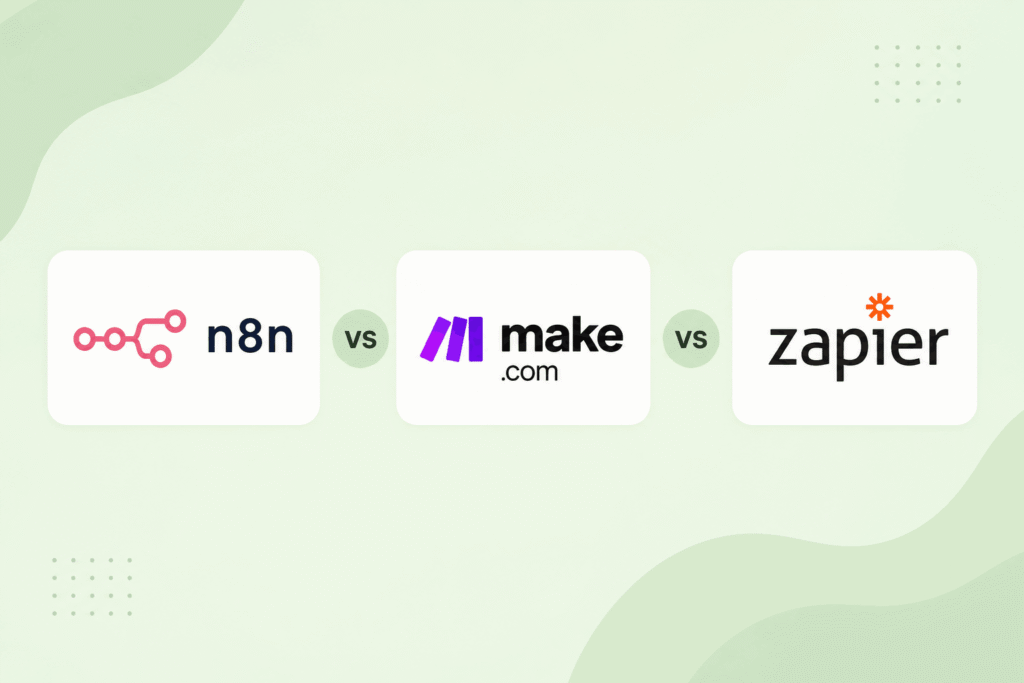
If you’ve already been exploring automation tools, you’ve probably come across Make.com and Zapier too. So how does n8n fit in? Let me lay this out clearly.
| Feature | n8n | Make.com | Zapier |
|---|---|---|---|
| Free plan? | Yes (self-hosted) | Yes (limited) | Very limited |
| No-code friendly? | Moderate | Yes | Very beginner-friendly |
| Visual builder? | Yes — node-based canvas | Yes — visual scenario builder | Yes — step-by-step flow |
| AI integrations? | Strong — built-in AI nodes | Good — via HTTP/modules | Good — growing library |
| Self-hosting option? | Yes | No | No |
| Learning curve | Steeper | Moderate | Gentlest |
| Best for | Tech-comfortable users, power workflows, cost-conscious | Beginners who want power without overwhelm | Complete beginners, simple automations |
The honest summary? Zapier is the easiest to learn but the most expensive at scale. Make.com sits in the middle — solid power with a friendlier interface. n8n is the most flexible and the most free, but it asks more of you technically, especially if you want to self-host it.
None of these tools is objectively “the best.” The best one is the one that matches where you are right now. And that’s exactly what we’re going to figure out.
The Real Pros and Cons of n8n for Beginners
Let’s be honest about what n8n does well and where it’s going to test your patience — especially if you’re just starting out.
What n8n Gets Right
- Genuinely free when self-hosted — no monthly fees eating your budget
- Incredibly flexible — connect almost anything to anything
- Strong AI workflow capabilities built right in
- Active community and growing library of templates
- You own your data — nothing goes through a third-party cloud
- Cloud version available if self-hosting feels too technical
Where It Gets Tricky
- Self-hosting requires some technical setup — it’s not plug-and-play
- The interface is less polished than Make.com or Zapier
- Error messages can be cryptic for beginners
- Fewer beginner tutorials compared to more established tools
- Debugging workflows takes patience when something breaks
- The cloud paid plan is pricier than Make.com’s equivalent
Heads upSelf-hosting means running n8n on your own computer or a server you rent — like a small virtual machine on a cloud platform. It’s not impossible for a beginner, but it does require following technical setup instructions carefully. If that sounds like a lot right now, n8n’s cloud version (paid) or starting with Make.com is a much smoother path in.
What Does n8n Actually Cost?
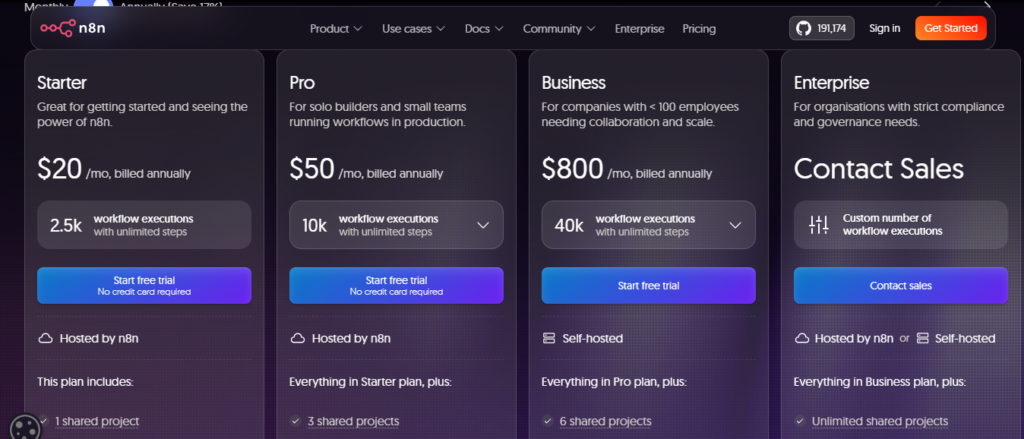
Note: Please check current pricing on official n8n pricing page.
This is where n8n genuinely shines — if you’re willing to do a little technical setup.
Self-hosted (free): You download n8n and run it yourself. Completely free, unlimited workflows, unlimited executions. The only cost is whatever server you choose to run it on — and you can start on a cheap virtual private server (VPS) for as little as $5 a month, or run it locally on your own computer for free during testing.
n8n Cloud (paid): If you don’t want to deal with self-hosting, n8n offers a managed cloud version starting at around $24 per month (Starter plan) when billed monthly, and $20 when billed annually. This includes a set number of workflow executions per month. It’s more expensive than Make.com’s free tier, but less technically demanding than self-hosting.
For most beginners exploring n8n for the first time, the cloud Starter plan is the path of least resistance. You get to learn the tool without worrying about server configuration. Once you’re comfortable and ready to scale, you can always migrate to self-hosting to cut costs.
So Should You, as a Beginner, Actually Use n8n?
Here’s my honest take — and I want to be real with you because I know how easy it is to spend three days setting up a tool only to feel like you’ve gone backwards.
Start with n8n if…
You’re comfortable following technical documentation and don’t mind a few frustrating moments early on. You’re cost-conscious and want a tool you can scale without the bill growing every month. You’re serious about building AI-powered automations and want the flexibility to create genuinely complex workflows. Or you’ve already spent some time with Make.com or Zapier and you’re ready for more power.
Wait on n8n if…
You’re brand new to automation and haven’t built a single workflow yet. You want to see quick wins and start getting results within your first week. The idea of “self-hosting” made you slightly nervous. Or you’re primarily looking to automate simple, everyday tasks like syncing a form to a spreadsheet or sending an auto-reply email.
My honest recommendation
If you’re a true beginner, start with Make.com. It’s the most beginner-friendly powerful automation tool out there, it has a free plan, and once you understand how workflows work there, n8n will make much more sense. Think of Make.com as learning to ride a bike with training wheels — n8n is the road bike you graduate to when you’re ready to go faster.
If You Do Want to Try n8n, Here’s How to Start
If you’ve read all of this and you’re still keen to give n8n a go — great. Here’s the lowest-friction way to start without getting tangled in technical setup.
Step 1: Sign up for n8n Cloud. Head to n8n.io and create an account. You can start a free trial of the cloud version without needing to install anything. This gets you into the interface immediately.
Step 2: Explore the template library. Before building anything from scratch, browse n8n’s pre-built workflow templates. There are hundreds of them — from simple Gmail-to-Sheets automations to more advanced AI pipelines. Starting from a template is much easier than a blank canvas.
Step 3: Build your first simple workflow. Pick something small and real — something you actually do manually right now. A good beginner workflow: when a new row is added to a Google Sheet, send yourself an email notification. Simple, but it teaches you how nodes connect and how data flows between them.
Step 4: Join the n8n community forum. The n8n community at community.n8n.io is genuinely helpful and very active. When you hit a wall — and you will hit a wall — this is the first place to go. Most beginner questions have already been asked and answered.
Step 5: Graduate to AI nodes. Once you’re comfortable with basic workflows, start exploring n8n’s AI features. The LangChain nodes and OpenAI integration are where n8n really earns its reputation. This is where you can start building the kind of intelligent automations that genuinely save hours every week.
Insider tip
One of the most common beginner mistakes in n8n is trying to build something too complex too soon. Pick the simplest version of what you want to automate, get it working, then add complexity layer by layer. Every experienced automation builder I’ve spoken to says the same thing: start boring, then make it brilliant.
What Can You Actually Build With n8n? Real-World Examples
Sometimes the best way to understand a tool is to see what people are actually doing with it. Here are some real workflows beginners and small business owners are building with n8n right now.
AI customer support triage: New support emails come in, get passed through an OpenAI node that categorises them by urgency and topic, and then get routed automatically to the right person or folder — no manual sorting required.
Content repurposing pipeline: A new blog post is published, n8n automatically sends the content to an AI node that generates five LinkedIn post variations, saves them to Notion for review, and sends a Slack message to notify the team. What used to take an hour now takes seconds.
Lead enrichment workflow: When a new contact is added to a CRM, n8n automatically searches for their LinkedIn profile, grabs publicly available company data, and enriches the CRM record — so salespeople always have context before they reach out.
Personal productivity automations: Daily briefings that pull your calendar events, unread emails, and top news headlines and deliver them as a single Slack message every morning. Your own custom assistant, built for free.
These aren’t advanced developer projects. They’re things real people are building after a few weeks of learning. And that should tell you something about how accessible n8n can be — once you’ve cleared the initial learning hurdle.
You may also read: 10 Powerful Ways AI Can Save You Time (Real Examples From Daily Life)
The Verdict
n8n Is Powerful — But Earn It
n8n is one of the most capable automation tools available today, and the fact that it’s free to self-host makes it genuinely exciting for anyone building an AI-powered workflow business or freelance service.
But powerful doesn’t always mean right for right now. If you’re a complete beginner, the kindest thing I can tell you is to start with Make.com, get your first few automations running, and come back to n8n when the basics feel comfortable. You’ll pick it up twice as fast, and you’ll actually enjoy the process instead of fighting with it.
If you’re already past the beginner stage and you’re ready for a tool with no ceiling — n8n is absolutely worth your time.
Key Takeaways
- n8n is a free, open-source automation tool for connecting apps and building AI-powered workflows without needing to code.
- Its biggest advantage is cost — self-hosting is free, and even the cloud plan is competitive at scale.
- The learning curve is steeper than Make.com or Zapier, making it better suited to people with some automation experience.
- For complete beginners, Make.com is a gentler starting point — use it to learn the concepts, then graduate to n8n.
- n8n’s AI integrations (especially OpenAI and LangChain nodes) are a genuine strength for anyone building AI-assisted automations.
- The n8n community forum is an underrated resource — use it early and often.
Ready to Start With Automation?
If you’re just finding your feet, my beginner’s guide to Make.com is a great first step — it walks you through building your very first workflow, step by step, with no experience needed.
And if this review helped you make sense of where n8n fits in the bigger picture — I’d love to hear what you’re planning to automate first. Drop a comment below. I read every single one.
Frequently Asked Questions
Is n8n completely free to use?
Yes, but only if you choose to self-host it. If you download the software and run it locally on your computer or host it on your own private cloud server, it is completely free with unlimited workflows and executions. If you do not want to manage a server, n8n offers a paid cloud-hosted option starting at around $24/month.
What is the difference between n8n, Make.com, and Zapier?
Zapier is the gentlest learning curve and easiest to use, but it becomes incredibly expensive as your workflows scale.
Make.com sits in the middle, offering a balance of powerful visual mapping with a friendlier, highly approachable interface for beginners.
n8n is the most flexible and cost-effective (free when self-hosted), but it has a steeper, more technical learning curve.
Do I need to know how to code to use n8n?
No, you do not need to write code to get started. n8n uses a visual drag-and-drop workspace built on “nodes” to map out automations. However, it does require a bit more technical comfort—such as understanding how data flows and following server setup documentation—compared to more basic alternatives.
Can n8n handle artificial intelligence (AI) workflows?
Absolutely. n8n has highly powerful, built-in native AI nodes (including OpenAI and LangChain). You can easily build smart pipelines, like an automated AI email assistant that drafts replies, categorizes inquiries, and sends internal summaries to your team.
Should I choose the self-hosted version or the cloud version as a beginner?
If you want a friction-free experience to test the waters, start with the n8n Cloud free trial. This allows you to explore the interface immediately without getting tangled up in technical server setup. Once you feel confident, you can migrate your workflows over to a self-hosted server to save money.