

If you’ve been hearing about Gemini AI and wondering whether it’s actually worth your time — or how it fits alongside tools like ChatGPT and Claude — you’re in exactly the right place.
Google’s AI assistant has come a long way since its early days, and in 2026 it’s doing some genuinely impressive things that no other AI tool can match. But it also has some real limitations that most reviews gloss over.
In this guide, we’re going to break all of it down — simply, honestly, and without the hype. By the end, you’ll know exactly what Gemini is, what it’s best at, what it’s not great at, and whether the free version is enough to get you started today.
TL;DR — Key Takeaways
- Gemini AI is Google’s AI assistant, built natively into Search, Gmail, Docs, and more.
- The free plan is genuinely useful — especially if you already live in the Google ecosystem.
- Gemini’s biggest strength is multimodal understanding — it handles images, text, and audio natively better than most rivals.
- It’s not the best choice for deep writing, complex coding, or long document analysis — Claude and ChatGPT lead there.
- Google AI Pro ($19.99/month) is the sweet spot for regular users. AI Ultra is hard to justify for most beginners.
- You can realistically use Gemini to earn money through content creation, freelancing, and Google Workspace productivity.
What Is Gemini AI, Really?
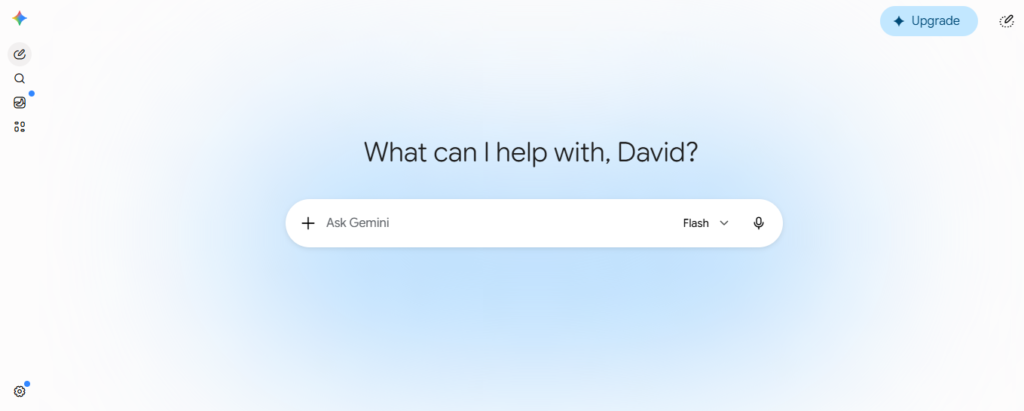
Let’s start with the basics, because there’s a lot of confusion around this one — and understandably so. Gemini has changed names, changed models, and been relaunched more than once in the last couple of years.
Here’s the simple version: Gemini is Google’s AI assistant, powered by a series of large language models developed by Google DeepMind. Think of it as Google’s answer to ChatGPT. You can chat with it, ask it questions, ask it to write things, analyse images, summarise documents, and a whole lot more.
But Gemini has something the others don’t — it was built from the ground up to be multimodal. That’s a fancy word that just means it was designed from day one to understand text, images, video, and audio together, not as separate add-ons bolted on later. This makes a real difference in how it handles visual tasks.
It’s also deeply woven into the Google tools you already use — Gmail, Google Docs, Google Drive, YouTube, and Google Search. If you spend most of your day inside Google’s world, Gemini meets you there in a way no other AI tool quite does.
The current generation of models as of June 2026 includes Gemini 3.5 Flash (fast, capable, and free to try) and Gemini 3.1 Pro (more powerful, available on paid plans). These represent a significant step up from even six months ago.
Gemini AI Features — What It Can Actually Do
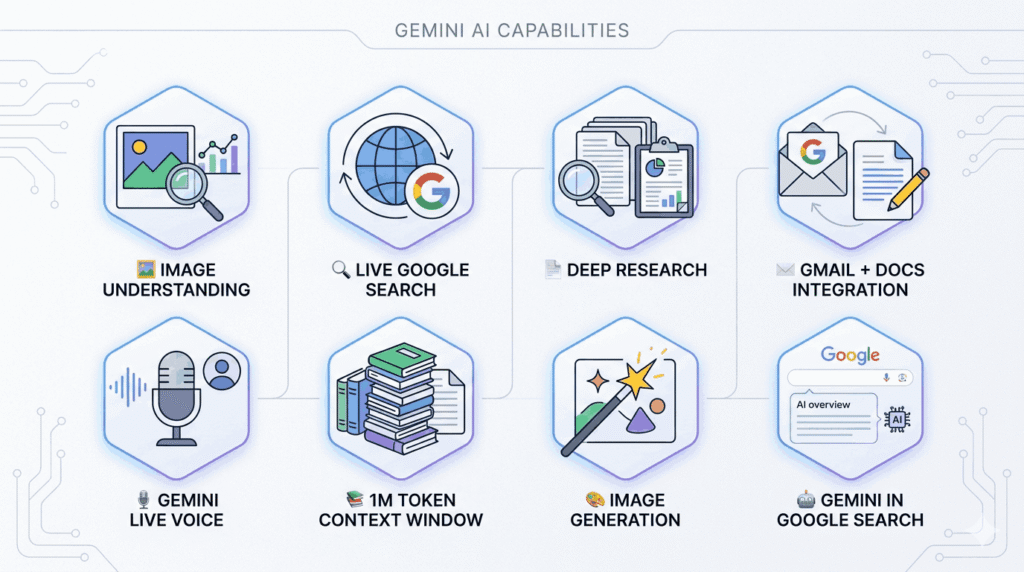
Alright, let’s get into the practical stuff. What can Gemini actually do for you as a regular person? Here’s a breakdown of the features worth knowing about.
Image Understanding
Upload a photo and ask questions about it. Great for analysing diagrams, reading screenshots, or describing visuals.
Live Google Search
Gemini pulls real-time information from the web as it responds — so its answers are far more current than most AI tools.
Deep Research
Ask it to research a topic thoroughly and it’ll compile a structured report — like having a research assistant on call.
Gmail + Docs Integration
Summarise long email threads, draft replies, and write documents directly inside Gmail and Google Docs.
Gemini Live Voice
Have a real-time spoken conversation with Gemini — like talking to a smart assistant on your phone, hands-free.
1M Token Context Window
On Pro plans, Gemini can read entire books, large codebases, or massive documents without losing track of details.
Image Generation
Create images from text descriptions using Google’s Imagen model — available on the free tier with some limits.
Gemini in Google Search
AI-powered overviews and answers appear right inside Google Search — you’re probably already using this without realising.
💡Insider Tip
The “Deep Research” feature is one of Gemini’s most underrated tools for beginners. On the free plan, you get 5 uses per month. Use it when you need a well-organised summary of a topic you know nothing about — it’ll save you hours of Googling.
Gemini AI Pricing — Which Plan Is Right for You?
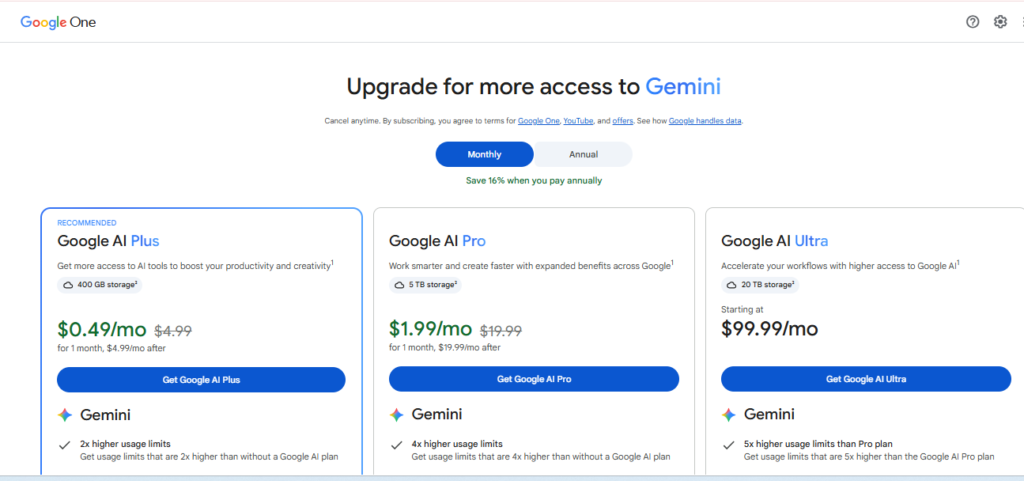
Here’s the good news: you can start using Gemini for free right now, no credit card needed. But the paid plans do unlock some genuinely useful upgrades. Let me break down what you’re actually getting at each level — in plain English.
| Plan | Price | What You Get | Best For |
|---|---|---|---|
| Free | $0/month | Gemini 3.5 Flash (limited daily quota), 5 Deep Research uses/month, image generation, Google Search integration, Gemini Live voice | Total beginners; casual daily use |
| AI Plus | $7.99/month | Enhanced Gemini 3.1 Pro access, more Audio Overviews, NotebookLM access, 200 GB Google One storage | Light users who want a boost without committing to Pro |
| AI Pro Best Value | $19.99/month | Full Gemini 3.1 Pro access, 1M token context window, 20 Deep Research sessions/month, all Google Workspace AI features | Regular users, content creators, small business owners |
| AI Ultra | $99.99/month | Everything in Pro plus Deep Think extended reasoning, early access to new features like Gemini Spark | Researchers and developers with very intensive needs |
A quick, honest take: the free plan is a perfectly reasonable starting point. The jump to AI Plus at $7.99 is worth it if you’re a regular Google One user anyway. AI Pro at $19.99 makes sense once you’re using Gemini daily for real work. And AI Ultra? Unless you’re doing complex scientific or mathematical research, it’s genuinely hard to justify the price jump — even reviewers who test these tools for a living say so.
⚠️ Heads Up
AI pricing changes fast — Google updated its plan structure at Google I/O in May 2026, cutting the Ultra price significantly. Always check Google’s official Gemini page before subscribing, as prices may have shifted since this was written.
How You Can Use Gemini AI to Earn Money
Let me be upfront here: AI tools don’t print money on their own. What they do is help you work faster, think more clearly, and produce better output — which over time can translate into real income. Here are some practical ways beginners are using Gemini to support an income.
Content Creation and Blogging
Use Gemini to research topics, outline blog posts, and draft social media captions faster than you could do it alone. Its live Google Search integration means you can get up-to-date content ideas without switching between tabs constantly. Pair this with affiliate marketing or a newsletter and you have a workable content business foundation.
Freelance Writing and Research Support
Gemini’s Deep Research feature can help you compile well-structured reports and summaries that freelance clients genuinely value. If you offer research, writing, or content services, Gemini can help you take on more projects without burning out.
Google Workspace Productivity (For Business Owners)
If you run any kind of small business, using Gemini inside Gmail and Google Docs can save you hours each week on emails, proposals, and documentation. Time you save is money you can redirect toward higher-value work.
Social Media and Visual Content
Gemini’s native image generation and understanding makes it useful for people running social media accounts. Generate visuals, analyse competitors’ posts, and draft platform-specific captions all in one place.
Creating Educational Content or Digital Products
Use Gemini to research and outline beginner-friendly guides, mini-courses, or PDF resources. Its strength at summarising and structuring information makes it a solid co-creator for digital products aimed at helping others learn something new.
💡Honest Reality Check
AI tools are multipliers, not shortcuts. The people earning real income with Gemini are pairing it with consistent effort, a clear niche, and an audience they’re genuinely helping. Start with one use case, get good at it, and build from there.
Where Gemini Beats the Competition — And Where It Falls Short
This is where I want to be really straight with you, because a lot of Gemini reviews are either pure hype or unfairly harsh. The truth is more nuanced than either camp.
After a fair look at how Gemini stacks up against ChatGPT, Claude, and Copilot in 2026, here’s the honest picture:
| Category | Gemini | ChatGPT | Claude | Copilot |
|---|---|---|---|---|
| Multimodal (images, video, audio) | 🥇 Best | Good | Good | Good |
| Real-time web search | 🥇 Excellent | Good | Available | Excellent |
| Google Workspace integration | 🥇 Native | None | None | None |
| Long document / context handling | 🥇 1M tokens | 128K tokens | 200K+ tokens | 128K tokens |
| Writing quality & tone | Good | Very Good | 🥇 Best | Good |
| Coding and debugging | Good | Very Good | 🥇 Best | Very Good |
| Response consistency | Can vary | Moderate | Most reliable | Good |
| Microsoft 365 integration | None | Good | Limited | 🥇 Native |
| Free tier generosity | 🥇 Very generous | Good | Good | Good |
| Response speed | 🥇 Fastest (Flash) | Fast | Fast | Fast |
You may also read: What Is ChatGPT? The Complete Beginner’s Guide (2026)
Where Gemini genuinely wins
Gemini’s native multimodality is its real superpower. It was designed from the start to understand images, audio, and text together — not as separate features patched in later. If your work involves a lot of visual content, video research, or mixed-media tasks, Gemini handles those better than any of its competitors.
The Google ecosystem integration is the other big one. If you live in Gmail, Google Docs, and Google Drive, Gemini meets you there in a way that ChatGPT and Claude simply can’t match right now. And with a 1 million token context window on paid plans, it can process entire codebases, long reports, or research archives without breaking a sweat.
Where Gemini falls short
Here’s the thing nobody tells you about Gemini: output quality can be uneven. In blind tests, Gemini consistently shows up as the solid “all-rounder” — it rarely fails spectacularly, but it also rarely produces the standout writing quality that Claude is known for, or the structured analytical depth that ChatGPT handles well.
For coding, Claude is clearly ahead. For long-form writing that needs warmth, nuance, and careful instruction-following, Claude also leads. For broad general-purpose use and the biggest ecosystem of integrations, ChatGPT still has an edge. If you’re heavily embedded in Microsoft 365, Copilot is the obvious answer.
✅ Gemini Strengths
- Best-in-class multimodal capabilities
- Native Google Workspace integration
- Live web search built in
- Fastest response times (Flash model)
- Most generous free tier among rivals
- Massive 1M token context window
- Deep Research feature is genuinely powerful
❌ Gemini Weaknesses
- Writing quality can be inconsistent
- Coding lags behind Claude and ChatGPT
- Complex reasoning not as strong as Claude
- Smaller third-party integrations ecosystem
- Tool-use reliability in agentic tasks is weaker
- AI Ultra is expensive for most regular users
You may also read: Claude AI: What It Is, How It Works, and Why It Matters in 2026
Tips for Getting the Most Out of Gemini AI
One of the biggest mistakes beginners make with any AI tool — Gemini included — is treating it like a search engine. You type a vague question, get a vague answer, and think “this isn’t that useful.” The reality is that the quality of what you put in directly shapes the quality of what comes out. Here’s how to change that.
1. Be specific about what you want and why
Instead of “write me a blog post about AI”, try “write me an introductory blog post explaining what Gemini AI is, aimed at a complete beginner with no technical background, in a friendly and conversational tone.” The more context you give, the better the output.
2. Use Deep Research for unfamiliar topics
Before you spend an hour Googling something you know little about, try Gemini’s Deep Research feature first. Give it a clear question and ask for a structured overview. It won’t always be perfect, but it’s a fantastic starting point — and on the free plan, you get 5 uses per month.
3. Upload images, documents, and screenshots
Gemini’s image understanding is one of its best features — and most beginners never use it. You can upload a screenshot of a form, a photo of handwritten notes, a PDF, or even a chart and ask Gemini to explain, summarise, or extract information from it.
4. Enable it inside Gmail and Google Docs
If you have a Gmail account, Gemini is probably already available in your sidebar. Look for the Gemini icon inside Gmail or Docs. You can use it to summarise long email threads in seconds, draft replies, and get suggestions while you write — without ever leaving your Google workspace.
5. Ask it to think step-by-step
For anything complex — planning a project, solving a problem, making a decision — add “think through this step by step” to your prompt. This simple addition pushes Gemini (and any AI tool) to produce far more organized, thoughtful responses rather than jumping to a quick surface-level answer.
6. Iterate, don’t accept the first draft
The first response is a starting point, not a final answer. If something is too formal, too vague, or not quite right — just say so. Tell it to try again with a different tone, more detail, or a different angle. AI tools reward the people who treat them like a conversation, not a one-shot query.
7. Try Gemini Live for hands-free thinking
Gemini Live lets you have a spoken, real-time conversation with the AI — available even on the free tier. If you’re someone who thinks better out loud, or you want to brainstorm ideas while doing something else, this is worth experimenting with. It feels less like using software and more like bouncing ideas off a knowledgeable friend.
💡Pro Tip
If you’re a Google Workspace user, check whether your plan already includes Gemini features at no extra cost. Google bundled Gemini into many Business Standard, Plus, and Enterprise Workspace tiers in 2025 — meaning you may already be paying for access you haven’t activated yet.
So, Is Gemini AI Worth It?
Here’s my honest take: yes — especially if you’re already living in Google’s world.
If Gmail, Docs, and Google Drive are where you spend your working day, Gemini is an obvious tool to try. The integration alone makes it more practical for everyday tasks than any rival. The free plan is generous, the Deep Research feature is genuinely useful, and the multimodal capabilities are best-in-class for visual tasks.
Where I’d temper expectations is in pure writing quality and coding. If those are your main use cases, Claude is a stronger choice. If you need the widest range of third-party integrations and the most mature ecosystem, ChatGPT still has the edge. Gemini’s strength is being the “quiet all-rounder” — consistently useful, rarely spectacular, always fast.
And that’s actually a really good thing for beginners. You don’t need spectacular. You need reliable, accessible, and useful. Gemini is all three — and the free plan gives you space to figure that out before spending a penny.
Conclusion
Gemini AI — Solid for Beginners, Excellent for Google Users
Start with the free plan. It’s more capable than most people realise, and gives you a genuine feel for the tool before committing.
Upgrade to AI Pro ($19.99/month) once you’re using it regularly for work — the 1M context window and full Deep Research access make a real difference.
Skip AI Ultra unless you have very specific research or reasoning needs. The jump in price doesn’t match the jump in usefulness for most regular users.
And if you want to go deeper on how Gemini compares to the other major AI tools out there, the comparison guide below has you covered.
You may also read: ChatGPT vs Claude AI (2026): Which Is Better for Beginners?
Frequently Asked Questions
Is Gemini actually free to use?
Yes. Google offers a robust free version of Gemini that handles daily tasks, basic brainstorming, and quick web searches. For most beginners, the free version is more than enough to get started.
Do I need coding or technical skills to use Gemini?
Not at all. If you can type a text message to a friend, you can use Gemini. It understands plain, conversational English (and dozens of other languages). You don’t need to know special prompts or code—just talk to it normally.
Is it worth upgrading to the paid tier (Gemini Advanced)?
It depends on your workflow. If you are using it for heavy data analysis, complex coding, massive research projects, or want access to Google’s most powerful, cutting-edge AI models, the $20/month Advanced subscription is worth it. If you just need general writing help and quick answers, stick to the free version.
I use Google Workspace at work. Do I already have access to Gemini?
Quite possibly! Many corporate and educational Google Workspace accounts now include Gemini integration (formerly Duet AI) directly inside Docs, Gmail, and Sheets. Check with your IT administrator or look for the Gemini star icon in the top right corner of your Google Docs.
What is Gemini’s biggest advantage over other AI models?
Its integration with the live internet and the Google ecosystem. Because it is built by Google, Gemini excels at real-time search, parsing YouTube videos, and connecting directly with your Google Docs, Gmail, and Maps (if you choose to turn those extensions on).
What is one concrete action I can take to start using Gemini today?
Go to gemini.google.com, log in with your Google account, and type this exact prompt: “I am a [your job title/role] looking to save time. What are 3 specific tasks in my daily routine that you can help me automate or speed up?” Let the AI show you its own value right out of the gate.