
Here’s the moment most beginners get stuck.
You’ve learned Make.com. You’ve built a few workflows. You can connect apps, automate lead notifications, and set up email sequences that run while you sleep. You genuinely have a skill that businesses will pay for.
And then you open a blank email, stare at it for 20 minutes, and close the laptop.
Because the gap between “I can do this” and “someone is paying me to do this” feels enormous when you have no portfolio, no testimonials, and no previous clients to point to.
This post closes that gap.
I’m going to walk you through exactly how to get your first AI automation client — who to target, what to say, how to price it, and what happens after they say yes. No hype, no “$10k in 30 days” promises. Just the honest, practical steps that actually work in 2026 for someone starting from zero.
Just getting started with automation tools? Before reading this, make sure you’ve worked through the 5 Make.com Workflows Every Beginner Should Build First — you need real skills before selling them.
Quick Summary
If you’re starting with no portfolio, focus on these five steps:
✅ Choose one simple automation service to offer
✅ Build a demo workflow you can show prospects
✅ Contact 10–20 small businesses with a specific solution
✅ Land a low-risk first project and deliver excellent results
✅ Collect a testimonial and turn it into a case studyGoal for the first 90 days:
- Month 1: Build skills and a demo
- Month 2: Outreach and discovery calls
- Month 3: Deliver projects and collect testimonials
Keep reading for the complete step-by-step roadmap.
First: Why This Is Actually a Good Time to Start
Before we get into tactics, let me give you the honest market picture.
The AI agents market grew from $8 billion in 2025 to nearly $12 billion in 2026. That growth is being driven not by tech companies hiring AI engineers, but by small businesses waking up to the fact that they’re drowning in repetitive manual work — and that someone with tools like Make.com and a few hours can solve that problem for them.
The businesses that need AI help most are not tech companies. They are the 33 million small businesses that have heard AI is important but have no idea what to actually do with it. These are your clients.
AI automation is the highest-demand, most underserved AI freelancing niche of 2026. Businesses know they should be automating repetitive tasks. Most have no idea how to start.
What that means for you: the opportunity is real. The demand is real. The gap between what businesses need and what they know how to do themselves is wider than it has ever been. You don’t need five years of experience to step into it. You need the right approach.
Step 1: Get Clear on Exactly What You’re Selling
The single biggest mistake beginners make is describing their service in technical terms that mean nothing to a business owner.
“I do AI automation” is not a service. It’s a category.
“I build Make.com workflows” tells a client nothing about what problem you solve.
What a client actually buys is a specific outcome — time saved, leads captured, money recovered, stress reduced. Your job is to connect the thing you build to the result they care about.
Here’s the difference in practice:
| Instead of saying this | Say this instead |
|---|---|
| I do AI automation | I set up a system that automatically follows up with every new lead within 2 minutes |
| I build Make.com workflows | I connect your contact form to your CRM so no lead ever slips through the gap again |
| I offer automation services | I save small business owners 5–10 hours per week by automating their most repetitive tasks |
The clearer and more specific your service description, the easier it is for a potential client to say “yes, that’s exactly what I need.”
For your first client, I’d recommend picking one of these three starter services — all buildable with Make.com or n8n, all genuinely valuable to small businesses, and none requiring advanced technical skills:
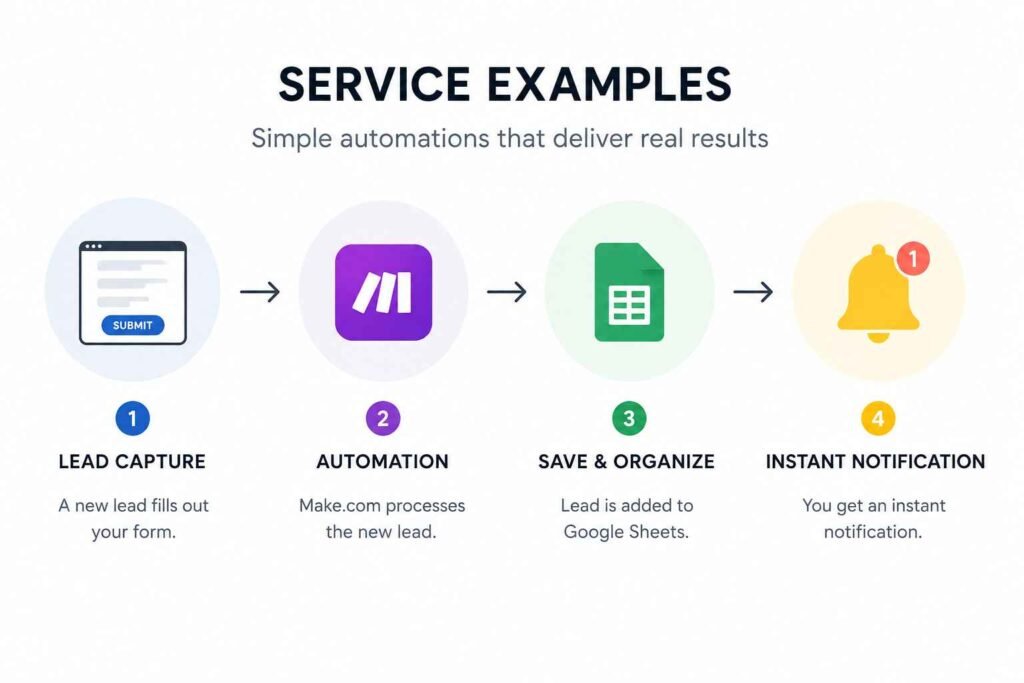
Service 1: Lead Capture + Instant Notification System When a new lead fills in a contact form, they’re automatically added to a Google Sheet and you (or the business owner) receive an instant notification with their details. Setup time: 45–90 minutes. Client value: immediate — they stop missing warm leads.
Service 2: Welcome Email Automation When someone signs up for a newsletter or contacts the business, they receive a personalised welcome email within seconds. Setup time: 30–60 minutes. Client value: better first impressions, zero manual effort.
Service 3: Social Media Cross-Posting When new content is published on a blog or posted on one platform, it’s automatically shared across all connected social accounts. Setup time: 60–90 minutes. Client value: consistent presence without the daily manual posting.
These three services have something important in common: you can explain the outcome in one sentence, build them in under two hours, and demonstrate them working in real time — which matters enormously when you have no portfolio yet.
Step 2: Choose the Right Clients to Target
Not every business is worth approaching. The best clients for a beginner automation freelancer share a few characteristics:
They have a clear, painful manual process. They’re doing something by hand — entering data, sending emails, copying information between apps — that obviously shouldn’t require a human. The pain point has to be visible and feel urgent.
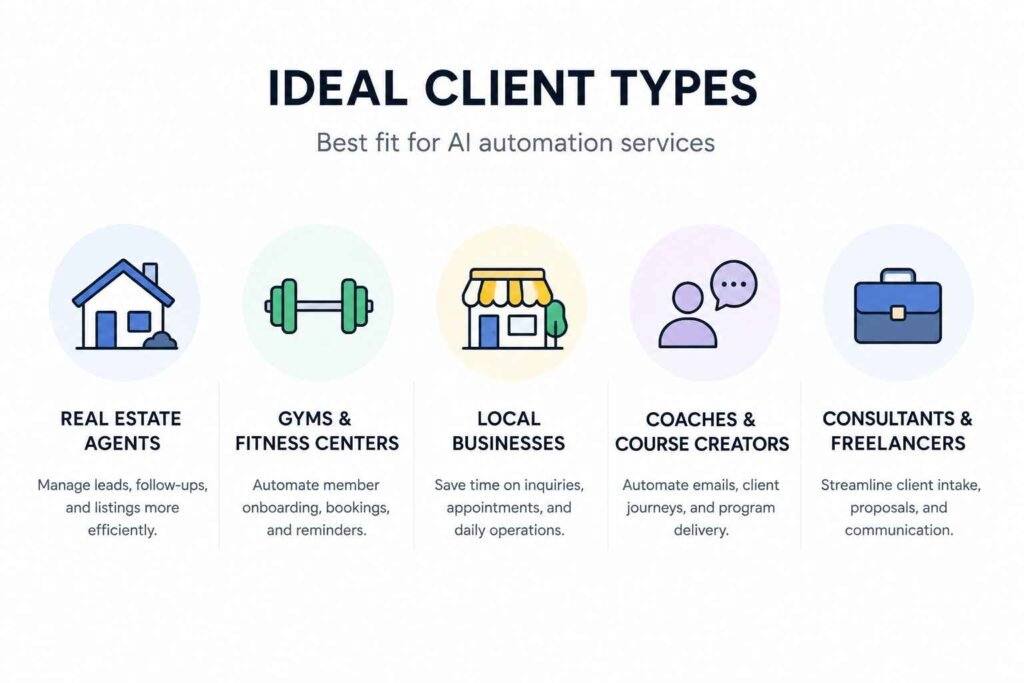
They have the budget to say yes. The best niches for AI automation services in 2026 are real estate agents, dental and medical offices, law firms, e-commerce brands, fitness coaches and gyms, and recruitment agencies.
These businesses have real revenue, real operational problems, and the budget to solve them. They are not tech-savvy but they understand the value of saving time.
They are not already automated. If a business already uses a sophisticated CRM with built-in automation, you’re not their person yet. You want the businesses still running on spreadsheets, sticky notes, and manual follow-ups.
Here is a simple way to think about ideal first clients:
Real estate agents — they copy-paste leads into CRMs manually, confirm bookings by hand, and send invoices one by one. It’s chaos. And they hate tech. Lead follow-up automation and client onboarding workflows are immediate wins.
Fitness coaches and gyms — onboarding new clients, scheduling sessions, and sending check-in messages all run manually at most small gyms. All of it is automatable in a single afternoon.
Local service businesses — plumbers, electricians, cleaning companies — who rely on contact forms but have no system for following up quickly. A lead notification workflow is instantly valuable.
Online coaches and consultants — who manage client intake, follow-up, and onboarding through a jumble of emails, forms, and calendar tools. Connecting these together is straightforward and valuable.
For your first client specifically, start with someone you already know or can reach without a cold pitch. A friend who runs a small business. A family member’s employer. A local company you already use. The goal of client number one is not to make money — it’s to build a real case study. More on that in a moment.
Step 3: Build a “Portfolio” Before You Have One
Here’s the truth about portfolios: you don’t need a paying client to build one.
What you need is a demonstration — proof that you can build something that works. There are three ways to get this before you’ve landed your first client.
Option 1: Build it for yourself
Build the lead notification workflow for your own website or social media profile. Set up the welcome email automation for your own newsletter. Screenshot the scenario, record a short video of it running, and write a one-paragraph explanation of what it does and what problem it solves. That’s a portfolio piece.
Option 2: Build it for free
Pick a local business — one you’re genuinely curious about — and build a demo workflow specifically for their business, using made-up but realistic data. A real estate agent’s lead form. A gym’s client intake. A coach’s contact form. Then reach out and show them what you built. This approach converts at 40–60% because you demonstrate value first.
Option 3: Document your learning projects
Every workflow you built while learning is a portfolio piece if you document it correctly. Take a screenshot of the scenario in Make.com. Write: “Problem this solves. How it works. What it saved (time, clicks, manual steps).” Three sentences. That’s a case study.
You only need one or two of these before you start reaching out. The goal isn’t an impressive portfolio page — it’s a credible answer to “have you done this before?”
Step 4: Find Your First Client
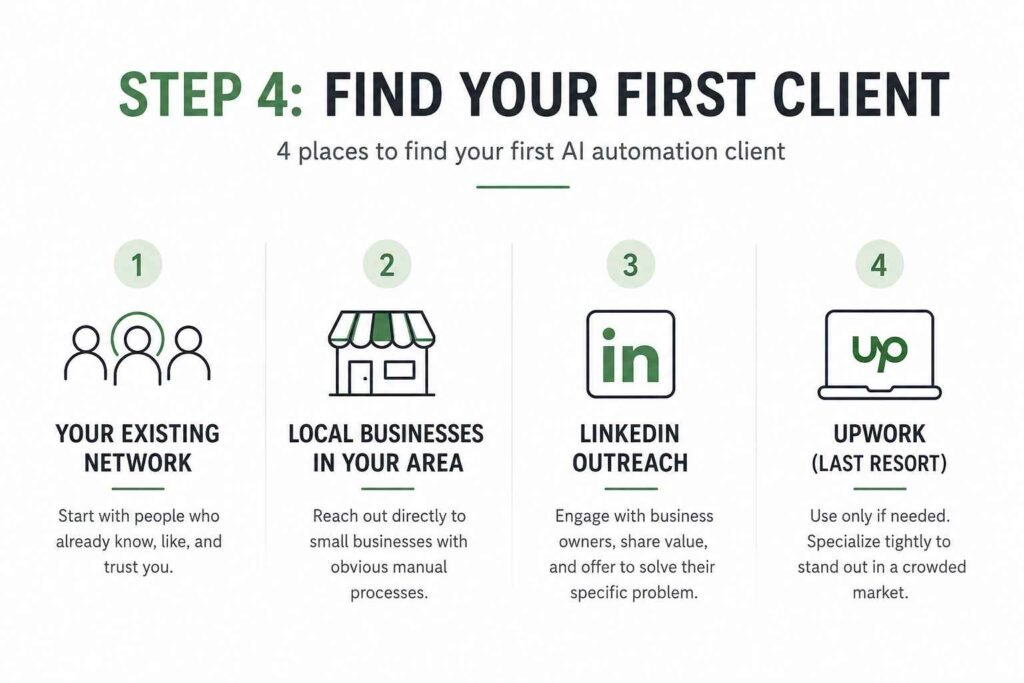
There are four places to find your first AI automation client, ranked from easiest to hardest.
Place 1: Your Existing Network (Start Here)
The fastest path to a first client is a person who already trusts you. Go through your contacts — phone, WhatsApp, LinkedIn, anywhere — and ask yourself: who runs a small business? Who has complained to me about repetitive work, missed leads, or being overwhelmed by admin tasks?
You’re not pitching automation. You’re offering to solve a specific problem you’ve already heard them describe. The message is simple:
“Hey [name], I’ve been learning automation tools — basically software that connects apps and eliminates repetitive tasks. I was thinking about the [specific problem they’ve mentioned] you deal with — I think I could set something up that solves it in a couple of hours. Would you be open to a 20-minute chat? No cost, and if it’s useful you can keep it.”
That’s it. No jargon. No pitch deck. Just a specific offer to solve a problem you already know they have.
Place 2: Local Businesses in Your Area
Walk or drive around. Look at businesses with contact forms on their website, inquiry processes that clearly require manual handling, or obvious repetitive admin. Book a time to go in person — or find the owner’s email on their website — and make a simple, specific offer.
The freelancers winning right now are not applying to more jobs. They’re making clients come to them. Going in person or reaching out directly — especially locally — puts you in a completely different category from the thousands of people posting “DM me for AI services” on social media.
Place 3: LinkedIn Outreach
LinkedIn is where business owners describe their problems publicly, every single day. Search for posts from small business owners using terms like “overwhelmed,” “too much admin,” “leads slipping through,” or “wasting time on.” Read what they write. Then reply with a genuine comment and, if relevant, a direct message offering to help with the specific thing they mentioned.
Write one post or article showing how you solved a specific problem — not a tutorial, but a case study format: “I built a lead notification system for a small business that saves them 3 hours a week and ensures every lead gets a response within 2 minutes.” That post does the attracting for you.
Place 4: Upwork (Last Resort)
On Upwork, clients can connect with freelance AI automation engineers who design and build systems to help automate business processes. The platform is real and the clients are real — but the competition is fierce and the race-to-the-bottom on price is brutal for beginners.
If you use Upwork, specialise your profile tightly — “Make.com automation for real estate agents” or “lead notification workflows for coaches” — rather than “AI automation freelancer.” Specificity beats generality every time on a crowded platform.
Step 5: Write a Message That Gets a Response
Most outreach fails because it talks about the sender, not the recipient. The client doesn’t care about your skills. They care about their problem.
Here’s a cold outreach message structure that works:
Subject: Quick idea for [Business Name]
Hi [Name],
I noticed [specific observation about their business — their contact form, a post they made, a process you observed].
I’m an automation freelancer specialising in [specific service] for [specific type of business]. I recently built a system for [type of client] that [specific result — e.g., “ensures every new enquiry gets a personalised response within 60 seconds, without any manual effort”].
I think something similar could help [Business Name] with [specific problem].
Would you be open to a 20-minute call this week to see if it’s a fit? If it’s not useful, no problem at all.
[Your name]
Three things make this message work. First, it opens with them, not you. Second, it describes a result, not a service. Third, it makes the ask small and low-risk — 20 minutes, not “hire me.”
Keep it short. Plain text always works better for cold outreach than formatted HTML emails — plain text looks like a real message from a real person, not a marketing email. The shorter and more specific the email, the higher the response rate.
Step 6: Price Your First Project Honestly
This is where most beginners either undercharge dramatically (offering to work for free out of insecurity) or freeze up entirely because they don’t know what’s normal.
Here’s what’s honest and realistic for a beginner in 2026:
For your absolute first project: Offer it free or at a very low rate (£50–£150 / $50–$150) in exchange for a detailed written testimonial and permission to use it as a case study. This is not desperation — it’s a deliberate investment in your first piece of real social proof. One good case study is worth more than ten half-built portfolio pieces.
For projects 2–5: Charge based on the value delivered, not your time. With active outreach, most beginners land 1–3 small projects in their first month, earning $300–$800. By month 3, consistent freelancers typically reach $1,500–$3,000 per month.
A simple lead notification workflow is worth £150–£300 / $150–$300 as a one-off setup fee. A more involved client onboarding system with email automation and CRM integration is worth £300–£600 / $300–$600. These aren’t arbitrary numbers — they reflect what a business would otherwise spend on several hours of admin staff time.
What to avoid: Charging hourly as a beginner. Hourly pricing punishes you for getting faster and puts the client in a position where they’re watching the clock. Price by project, from day one.
Once you’ve completed a few projects and have testimonials to point to, start at £60–£80 / $60–$80 per hour to get testimonials, then raise rates every 3–4 clients.
Step 7: Handle the Discovery Call
If someone agrees to a 20-minute call, don’t show up with a pitch. Show up with questions.
The call has one job: understand their problem well enough to know whether you can solve it — and to quote it accurately. Here are the five questions to ask on every discovery call:
1. “Walk me through what you do manually today when [the problem occurs].” Let them describe the process. Listen for the friction, the time cost, the frustration. This is where you find the real pain — not the polite version they wrote in a contact form.
2. “How long does this take you or your team each week?” This gives you the value anchor. If it takes 5 hours a week and their time is worth £40/hour, that’s £800/month of wasted time. Your £300 setup fee is already obviously worth it.
3. “What tools do you already use?” You need to know what apps they’re using before you commit to building anything. Make.com connects to 3,000+ apps, but it’s worth confirming before you quote.
4. “What would a successful outcome look like for you?” This is the most important question. Their answer becomes the success metric — and the thing you reference in your case study later.
5. “What’s the timeline you’re working with?” Urgency tells you a lot. A business owner who says “as soon as possible” is a ready buyer. Someone who says “eventually” might need a follow-up in a few months.
After the call, send a one-page proposal by email within 24 hours. Keep it simple: the problem you’re solving, how you’ll solve it, what it costs, and what they can expect. No lengthy documents. No jargon. The proposal is just a written version of what you discussed.
Step 8: Deliver, Document, and Turn One Client Into Many
Getting the first client is the hardest part. Keeping clients and getting referrals is far easier — if you deliver well and document everything.
Deliver well. Build exactly what you discussed, test it thoroughly before handing it over, and show the client how to use it in a short video or screen recording. Most automation freelancers skip this step. It takes 10 minutes and earns disproportionate goodwill.
Document the result. Before you hand the project over, capture the before-and-after. How long did the process take manually? How long does it take now? What’s the time saved per week? These numbers are your next portfolio piece.
Ask for a testimonial immediately. The best time to ask is right after the client sees it working for the first time — not weeks later when the excitement has faded. A simple “Would you be happy to write two or three sentences about what I built and how it helped? I’d love to include it on my website” works perfectly.
Ask for a referral. After delivering successfully, say: “I’m taking on two more clients at the moment — if you know anyone who deals with similar admin headaches, I’d really appreciate an introduction.” Most people are happy to refer when they’re satisfied. Most freelancers never ask.
One client, handled well, can become two or three clients before the month is out.
What to Expect in Your First 90 Days
Let me be honest about the timeline, because most content on this topic either wildly overpromises or dramatically underestimates what’s possible.
Month 1: This is the hardest month. You’re reaching out, hearing nothing, maybe getting one or two responses. Your first project might be free or very low rate. You’ll second-guess yourself. This is completely normal. The goal of month 1 is to land one real project and get one real testimonial.
Month 2: You have social proof now. Outreach gets a little easier. You start to see which types of businesses respond best and which services are easiest to explain. Your confidence in the discovery call improves noticeably. Most beginners need 3–6 months to get their first clients and prove the concept.
Month 3: If you’ve been consistent — reaching out every week, delivering well, asking for referrals — you’ll likely have 2–4 clients at various stages. By month 3, consistent freelancers typically reach £1,200–£2,400 / $1,500–$3,000 per month. Not life-changing money yet, but proof that the model works.
The people who don’t make it through this period give up in month one because they sent five emails, heard nothing, and decided “this doesn’t work.” It works. The timelines are just longer than the YouTube thumbnails imply.
The Mindset That Makes This Work
One thing separates the beginners who land clients from the ones who don’t: the willingness to reach out before they feel fully ready.
There is no certification that makes you ready. There is no number of tutorials that makes you qualified. The credential is a working automation that solves a real problem — and you can build that today with the skills you already have.
AI workflow automation isn’t just another freelance skill — it’s becoming a business essential. As AI capabilities expand, businesses need specialists who can bridge the gap between technology and practical implementation. That gap is widest right now, in 2026, before every business has figured this out themselves.
The business owner you’re nervous about emailing is not sitting there with a queue of experienced automation freelancers to choose from. In most cases, they’ve never heard of Make.com. They’ve never seen a workflow scenario. You walking in — digitally or physically — and saying “I can solve this specific problem for you” is likely the first time anyone has offered.
That’s not something to be paralysed by. That’s an advantage.
Quick Reference: Your First-Client Action Plan
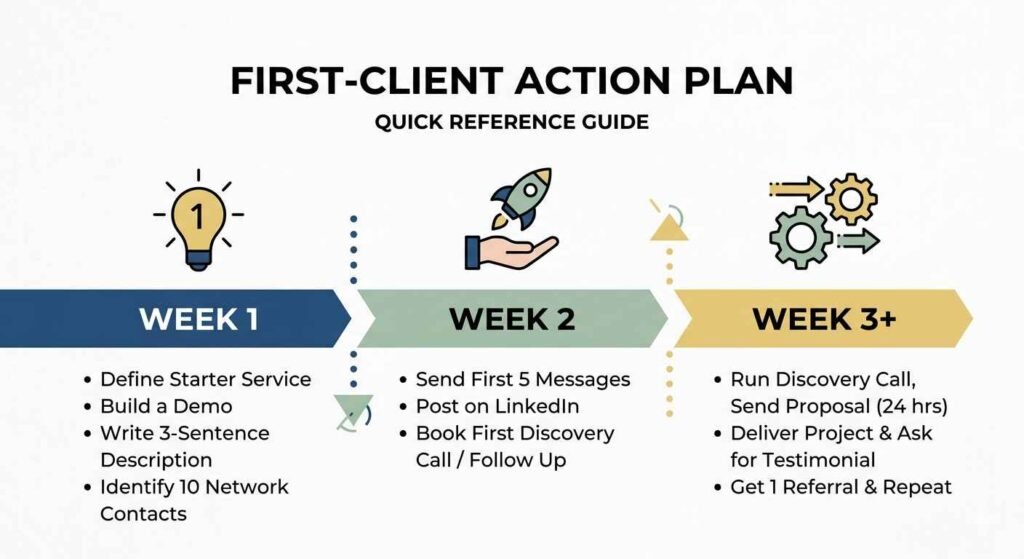
Here’s the entire process on one page:
This week:
- Define your one starter service — which of the three do you want to lead with?
- Build a demo of that service (for yourself or a made-up client)
- Write a 3-sentence description of what it does and who it helps
- Identify 10 people in your network who run small businesses
Next week:
- Send your first 5 outreach messages (warm contacts first)
- Post one case study or behind-the-scenes post on LinkedIn
- Book your first discovery call if someone says yes — or follow up once if you hear nothing
Week 3 onwards:
- Run the discovery call, send a proposal within 24 hours
- Deliver the project, capture the result, ask for a testimonial
- Ask for one referral from your first happy client
- Repeat
That’s it. Not complicated. Just consistent.
Landing your first client is the hardest part — but it’s just step one. If you’re thinking bigger picture, my complete guide to starting an AI automation agency covers pricing, niches, and how to grow past your first few projects.
Frequently Asked Questions
Do I need to be technical to do this?
No. Modern automation platforms like Make.com, Zapier, and n8n provide visual workflow builders that require zero coding. Your competitive advantage is strategic thinking and client outcomes, not programming.
What if I’m not in the US or UK? Does this work internationally?
Yes. Small businesses everywhere deal with the same manual admin problems. The tools are the same, the approach is the same, and local knowledge of your market is actually an advantage — you understand the businesses in your community better than anyone else.
How many outreach messages should I send before giving up?
Don’t give up based on a number. Send 10 messages. Follow up once with each. That’s 20 touchpoints. If you get zero responses, revisit the message — not the effort. A good reply rate for B2B cold outreach is 5–10%, so even with a great message, expect most people not to respond. That’s normal. Keep going.
Should I build a website first?
Not for your first client. A LinkedIn profile with one case study is enough. Save the website for when you have two or three testimonials to put on it — then it’s worth building.
What if the client asks for something I don’t know how to build?
Be honest: “I haven’t built exactly that before, but I’m confident I can figure it out — let me come back to you with a plan.” Then go figure it out. This is how every freelancer grows. The client cares about the result, not your research process.
Final Thought
Getting your first AI automation client is not a skill problem. If you’ve built the workflows from my Make.com beginner’s guide or n8n beginner’s guide, you have everything you need technically.
It’s an action problem. It’s sitting down and writing the email, making the call, showing up before you feel 100% ready.
The businesses need what you can build. The gap is real. The only thing standing between you and your first paid project is the decision to reach out.
Send the first message today.
Ready for the next step? Read:
- How to Become an AI Automation Specialist in 2026 — the full career roadmap
- 5 Make.com Automation Workflows Every Beginner Should Build First — the skills you need before selling