
The Rise of Artificial Intelligence
There is no doubt that Artificial Intelligence (AI) is everywhere today. From search engines and smartphones to writing assistants and chatbots, AI has become part of our daily lives.
Personally, I can hardly go a day without using it. But what exactly is AI—and why should you care?
At its core, AI refers to computer systems that can perform tasks that normally require human intelligence — things like understanding language, recognizing images, making decisions, and even writing stories or code. Think of it as teaching a computer to “think” by learning from enormous amounts of data.
Here is my full post about “What Is Artificial Intelligence? A Simple and Powerful Beginner’s Guide (2026)“
We’ve been living with AI longer than you might realize. Every time Netflix recommends a show you actually like, every time your phone corrects a typo, or every time Google Maps reroutes you around traffic — that’s AI quietly doing its job.
But something changed dramatically in late 2022: AI stopped being something that happened to you in the background, and became something you could actually talk to.
That change had a name: ChatGPT.
ChatGPT by the Numbers (May 2026)
To understand just how big ChatGPT has become, consider this: it’s now the fastest-growing software product in the entire history of consumer technology. That’s not marketing hype — the numbers back it up.
📊 Key Stats — May 2026
- ✅900 million weekly active users worldwide
- ✅5.51 billion monthly visits in April 2026
- ✅2+ billion messages processed every single day
- ✅76.85% share of the entire generative AI market
- ✅~50 million paying subscribers
- ✅ Reached 1 million users in just 5 days after launch
- ✅ Reached 100 million users in just 2 months — faster than Instagram, TikTok, or any app ever
For context: Instagram took 2.5 years to hit 100 million users. ChatGPT did it in two months. And it hasn’t slowed down since.
“ChatGPT reached 900 million weekly active users — roughly 10% of the world’s entire population — by early 2026.”
Among the many AI tools now available — Google Gemini, Microsoft Copilot, Anthropic’s Claude, Meta AI, and dozens of others — ChatGPT still holds the largest slice of the pie, commanding nearly 77% of the AI search and chat market. It’s the tool people reach for first, and for many, it’s the only AI they’ll ever use.
What Exactly Is ChatGPT?

ChatGPT is an AI-powered chatbot created by OpenAI, an American AI safety company founded in 2015. It was publicly released on November 30, 2022, and changed the internet almost overnight.
The name breaks down simply: “Chat” because you interact with it through conversation, and “GPT” which stands for Generative Pre-trained Transformer — the type of AI model it uses under the hood.
In plain English? ChatGPT is a program you can have a conversation with. You type (or speak) a question, a request, or even a half-formed idea — and it responds in natural, human-like language. It can write, explain, code, brainstorm, translate, summarize, analyze, and much more.
You can access it at chat.openai.com, or through the ChatGPT mobile app (available on both iOS and Android, with 73.4 million downloads in December 2025 alone). As of 2024, you can even try it without making an account — just visit the site and start typing.
🤔 Quick Analogy
Think of ChatGPT like a super-knowledgeable friend who has read nearly the entire internet, studied millions of books, and can talk to you about almost any topic — any time of day, without judgment, and in over 63 languages.
How Does ChatGPT Actually Work?
You don’t need a computer science degree to use ChatGPT, but a basic understanding of how it works can help you get more out of it.
ChatGPT is built on a type of AI called a Large Language Model (LLM). During its training, it processed enormous amounts of text — books, websites, articles, code, conversations — and learned the patterns of how language works.
It didn’t memorize all of this text; instead, it learned to predict what word or idea typically comes next in any given context.
When you type a message to ChatGPT, it reads your input, figures out what you’re asking for, and generates a response one word at a time — picking the most likely and useful continuation of the conversation.
This is why it feels so natural: it’s essentially doing what a very well-read human brain does when formulating a response.
The model powering ChatGPT as of 2026 is GPT-5 (and its variants like GPT-5.5), which is vastly more capable than the original GPT-3.5 model that launched the product. Each generation has brought better reasoning, accuracy, and understanding of nuance.
ChatGPT’s Features — Explained for Beginners
ChatGPT isn’t just a chatbot anymore. Over the past few years, OpenAI has added a powerful suite of features that make it more like a complete AI assistant. Here’s a breakdown of each one:
Natural Language Chat
The foundation of ChatGPT. Ask it anything in plain English (or 95+ other languages) and get a clear, conversational response. No commands to memorize — just talk to it like a person.
Web Search (Browse the Web)
ChatGPT can search the internet in real time, giving you up-to-date information on news, prices, events, and more — going beyond its training data cutoff.
Image Generation (DALL·E)
Type a description and ChatGPT creates original images from scratch. Want “a cozy coffee shop on Mars at sunset”? Done. Useful for designers, marketers, and curious creatives alike.
Voice Mode
Talk to ChatGPT out loud using its Advanced Voice Mode. It listens, understands your speech, and responds in a natural-sounding voice — perfect for hands-free use while driving or cooking.
File & Document Analysis
Upload PDFs, Word docs, spreadsheets, or images. ChatGPT reads them and can summarize, answer questions, extract data, or spot errors — like having a smart research assistant on call.
Code Writing & Debugging
Through Codex, ChatGPT can write code in dozens of programming languages, explain how code works, identify bugs, and suggest improvements.
Whether you’re a beginner learning to program or an experienced developer building complex applications, it can significantly boost productivity.
Video Generation (Sora)
OpenAI’s Sora 2 model (now integrated into ChatGPT) can generate short AI videos from text descriptions. Free users get basic clips; paid users unlock higher resolutions and longer durations.
Memory
ChatGPT can remember things about you across conversations — your name, preferences, job, or ongoing projects — so you don’t have to repeat yourself every time you start a new chat.
Deep Research Mode
Ask ChatGPT to deeply research a topic and it will run multiple searches, synthesize information from many sources, and deliver a thorough, cited report — like having a research intern in your pocket.
Custom GPTs (GPT Store)
Users and developers have built thousands of specialized AI assistants available in the GPT Store — from resume editors to recipe creators to coding tutors. You can even build your own.
Data Analysis
Upload a spreadsheet or dataset and ChatGPT can analyze it, generate charts, spot trends, and explain insights in plain language — no data science background needed.
Multilingual Support
ChatGPT communicates fluently in 63 languages (37 in voice mode). Whether you need to translate content, write in another language, or understand a foreign document, it’s got you covered.
Pro Tip
The majority of ChatGPT queries — about 49% — are people simply asking questions. Another 40% use it to get work done, like writing or coding. Only about 11% use it purely for exploration or creativity. Whatever your need, there’s likely a feature built for it.
Free vs. Paid Plans — Which One Do You Need?
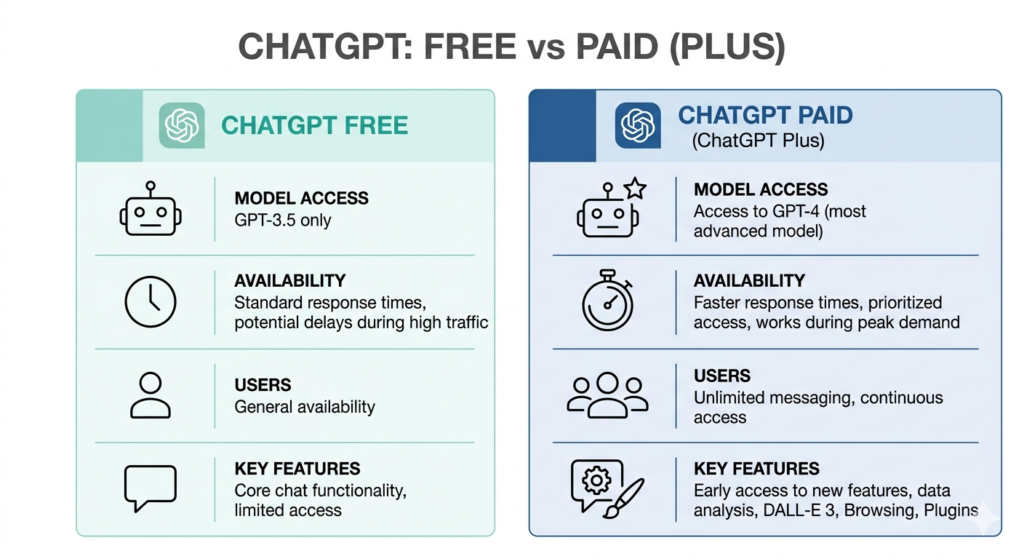
One of the most common questions beginners have is: “Do I have to pay?” The honest answer is: not necessarily — but it depends on how much you use it.
As of 2026, ChatGPT has six tiers ranging from completely free to enterprise-level. Here’s a simplified look at the main plans most people will care about:
| Plan | Price | Best For | Key Features |
|---|---|---|---|
| Free | $0/mo | Casual, first-time users | Basic GPT-5 access, limited messages, web search, file uploads, Sora 1 video (320p), ads shown |
| Go | $8/mo | Light daily users | More messages than Free, still includes ads, good middle ground |
| Plus ⭐ | $20/mo | Daily users, professionals | Full GPT-5.5, no message cap during normal use, no ads, Deep Research, Sora 2 video (720p), voice with video, custom GPTs, priority access |
| Pro | $200/mo | Power users, researchers | Near-unlimited access, most powerful reasoning models, all Plus features |
| Business / Enterprise | $25+/user/mo | Teams, companies | Data privacy controls, admin dashboard, higher limits, dedicated support |
Is the Free Plan Good Enough?
For beginners who want to explore ChatGPT and use it occasionally — yes, absolutely. The free plan has become surprisingly capable in 2026.
You can have real conversations, get writing help, ask questions, and even generate images. The main limitations are message caps (you’ll hit a ceiling if you use it heavily) and ads (which appeared on the free tier in February 2026).
When Is Plus Worth It?
If you find yourself running into message limits, need faster responses, want to use Deep Research, or rely on ChatGPT for work, the $20/month Plus plan is widely considered one of the best-value subscriptions in AI. Think of it this way: if ChatGPT saves you just one hour of work per month, it’s already paid for itself.
💰 Beginner Recommendation
Start with the free plan. Use it for a week or two and see how often you hit limits. If you find yourself frustrated by caps or needing more powerful features, upgrade to Plus. There’s no long-term commitment — you can cancel anytime.
ChatGPT vs. Other AI Tools — Where It Wins
ChatGPT isn’t the only AI chatbot on the market. Google has Gemini, Anthropic has Claude, Microsoft has Copilot, and there are dozens of smaller players. So why do nearly 77% of AI users choose ChatGPT? Here’s how the landscape breaks down:
🟢 ChatGPTMost Popular
- Best all-around versatility
- Largest feature set
- Biggest community & ecosystem
- Best for business & strategy tasks
- GPT Store with 1000s of custom bots
- Voice, video, image, code in one place
🔵 Google GeminiStrong
- Best if you live in Google Workspace
- Integrates with Gmail, Docs, Drive
- Excellent for multimodal tasks
- Massive context window (1M tokens)
- Great for research with live web data
🟣 Claude (Anthropic)Strong
- Best for long documents & coding
- Preferred by engineers & developers
- Excellent nuanced writing quality
- 1M token context window
- Known for careful, thoughtful answers
⬛ Microsoft Copilot
- Best for Microsoft 365 users
- Built into Word, Excel, Teams
- Strong for business workflows
- Powered by OpenAI tech
- Best enterprise security posture
Where ChatGPT Has the Clear Edge
While every tool has its strengths, ChatGPT wins in a few areas that matter most to the average user:
- Ecosystem & integrations: ChatGPT has the largest third-party ecosystem, with thousands of custom GPTs and API integrations. It’s embedded in more products than any competitor.
- All-in-one convenience: Chat, web search, image generation, video, voice, code, and file analysis — all under one roof. Competitors often require separate apps for these.
- Ease of use for beginners: ChatGPT’s interface is widely regarded as the most beginner-friendly. If you’ve never used AI before, ChatGPT is the easiest place to start.
- Brand trust & track record: Being the first major consumer AI chatbot, ChatGPT has the largest body of tutorials, guides, and community knowledge — making it easier to learn.
- Continuous innovation: From the Ghibli-style image generation that went viral, to the toll-free phone number (1-800-CHATGPT) for voice access, OpenAI ships new features at a relentless pace.
You may also read: ChatGPT vs Claude AI (2026): Which Is Better for Beginners?
Who Should Use ChatGPT? (Real-World Examples)
One of the beautiful things about ChatGPT is how versatile it is. Here are some real examples of how different people use it every day:
🎓 Students
Students use ChatGPT to understand difficult concepts, generate study summaries, draft essays, and solve math problems step by step. Just remember to verify important information and be transparent with your instructors about how you use AI.
Related article: How to Make AI Your Professor: Learn Any Skill for Free in 2026
✍️ Writers & Content Creators
Bloggers, marketers, and authors use it to brainstorm ideas, break through writer’s block, draft outlines, refine their writing tone, or research topics quickly.
Here is my full article: How to Use AI for Blogging in 2026: The Complete Beginner’s Guide — a step-by-step guide to creating content, increasing productivity, and growing a blog with AI.
💼 Professionals & Entrepreneurs
Professionals use ChatGPT to write emails, draft reports, prepare for meetings, analyze data, create presentations, and build business plans — saving hours of work each week.
👨💻 Developers
Coders use ChatGPT to write new functions, debug tricky errors, understand unfamiliar codebases, and learn new programming languages faster than ever before.
🌍 Language Learners
ChatGPT is an incredibly patient language tutor. Practice conversations, get grammar corrections, and ask for explanations in any of its 63 supported languages.
🏠 Everyday Life
Plan a trip, find a recipe for the ingredients in your fridge, get a second opinion on a decision, draft a difficult message, or just have someone to bounce ideas off. ChatGPT is genuinely useful for the small stuff too.
Tips for Getting the Best Results from ChatGPT
If you’re new to ChatGPT, here are a few simple habits that will dramatically improve your results right from day one:
✅ Beginner Tips That Actually Work
- 📌Be specific.Instead of “help me write an email,” try “write a professional email to my boss asking for Friday afternoon off — keep it short and polite.”
- 📌Give context: Tell it who you are and what you need: “I’m a marketing manager preparing for a client pitch…”
- 📌Ask it to explain: If you don’t understand a response, just say “explain that more simply” or “give me an example.”
- 📌Iterate: ChatGPT works best as a back-and-forth conversation. Refine its answers by saying “make it shorter,” “make it funnier,” or “try a different approach.”
- 📌Verify important facts: ChatGPT is powerful, but not perfect. For medical, legal, or financial decisions, always double-check with a qualified professional.
- 📌Use custom GPTs: Visit the GPT Store and find a specialized assistant built exactly for your task — whether it’s resume writing, coding, fitness coaching, or anything else.
Want to get better results from ChatGPT? Check out “Master Prompt Engineering: The Best Beginner’s Guide to AI Prompts (2026)“ to learn how to craft powerful prompts and use AI more effectively.
Tip:
One thing to keep in mind is that AI can make mistakes—a fact that even AI companies like OpenAI openly acknowledge. When using AI, always verify important information and consult official sources whenever possible, especially for medical, legal, financial, or other high-stakes topics.
Final Verdict — Is ChatGPT Worth It?
If you haven’t tried ChatGPT yet, there’s never been a better time to start — and the free plan means there’s no financial risk whatsoever.
ChatGPT has gone from a curious novelty to a genuine productivity tool that hundreds of millions of people rely on every single day. Whether you’re a student, a working professional, a creative, or just someone who’s curious about AI, it has something to offer you.
It’s not perfect — no AI is. It can occasionally get facts wrong, struggle with very recent events (without web search enabled), and it won’t replace the judgment of a doctor, lawyer, or accountant.
But as a thinking partner, a writing assistant, a research helper, and a creativity booster, it’s genuinely extraordinary.
The AI revolution isn’t coming. It’s already here — and ChatGPT is the most accessible front door into it. The best way to understand it? Just open a new chat, type something you’ve been curious about, and see what happens.
🔗 Get Started Free: Visit chat.openai.com — no account required to try it.
This article is for informational purposes. Pricing and features may change — always check openai.com for the latest.
Здесь сайте есть шанс обнаружить важную информацию.
https://sorrybabushka.ru/interesting/290-volgogradskaya-oblast-snyala-trevogu-o-vozmozhnom-padenii-bespilotnika.html