

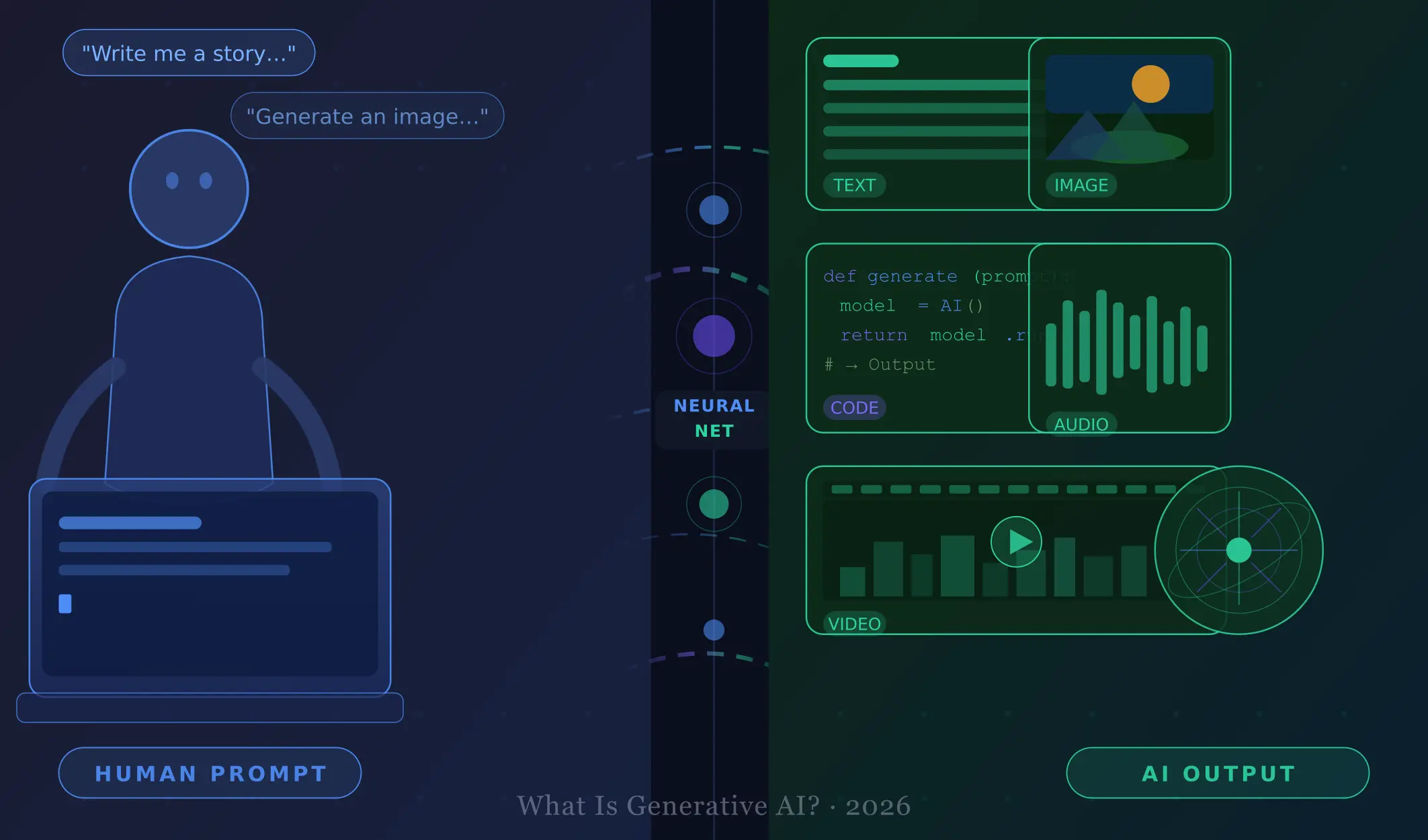
Imagine asking a computer a question and receiving a beautifully written article in seconds. Or describing a scene and watching it appear as a stunning image — created from scratch, just for you. That is the promise of generative AI, and in 2026, it is no longer a futuristic dream.
Whether you’ve heard the term at work or seen it trending online, this guide breaks it all down in plain, friendly language. By the end, you’ll understand what generative AI is, how it works, where it shows up daily, and how to start using it today.
What Is Generative AI?
Generative AI refers to a category of artificial intelligence that can create new content — text, images, audio, video, code, and more — based on the inputs it receives.
Unlike traditional software that follows fixed rules, generative AI learns patterns from enormous amounts of data and uses that knowledge to produce original outputs.
Simple analogy: Imagine spending your entire life reading every book ever written and studying every painting ever made. You’d develop an extraordinary ability to write stories or paint pictures yourself. Generative AI does something similar — only with billions of data points, in a fraction of a second.
The most well-known generative AI systems today include large language models (LLMs) for text, diffusion models for images, and multimodal models that handle several content types at once.
How Does Generative AI Work?
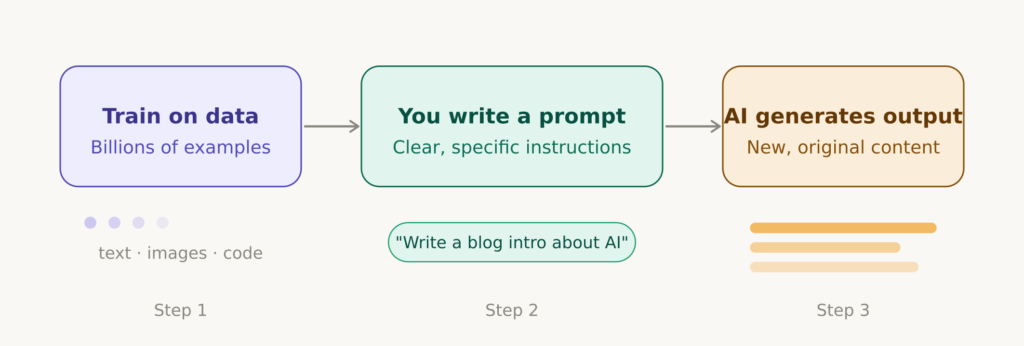
You don’t need to be a data scientist to understand the basics. Here’s a simple three-step breakdown:
1. Training on Massive Data
Models are trained on billions of web pages, books, articles, images, and code repositories. During training, the model learns statistical patterns — which words appear together, which colors belong in a sunset, which lines of code solve a problem.
2. Understanding Your Prompt
When you type a question or instruction (called a prompt), the AI processes your words and generates the most relevant response based on everything it has learned. The better your prompt, the better the output.
Recommended to read: Master Prompt Engineering: The Best Beginner’s Guide to AI Prompts (2026)
3. Generating Output
The model doesn’t retrieve stored answers — it generates new content on the fly. For text, this means predicting the next word, building a coherent response token by token. For images, it starts with noise and gradually shapes it into a picture matching your description.
Real-World Generative AI Examples
Generative AI isn’t confined to research labs. Here’s how it’s already being used across different content types:
✍️Text Generation
- Writing blog posts and marketing copy
- Summarizing long documents
- Answering customer service questions
- Brainstorming essays and research
🎨 Image Generation
- Creating illustrations and logos
- Generating product mockups
- Producing concept art for films
- Personalizing advertising visuals
Recommended to read: 10 Free AI Image Generators in 2026 That Still Feel Fresh & Unique (No Midjourney Subscription Needed)
💻 Code Generation
- Writing boilerplate code faster
- Debugging and explaining code
- Auto-completing as developers type
- Translating between languages
🎵 Audio & Video
- Cloning voices for podcasts
- Generating background music
- Creating video clips from text
- AI-narrated news and tutorials
Popular Generative AI Tools in 2026
Ready to see what generative AI can do? Here are the most widely used tools today, organized by what they create:
✍️ For Text
Claude (Anthropic): Thoughtful, nuanced writing and analysis — great for long-form tasks
ChatGPT (OpenAI): Pioneer in conversational AI, excellent for Q&A and writing
Gemini (Google): Deeply integrated with Google’s ecosystem for productivity
🎨 For Images
Midjourney: Strikingly artistic, high-quality images from text prompts
DALL-E (OpenAI): Beginner-friendly image generator with strong creative range
Adobe Firefly: Built into Adobe’s suite — ideal for professional design workflows
💻 For Code
GitHub Copilot: Industry standard for AI-assisted coding inside editors
Cursor: AI-first code editor beloved by professional developers
Claude Code: Powerful agentic coding tool for complex software projects
🎵 For Audio & Video
ElevenLabs: Realistic AI voice generation for creators and businesses
Sora (OpenAI): Text-to-video generation capable of short cinematic clips
Suno / Udio: AI music generation from simple text descriptions
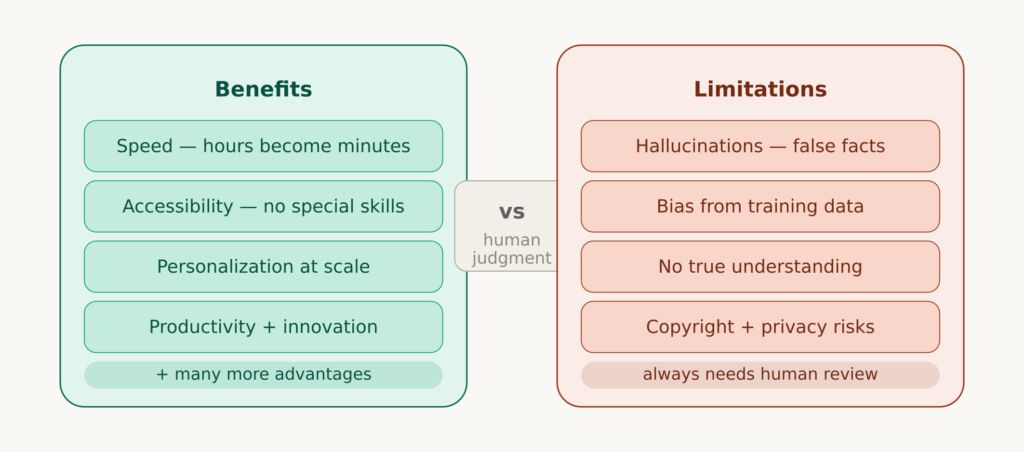
Benefits of Generative AI
Generative AI offers remarkable advantages for individuals and businesses alike:
- Speed — Tasks that once took hours can now take minutes.
- Accessibility — People without specialized skills can create professional-quality content.
- Personalization — AI tailors content to specific audiences, languages, or formats at scale.
- Productivity — Automating repetitive creative tasks frees up time for higher-level thinking.
- Innovation — AI can help brainstorm ideas and approaches humans might never consider alone.
Limitations of Generative AI
Think of generative AI as a brilliant but imperfect assistant: incredibly capable, but always in need of human judgment and review.
- Hallucinations — AI can generate plausible-sounding information that’s simply wrong. Always verify facts.
- Bias — Models trained on biased data can produce biased outputs — a serious concern in high-stakes decisions.
- Lack of true understanding — AI generates statistically likely responses, but doesn’t truly comprehend meaning.
- Copyright concerns — Questions around ownership of AI-generated content are still being resolved legally.
- Privacy risks — Sharing sensitive information with AI tools can pose data security concerns.
How Generative AI Is Changing Industries
Generative AI isn’t simply automating old tasks — it’s fundamentally reshaping how entire industries operate.
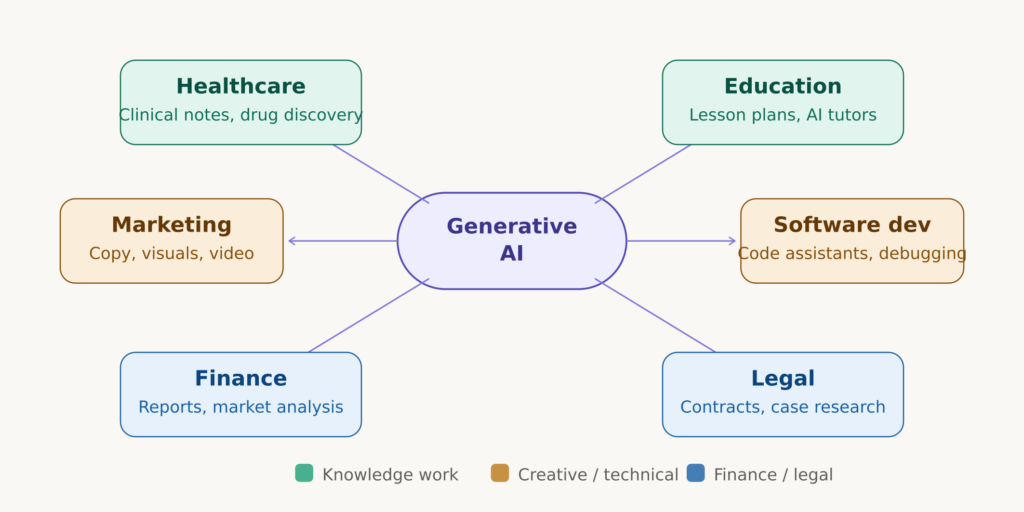
Healthcare: Doctors use AI to draft clinical notes and summarize patient histories. Researchers apply generative models to accelerate drug discovery, cutting timelines from years to months.
Education: Teachers create personalized lesson plans with AI assistance. Students use AI tutors for on-demand explanations. Institutions are rethinking assessment strategies in response to AI-assisted writing.
Marketing: Teams generate ad copy, product descriptions, and social content at scale. Video creators use AI for scripting, editing, and generating footage — dramatically reducing production costs.
Software Development: Developers report significant productivity gains with AI code assistants. Junior developers contribute more effectively; senior developers focus on architecture and strategy.
Finance & Legal: Law firms summarize contracts and research case law with AI. Financial analysts synthesize earnings reports. Compliance teams automate review of regulatory documents.
Across all of these industries, the pattern is the same: generative AI doesn’t replace human expertise — it amplifies it. The professionals thriving in 2026 are those who’ve learned to work alongside AI effectively.
How Beginners Can Start Using Generative AI
You don’t need any technical skills to get started. Here’s a simple path for complete beginners:
1. Pick One Tool and Explore It
Start with a free text tool like Claude.ai or ChatGPT. Ask it to explain something you’re curious about, help write an email, or summarize an article. Get comfortable before moving on.
2. Learn to Write Good Prompts
The quality of your output depends on the quality of your input. Be specific. Instead of “write a blog post,” try: “write a 300-word introduction for beginners about healthy meal planning, in a warm and encouraging tone.”
Here is my full post of how you can write good prompts: Master Prompt Engineering: The Best Beginner’s Guide to AI Prompts (2026)
3. Experiment Across Content Types
Once comfortable with text, explore image tools like DALL-E or Midjourney. Try describing a scene and see what gets created. Experiment with audio tools if you make videos or podcasts.
4. Apply AI to Real Tasks
Think about a task in your own life or work that feels repetitive. Could AI help draft the first version? Could it summarize a long document? Start small, review output carefully, and build from there.
5. Stay Curious and Keep Learning
Generative AI is evolving rapidly. Follow reputable AI blogs, watch tutorials, and join online communities. Understanding how machine learning works will also deepen your knowledge significantly.
Key Takeaways
- Generative AI creates original content — text, images, code, audio, and video — based on learned patterns.
- It works by training on massive datasets and generating responses based on the prompts you provide.
- Examples are everywhere: writing assistants, image generators, coding copilots, and music tools.
- Popular tools include Claude, ChatGPT, Midjourney, GitHub Copilot, and many more.
- The technology offers incredible benefits in speed, accessibility, and productivity — but requires human judgment.
- Generative AI is transforming healthcare, education, finance, marketing, and software development.
- Beginners can start today: pick one tool, write clear prompts, and apply AI to a real task.
Frequently Asked Questions
1. What is generative AI in simple terms?
Generative AI is a type of artificial intelligence that can create new content — such as text, images, code, and audio — based on patterns it has learned from large amounts of existing data. You provide a prompt, and the AI generates original output in response.
2. How does generative AI work?
Generative AI works by training on massive datasets to learn statistical patterns. When you give it a prompt, it uses those patterns to predict and generate the most relevant output — producing new content rather than simply retrieving pre-written answers.
3. What are the best generative AI tools for beginners?
The best generative AI tools for beginners include Claude and ChatGPT for text generation, DALL-E for images, and GitHub Copilot for coding assistance. All offer free tiers and beginner-friendly interfaces.
4. Is generative AI dangerous?
Generative AI carries risks including generating false information (hallucinations), bias in outputs, and potential misuse for creating misleading content. Used responsibly, with human oversight and critical thinking, it is a powerful and safe tool.
5. Can generative AI replace human jobs?
Generative AI is changing many jobs by automating repetitive creative tasks, but it’s not simply replacing humans. Most evidence suggests it acts as an amplifier — making skilled professionals more productive rather than making them obsolete. New roles are also emerging to manage and work alongside AI systems.
Generative AI is one of the most transformative technologies of our time — and the exciting part is that it’s still in its early stages.
Related Posts You’ll Find Helpful
- What Is Artificial Intelligence? Beginner’s Guide
- 10 Free AI Image Generators in 2026
- ChatGPT vs Claude AI (2026): Which Is Better for Beginners?
- How to Start Learning AI With No Experience
📩 Enjoyed This Post? Get More Like It
Join other beginners across Africa learning how to use AI to build skills and earn money online. No spam — just practical tips, straight to your inbox.
[mc4wp_form id=”2093″]