

TL;DR: Building with AI doesn’t require learning to code. Modern no-code tools let you connect an AI model to a trigger, a data source, and an action using a visual interface instead of a script. Below are 15 real projects, ordered from easiest to most advanced, each with the tools you need, what it teaches you, and its portfolio value — plus a simple guide to which one to build first.
If you’ve been reading about AI agents and automation for weeks but haven’t actually built anything yet, you’re not behind. You’re just stuck at the part nobody explains well: the gap between understanding what AI can do and knowing what to actually open on your screen.
I was there myself. I could explain what an AI agent was in theory long before I could point to a single thing I’d built with one. What changed things wasn’t a coding course — it was picking one small, unglamorous project and finishing it.
This guide is that starting point for you. It’s not another list of AI tools to bookmark and forget. It’s 15 specific things you can build this month, organized by difficulty, with the exact skill each one teaches and what it’s worth to your portfolio.
What Does “No-Code AI” Actually Mean?
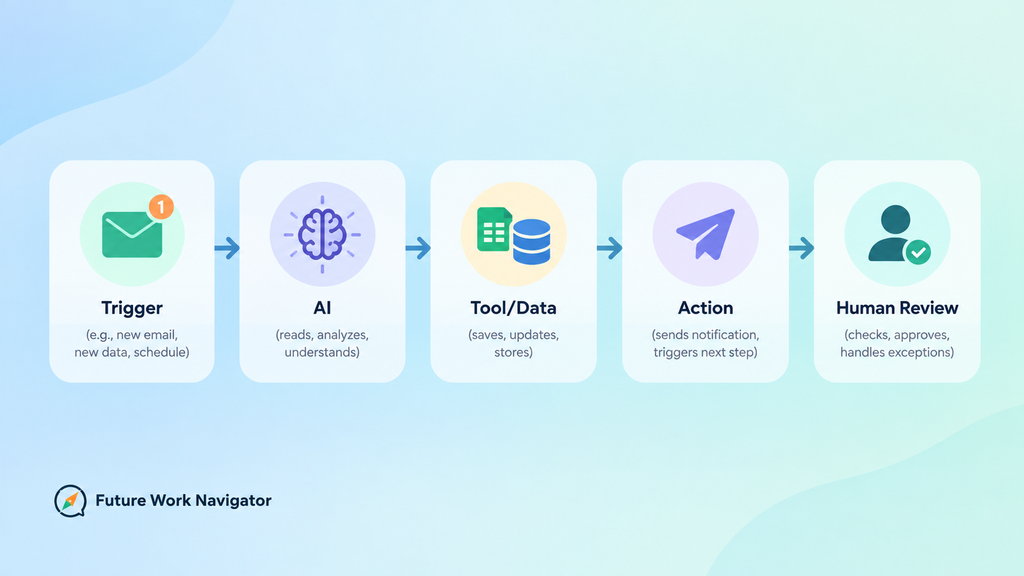
No-code AI means connecting an AI model to your everyday tools using a visual interface instead of writing programming code. You drag, click, and configure instead of typing functions — but you’re still doing real technical thinking about how information should flow.
Almost every no-code AI project follows the same basic shape, and once you see it, all 15 projects below will make immediate sense:
Trigger → AI → Tool or Data → Action → Human Review
For example: a new email arrives (trigger), AI reads and categorizes it (AI), the category gets written to a spreadsheet (tool), a notification goes out (action), and a person double-checks anything unusual (human review).
That last step matters more than most beginner guides admit — I’ll come back to it. If you want the deeper mechanics of how these pieces connect, this AI agents guide walks through it from zero.
How These 15 Projects Are Organized
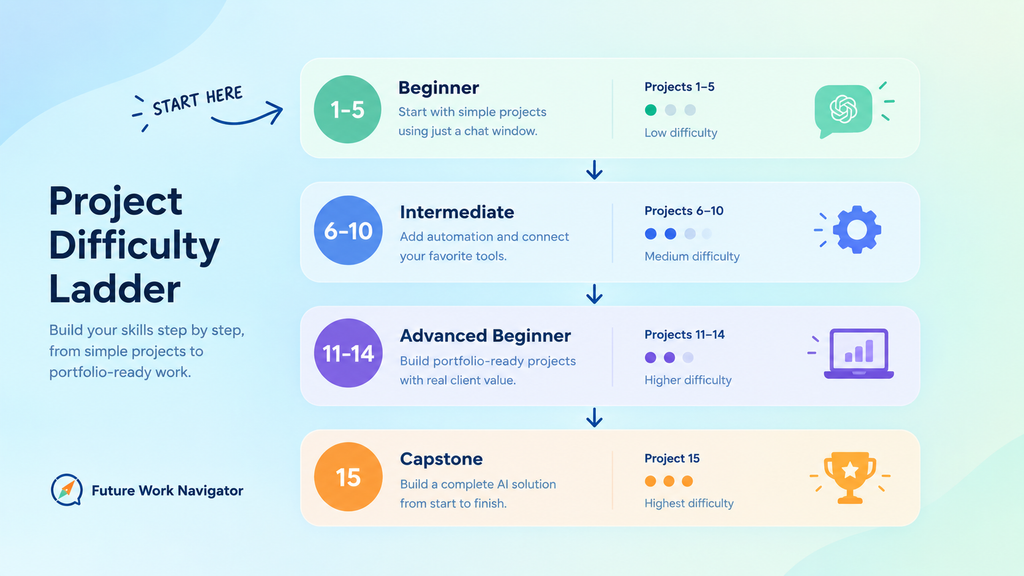
The projects below move from things you can finish in an afternoon with just a chat window, to systems that combine AI with automation platforms like Make.com or n8n. You don’t need to build all 15. In fact, please don’t try — I’ll explain why in a minute.
Beginner-Level Projects: Build These With Just a Chat Window
These five need nothing but an AI chat tool. No account setup beyond signing in, no automation platform, no monthly cost if you use a free tier. They’re the right place to start if you’ve never built anything with AI before.
1. AI Personal Study Assistant
Feed your notes, textbook chapters, or course material to an AI tool and have it generate plain-language explanations, summaries, and practice quiz questions. This is the fastest way to learn how to give an AI model context and get something useful back.
Tools: ChatGPT, Claude, or Gemini; optionally Google Docs or Notion to store the output
What you learn: Prompting and how to structure information so AI can work with it
Difficulty: Low | Portfolio value: Low
2. AI Resume & Cover Letter Assistant
Paste in a job description alongside your resume, and have AI point out gaps, suggest phrasing, and draft a tailored cover letter. The workflow is easy to follow — input, analysis, tailored output — which makes it a genuinely good first project.
Tools: ChatGPT or Claude
What you learn: How to chain a multi-step request into one clear output
Difficulty: Low | Portfolio value: Low
3. AI Content Idea Generator
Give AI a topic, audience, and niche, and have it return article titles, outlines, and social post angles. If you write or freelance in any content niche, this becomes a tool you’ll actually keep using after you build it.
Tools: ChatGPT or Claude
What you learn: Prompt templates you can reuse across projects
Difficulty: Low | Portfolio value: Low
4. AI Meeting Notes Summarizer
Paste a meeting transcript and have AI extract a clean summary and a list of action items. Push the output automatically into Google Docs or Sheets and you’ve built your first real (if small) automation.
Tools: ChatGPT or Claude, optionally Google Docs or Sheets for storage
What you learn: Turning unstructured text into structured output
Difficulty: Low | Portfolio value: Medium
5. AI Document Summarizer
Upload or paste a long document — a contract, a report, an article — and have AI return a summary, key points, important dates, and open questions. Simple to build, but it’s a skill you’ll reach for constantly once it exists.
Tools: ChatGPT or Claude
What you learn: Extracting structured information from long, messy text
Difficulty: Low | Portfolio value: Low
Intermediate Projects: Where Real Automation Starts
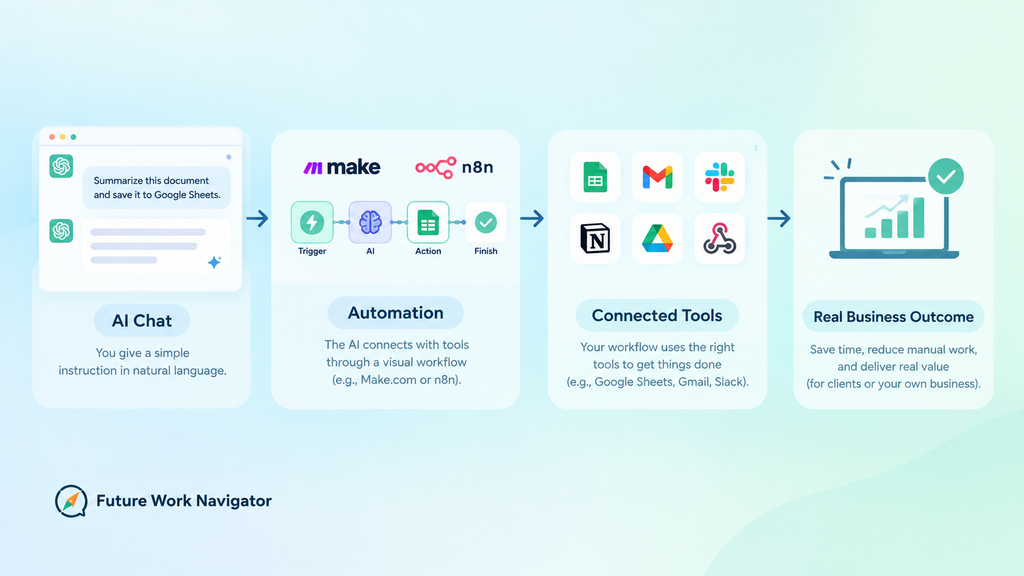
This is where the article gets genuinely useful, because these five combine AI with an automation platform like Make.com or n8n instead of just a chat window. They connect a trigger to an action without you writing code — and they’re the first projects that could plausibly save someone real time.
6. AI Email Classifier
A new email arrives, AI reads it and assigns a category — urgent, customer, marketing, personal, other — and the result gets saved automatically. This is a genuinely useful starting point for learning visual automation platforms.
Tools: Make.com or n8n plus an AI model connection
What you learn: Building your first trigger-to-action automation
Difficulty: Medium | Portfolio value: Medium
7. AI Email Drafting Assistant
AI reads an incoming customer email, understands the request, and drafts a response — which a human reviews before it’s sent. Build in the human-review step from day one; it’s the difference between a helpful assistant and a liability.
Tools: Make.com or n8n plus an AI model connection
What you learn: Designing for human-in-the-loop review, not full automation
Difficulty: Medium | Portfolio value: Medium
8. AI Lead Qualification System
A new lead comes in, AI analyzes the details, assigns a qualification score, logs it to a spreadsheet or CRM, and notifies whoever needs to follow up. This one connects directly to real client work — it’s close to what small businesses actually pay for.
Tools: Make.com or n8n, Google Sheets or a simple CRM
What you learn: Multi-step workflows with a real business outcome
Difficulty: Medium | Portfolio value: High
9. AI Customer FAQ Assistant
Load in FAQ content or product documentation, and let AI search it to answer visitor questions. This introduces you to knowledge-based AI (sometimes called RAG) without needing to understand what’s happening underneath.
Tools: Make.com or n8n, plus a knowledge base or document source
What you learn: How AI can search and answer from your own content
Difficulty: Medium | Portfolio value: Medium
10. AI Research Assistant
Give it a research question and have AI gather information, organize findings, and produce a structured report saved automatically. This is one of the three projects I’d point a serious beginner toward first — just be upfront in your portfolio that AI-generated research still needs fact-checking before anyone relies on it.
Tools: Make.com or n8n with web-search or research-oriented AI tools
What you learn: Structuring open-ended research into a usable report
Difficulty: Medium-High | Portfolio value: High
Advanced Beginner Projects: Portfolio-Ready Work
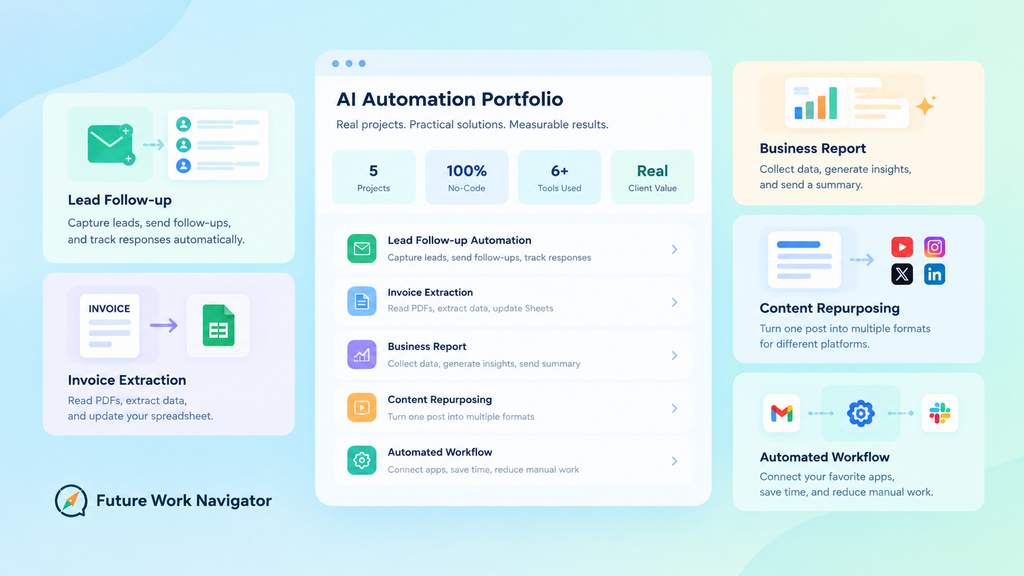
These five are where a project stops being a demo and starts looking like something a client or employer would actually pay for. They take longer to build, but they’re worth the extra hour.
11. AI Content Repurposing System
Feed in one blog post and have AI generate a LinkedIn post, an X post, a Facebook post, a newsletter snippet, and a few short-video ideas from it. If you’re already blogging, this is directly useful to your own workflow.
Tools: ChatGPT or Claude, optionally Make.com to distribute the output
What you learn: Adapting one piece of content across formats and platforms
Difficulty: Medium | Portfolio value: Medium
12. AI Lead Follow-Up Automation
A new lead triggers a personalized follow-up draft, a human approves it, the email sends, and the interaction gets logged automatically. This has strong freelance potential — it’s a clear, sellable outcome for a small business.
Tools: Make.com or n8n, an email tool, a spreadsheet or CRM
What you learn: End-to-end workflow design with an approval checkpoint
Difficulty: Medium-High | Portfolio value: High
13. AI Invoice / Document Data Extractor
Upload an invoice PDF and have AI pull out the company name, invoice number, date, and amount, then write it straight into a spreadsheet or database. This introduces structured data extraction — a skill in real demand from small businesses drowning in paperwork.
Tools: Make.com or n8n, Google Sheets
What you learn: Extracting structured data from unstructured documents
Difficulty: Medium-High | Portfolio value: High
14. AI Business Report Generator
Point AI at spreadsheet data and have it generate a summary, spot trends, flag unusual changes, and recommend next steps — delivered automatically by email. This is a far more impressive portfolio piece than yet another chatbot demo.
Tools: Make.com or n8n, Google Sheets, email delivery
What you learn: Turning raw data into a decision-ready report
Difficulty: Medium-High | Portfolio value: High
15. AI Agent With Tools (Capstone Project)
Build a research agent that can search for information, analyze what it finds, use a connected tool, produce a report, and save the result — all from a single question. This is where you move from a simple AI prompt to a system that can actually take multi-step action, and it’s worth building last, once the earlier projects have made the individual pieces familiar.
Tools: n8n or another AI-agent builder
What you learn: The real difference between an AI prompt and an AI system
Difficulty: High | Portfolio value: High
All 15 Projects at a Glance
| Project | Difficulty | Automation? | Portfolio Value |
| 1. Study Assistant | Low | No | Low |
| 2. Resume & Cover Letter Assistant | Low | No | Low |
| 3. Content Idea Generator | Low | No | Low |
| 4. Meeting Notes Summarizer | Low | Partial | Medium |
| 5. Document Summarizer | Low | No | Low |
| 6. Email Classifier | Medium | Yes | Medium |
| 7. Email Drafting Assistant | Medium | Yes | Medium |
| 8. Lead Qualification System | Medium | Yes | High |
| 9. Customer FAQ Assistant | Medium | Yes | Medium |
| 10. Research Assistant | Medium-High | Yes | High |
| 11. Content Repurposing System | Medium | Yes | Medium |
| 12. Lead Follow-Up Automation | Medium-High | Yes | High |
| 13. Invoice / Document Data Extractor | Medium-High | Yes | High |
| 14. Business Report Generator | Medium-High | Yes | High |
| 15. AI Agent With Tools | High | Yes | High |
“You don’t need to build all 15. Build one, document it well, and let that single project open the door to the next.”
Key Takeaways
- No-code AI means visual tools, not no technical thinking — you’re still designing how information flows
- Every project follows the same shape: trigger → AI → tool/data → action → human review
- Start with one beginner-tier project before touching an automation platform
- Projects 8, 10, 12, 13, and 14 have the strongest freelance and portfolio potential
- Human review isn’t optional for anything that emails, messages, or acts on someone else’s behalf
Which Project Should You Start With?
If you’ve never built anything with AI before, start with Project 1 or Project 4. Both need only a chat window, take under an hour, and immediately show you the shape every later project follows.
If you want a portfolio piece a freelance client could recognize, start with Project 8 or Project 10. Both solve a problem a real business would pay to have solved.
If your goal is learning automation specifically, start with Project 6. It’s the simplest complete trigger-to-action workflow on this list.
If you’re thinking about AI agents long-term, save Project 15 for last. It makes far more sense once you’ve built two or three of the simpler projects first.
What Tools Do You Actually Need?
You don’t need twenty different subscriptions to work through this list. Here’s what actually covers all 15 projects:
AI models: ChatGPT, Claude, or Gemini — any of these can cover the beginner-tier projects on their own.
Automation: Make.com or n8n for anything with a trigger-to-action flow. Make.com’s complete beginner’s guide covers setup if you’re new to it, and this Make.com vs n8n comparison can help you pick between them.
Data and storage: Google Sheets and Google Forms handle most of the structured-data projects on this list.
Knowledge tools: Notion or Google Drive work fine for anything document- or knowledge-based.
I use Make.com for my own automation projects, and if you sign up through my link, I earn a small commission at no extra cost to you — here’s my Make.com referral link if you want to try it. Free-tier limits on any of these tools change often, so check current pricing directly before you commit to a workflow that depends on one.
Turning One Project Into a Portfolio
Whichever project you pick, the project itself isn’t really the portfolio piece — how you document it is. For each one, write down the problem you were solving, your goal, the tools you used, the workflow, what the AI did versus what the automation did, the result, the limitations you ran into, and what you’d improve next time. This guide to building an AI automation portfolio walks through exactly how to structure that documentation so it’s useful to a future client, not just a personal note to yourself.
What I’d Do If I Were Starting From Zero Today
I wouldn’t try to build an AI agent on day one. I’d start with a simple assistant project, get comfortable with prompting, then build one real automation, and only after that move toward a project that solves an actual business problem — something like the lead qualification or invoice extraction projects above.
I’m still working through this list myself, testing these projects and figuring out what’s harder than it looks in practice. If you’re trying to find businesses that could actually use one of these once you’ve built it, this guide on finding businesses that need AI automation is the natural next step.
Frequently Asked Questions
Do I need to learn Python before I try any of these projects?
No. Every project on this list can be built with visual, no-code tools like ChatGPT, Make.com, or n8n. Coding knowledge can help later if you want to customize deeply, but it isn’t a requirement to start or to finish any of these 15.
Which project is the best one to put on a resume or portfolio?
Projects 8, 12, 13, and 14 tend to land best with a business audience because they solve a specific, recognizable problem — lead handling, follow-ups, invoices, or reporting — rather than being a general-purpose chatbot demo.
How long does it take to build one of these projects?
The beginner-tier projects (1–5) usually take under an hour. The intermediate projects (6–10) typically take a few hours once you’re learning the automation platform alongside the project itself. The advanced projects (11–15) can take a few sessions, especially the AI agent capstone.
Is it safe to let AI send emails or messages automatically?
Build in a human-review step for anything that contacts another person or takes an action with real consequences. Every workflow above that touches email or client communication includes an approval checkpoint for exactly this reason.
Free Weekly Newsletter
Get one AI or automation breakdown like this every week
No hype, no fake income claims — just what I’m actually learning and building, explained the way I wish someone had explained it to me.
Join the NewsletterFree. Unsubscribe anytime. No spam.
Nice post. We have been pointing support flows at a decision-label API (https://jevapi.pro) instead of brittle keyword rules.