

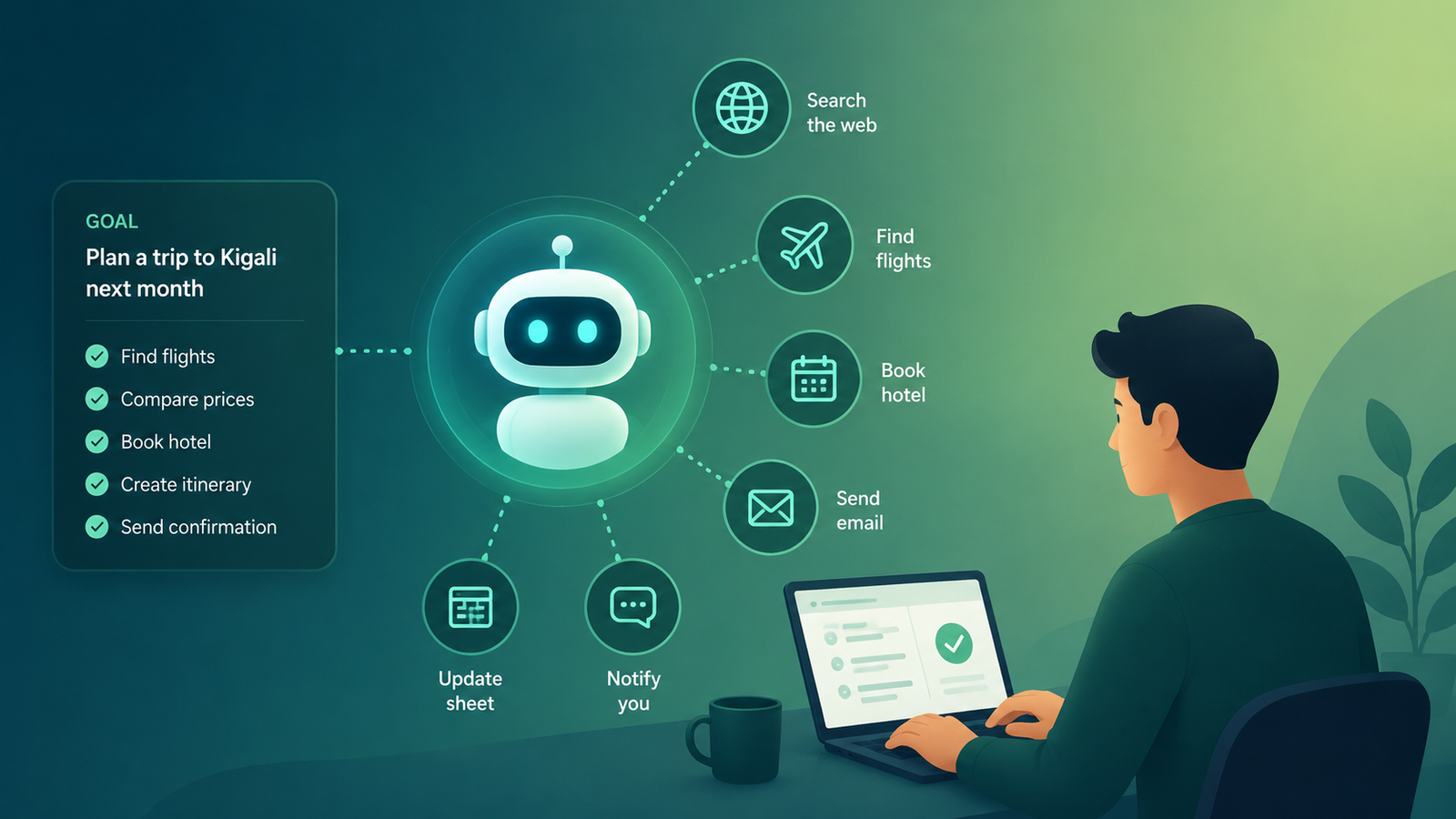
TL;DR An AI agent is an AI system that doesn’t just answer your question — it can plan steps, use tools, and take multi-step actions to actually complete a goal, with little or no hand-holding from you. If a chatbot is a smart friend you ask questions, an AI agent is more like an assistant you hand a task to. Below: what agents actually are, how they work, real examples, and the honest limitations nobody mentions.
Have you ever asked ChatGPT a great question, gotten a genuinely useful answer, and then thought: “okay… but I still have to go do all of this myself”?
I’ve been there more times than I can count. You get the plan, the outline, the list of steps — and then the actual doing still sits on your plate. For a long time, that’s just how AI worked. You asked, it answered, and the rest was on you.
That’s changing. “AI agents” is the term you’ve probably started seeing everywhere — in tool names, YouTube titles, LinkedIn posts. And if you’re a complete beginner, it can sound like one more confusing concept stacked on top of a pile you already didn’t fully understand.
Here’s the thing: the idea behind AI agents is actually pretty simple once you strip away the hype. By the end of this guide, you’ll know exactly what an AI agent is, how it’s different from the chatbots you already use, real examples you can try, and — just as important — where agents still fall short.
Let’s break it down.
“An AI agent isn’t smarter than ChatGPT. It’s just allowed to do more than talk.”
What Is an AI Agent, Exactly?
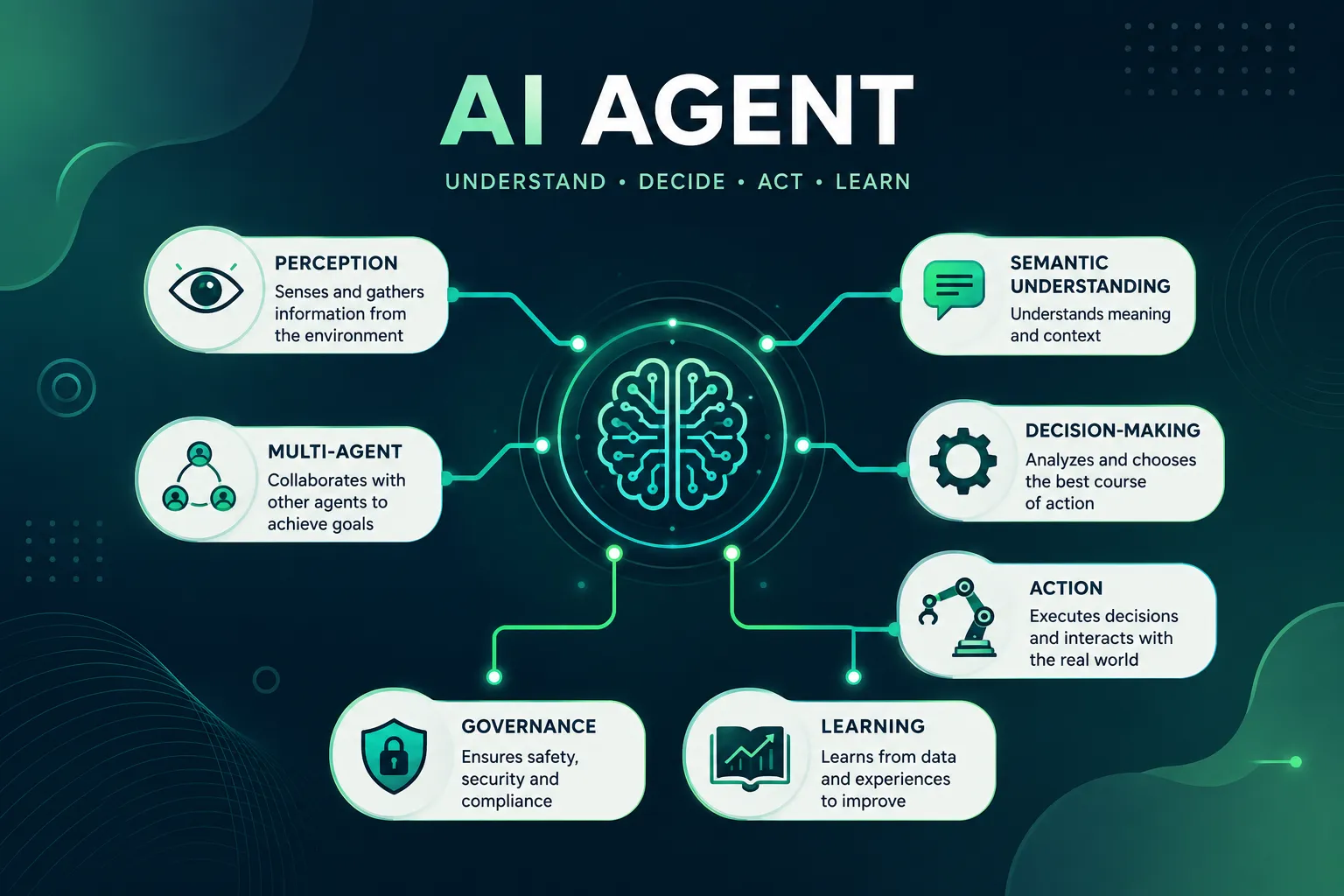
An AI agent is an AI system given a goal, the ability to reason through steps, and access to tools or actions it can take on its own — searching the web, running code, sending an email, updating a spreadsheet — until the goal is done or it needs your input.
Think about the difference between asking a librarian a question and hiring an assistant. A librarian (a chatbot) answers what you ask, using what they know.
An assistant (an agent) takes a goal — “book me a flight to Kigali next month under $600” — and goes and does the research, checks the options, and comes back with a completed task, not just information.
If you’re still getting comfortable with the basics of AI itself, it’s worth starting with what artificial intelligence actually is before layering agents on top — the concepts build on each other.
How Is an AI Agent Different From a Regular Chatbot Like ChatGPT?
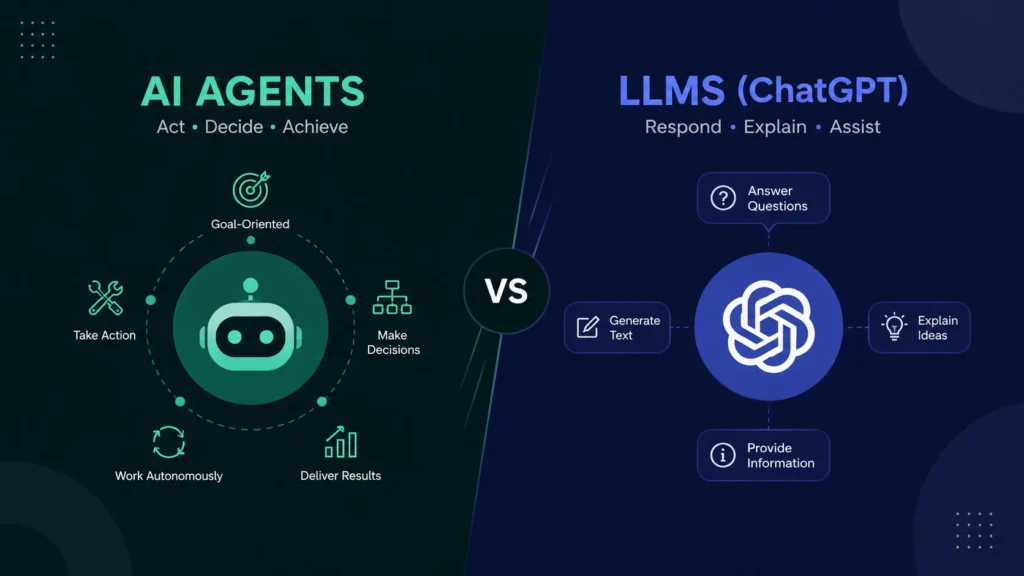
A regular chatbot responds to a single prompt and stops. An AI agent breaks a bigger goal into smaller steps, decides which tool or action to use for each step, checks its own results, and keeps going — often through several rounds — until the task is actually finished.
Tools like ChatGPT and Claude already blur this line. When you ask one of them to search the web, run a calculation, or work through a coding task across several steps without you re-prompting each time, you’re seeing early agent behavior layered on top of a chatbot interface.
The chatbot is the conversation. The agent is what happens when that conversation is allowed to act.
Chatbot vs. AI Agent, at a Glance
| Chatbot | AI Agent |
| Answers questions | Completes goals |
| Responds to one prompt | Works through multiple steps |
| Usually no tools | Uses tools (search, code, connected apps) |
| Waits for your next message | Keeps going until the goal is done |
| Gives you information | Takes actions on your behalf |
| Key Takeaways AI agents plan, act, and use tools — they don’t just reply to a single message.The core building blocks are: a goal, a reasoning loop, tools/actions, and memory.You’ve likely already used early agent features inside ChatGPT and Claude.No-code platforms like Make.com and n8n let beginners build agent-style automations without writing a single line of code.Agents are genuinely useful, but they still make mistakes — human oversight still matters. |
How Do AI Agents Actually Work?
Most AI agents run on a loop that looks roughly the same no matter which tool builds it: understand the goal, make a plan, take an action, look at the result, and repeat until the goal is met or a human needs to step in. Here’s what that loop looks like laid out visually:
| 1. GOAL — you tell it what you want |
| ↓ |
| 2. PLAN — it breaks the goal into steps |
| ↓ |
| 3. ACT — it uses a tool to take a step |
| ↓ |
| 4. CHECK — it reviews the result |
| ↓ |
| 5. DONE? — No → back to Act | Yes → Finish |
1. You give it a goal, not just a question
Instead of “summarize this article,” you might give an agent “research the top three project management tools for a 5-person remote team and send me a comparison.” That’s a goal with several steps hidden inside it.
2. It breaks the goal into steps
The agent reasons through what needs to happen: search for options, gather details on each, compare them, format a summary. This planning step is what separates an agent from a simple chatbot reply.
3. It takes action using tools
This is the part that makes agents genuinely new. The AI can call a web search, run code, read a file, or trigger an action in a connected app — instead of just describing what you should do, it does a version of it.
4. It checks its own work and adjusts
A well-built agent looks at what it produced, checks it against the goal, and course-corrects if something’s off — a search came back empty, a step failed, a number looks wrong — before moving to the next step.
5. It finishes, or it asks you
The best agent systems know when to hand control back to a human, especially for anything risky, expensive, or ambiguous. That handoff point is one of the most important (and most often skipped) design decisions — Anthropic’s own engineering team has written about keeping agent designs simple and giving them clear stopping points rather than letting them run indefinitely on their own.
What Does This Actually Look Like? A Simple Example
Let’s make this concrete. Imagine you run a small bakery and every morning you dread digging through your inbox for cake orders.
You set up an agent with one instruction: “Every morning at 8 AM, check my Gmail for new cake orders, add each one to my Google Sheet order tracker, and send me a Slack summary of what came in overnight.”
Here’s the loop in action: the agent opens Gmail (the tool) and scans for messages matching “order” patterns (the plan). For each order it finds, it pulls out the customer name, cake type, and pickup date, and adds a new row to your Google Sheet (the action). It then checks that the row was added correctly (the check) before moving to the next email. Once every order is logged, it writes a short Slack message summarizing the batch and sends it to you (finish).
You didn’t touch Gmail, the spreadsheet, or Slack yourself. You set the goal once, and the agent handled the repetitive middle part every single morning — the exact kind of task that’s easy to build first, because a missed or duplicated row is annoying, not costly.
What Can AI Agents Do Today?
It’s worth being clear-eyed about where things actually stand. According to Gartner’s 2026 forecast, task-specific AI agents are expected to be built into roughly 40% of enterprise applications by the end of 2026, up from under 5% just a year earlier — a fast curve, though it’s worth noting that figure is a forecast from a research firm, not a measured outcome, and different surveys define “agent” differently.
In practice, today’s agents are genuinely reliable for a specific category of task: well-defined, repetitive, and checkable. Sorting and routing emails. Pulling data from one place into another. Drafting a first version of a report from source material. Running a multi-step coding task inside a defined codebase. Monitoring a feed and flagging items that meet a rule.
They’re far less reliable for open-ended, high-stakes, or ambiguous work — anything where a wrong judgment call would be costly, or where the “correct” answer depends on context an agent can’t see. That gap between what agents can do today and what the hype suggests is exactly why starting small matters.
What Are Real-World Examples of AI Agents?
Agents show up in more places than most beginners realize — some obvious, some quietly built into tools you may already use.
Customer support agents
Many companies now use AI agents that can look up an order, check a policy, issue a refund, and close a support ticket — not just answer “what’s your return policy?”
Research and writing agents
Give an agent a topic, and it can search multiple sources, pull the relevant facts, and draft a structured summary or report, checking its own sources along the way instead of relying on one static answer.
Coding agents
Developer-focused agents can read a codebase, write and test code changes, and fix errors across multiple files in one session — a very different experience from pasting code into a chat one snippet at a time.
Automation agents built on no-code platforms
This is where things get genuinely accessible for beginners. Platforms like Make.com and n8n now include AI agent modules you can drag into a workflow — no coding required.
Instead of a rigid “if this, then that” automation, you can build a flow where an AI step reasons through a decision (“is this email urgent?”) before the automation continues.
If you’re weighing which platform fits your project, this comparison of Zapier, Make, and n8n is a good next read, and these automation workflow patterns show what agent-style steps look like inside a real workflow.
What Tools Let a Complete Beginner Build or Use AI Agents?
You don’t need to know how to code to start experimenting with agents today. A few starting points:
- ChatGPT and Claude — both now support multi-step tasks, tool use, and browsing within the chat interface itself. This is the lowest-friction way to feel what “agentic” behavior is like.
- Make.com — a visual, no-code automation builder where you can add AI reasoning steps into a workflow by dragging and connecting blocks.
- n8n — similar in spirit to Make, with more flexibility for people who want to grow into slightly more technical setups over time.
A quick, honest disclosure: the Make.com link above and below is my referral link. If you sign up through it, I earn a small commission at no extra cost to you — it’s one of the ways I keep this site running. I only recommend tools I actually use myself.
If you want to try building a simple agent-style workflow yourself, you can start a free Make.com account here.
And if part of why you’re curious about agents is the income angle — automating parts of your work or a client’s work — that connects directly to our guide on earning money with AI as a beginner, and to what it actually takes to become an AI automation specialist.
What Are the Honest Limitations and Risks of AI Agents?
This is the part most articles skip, and it matters more than any of the exciting stuff above.
- Mistakes compound. A chatbot gives one answer that might be wrong. An agent takes several actions in a row — if step two is based on a wrong assumption from step one, the error can carry through the whole task.
- They cost more. Multi-step reasoning and tool use use more computing power than a single chat reply, which usually means a higher cost per task on paid platforms.
- Permissions are a real risk. Giving an agent access to your email, calendar, or payment methods means giving it the ability to actually do things in those accounts — mistakes aren’t just wrong text, they’re wrong actions.
- They still need a human in the loop. The most reliable agent setups I’ve seen (and used) keep a person checking in at key decision points, rather than leaving the agent to run completely unsupervised.
None of this means agents aren’t worth learning. It means going in with realistic expectations — honesty over hype, always — instead of assuming an agent can be handed a task and forgotten about.
| Myth vs. Reality Myth: AI agents can replace people. Reality: They automate repetitive, well-defined work. People still supervise, make judgment calls, and handle anything an agent gets wrong or wasn’t built to handle. |
How Can a Complete Beginner Start Experimenting With AI Agents Today?
- Start inside a chatbot you already use. Give ChatGPT or Claude a multi-step task (“research X and draft a summary”) instead of a single question, and notice how it plans and works through it.
- Pick one small, low-risk task to automate. A good first project is something like sorting incoming emails by topic, not something touching money or client data.
- Try one no-code platform, not three. Pick Make.com or n8n, build one simple workflow end to end, and get comfortable before adding complexity.
- Read through a couple of real workflow examples before building your own — it’s much easier to adapt something that already works than to design from a blank canvas.
For the skills that tie all of this together, these 12 AI skills every beginner should learn is a solid next stop.
Frequently Asked Questions
Is an AI agent the same thing as AGI (artificial general intelligence)?
No. AGI refers to a hypothetical AI that matches human-level intelligence across virtually any task. An AI agent is a much narrower, practical concept — a current AI system set up to plan and act on a specific goal using defined tools.
Can AI agents work completely without me supervising them?
Technically some can run unsupervised, but it isn’t recommended for anything with real consequences. The safest and most reliable setups keep a human checking key decisions, especially early on while you’re still learning what the agent gets wrong.
Do I need to know how to code to use AI agents?
No. No-code platforms like Make.com and n8n, plus the built-in agent features in ChatGPT and Claude, let complete beginners build and use agent-style workflows with zero programming experience.
Is it safe to give an AI agent access to my email or accounts?
It can be, if you limit permissions carefully and start with low-stakes tasks. Avoid connecting an agent to anything involving payments or sensitive data until you’ve tested it thoroughly on smaller tasks.
What’s the difference between an AI agent and regular automation like Zapier?
Traditional automation follows fixed “if this, then that” rules with no reasoning involved. An AI agent adds a reasoning step — it can make judgment calls, like deciding whether an email is urgent, instead of only following a rigid rule.
Will AI agents replace jobs?
Some repetitive, rules-based tasks will likely shift toward agents over time. But agents still need people to set them up, supervise them, and handle anything that requires judgment, context, or accountability — which is exactly the skill gap this site focuses on helping beginners fill.
Where to Go From Here
AI agents are one of those topics that sound intimidating from the outside and click pretty quickly once you actually try one. Start small, stay curious, and don’t feel like you need to understand everything before you experiment. Now that you understand what AI agents are, the natural next step is building the practical skills behind them. Start with the 12 AI skills every beginner should learn, then come back here and try building your first simple agent-style workflow — something small, like the bakery example above.
Free Weekly Newsletter
Want beginner-friendly AI breakdowns like this in your inbox?
I share honest, plain-English guides on AI tools, automation, and digital income every week — no hype, no fake numbers, just what actually works for beginners.
Join the Newsletter
¡Excelente artículo! Para vídeo IA (ads/avatares) prueba Pixwit: . Pixwit
Полезно. Blob Opera и ритм-игры: The Choicer Voicer: . The Choicer Voicer
À garder. Luna Lisa Alpha sur . Luna Lisa Alpha
Solid write-up — learned a lot. Worth trying WanVideoGen — for Wan 3.0 AI video with native audio.. WanVideoGen