

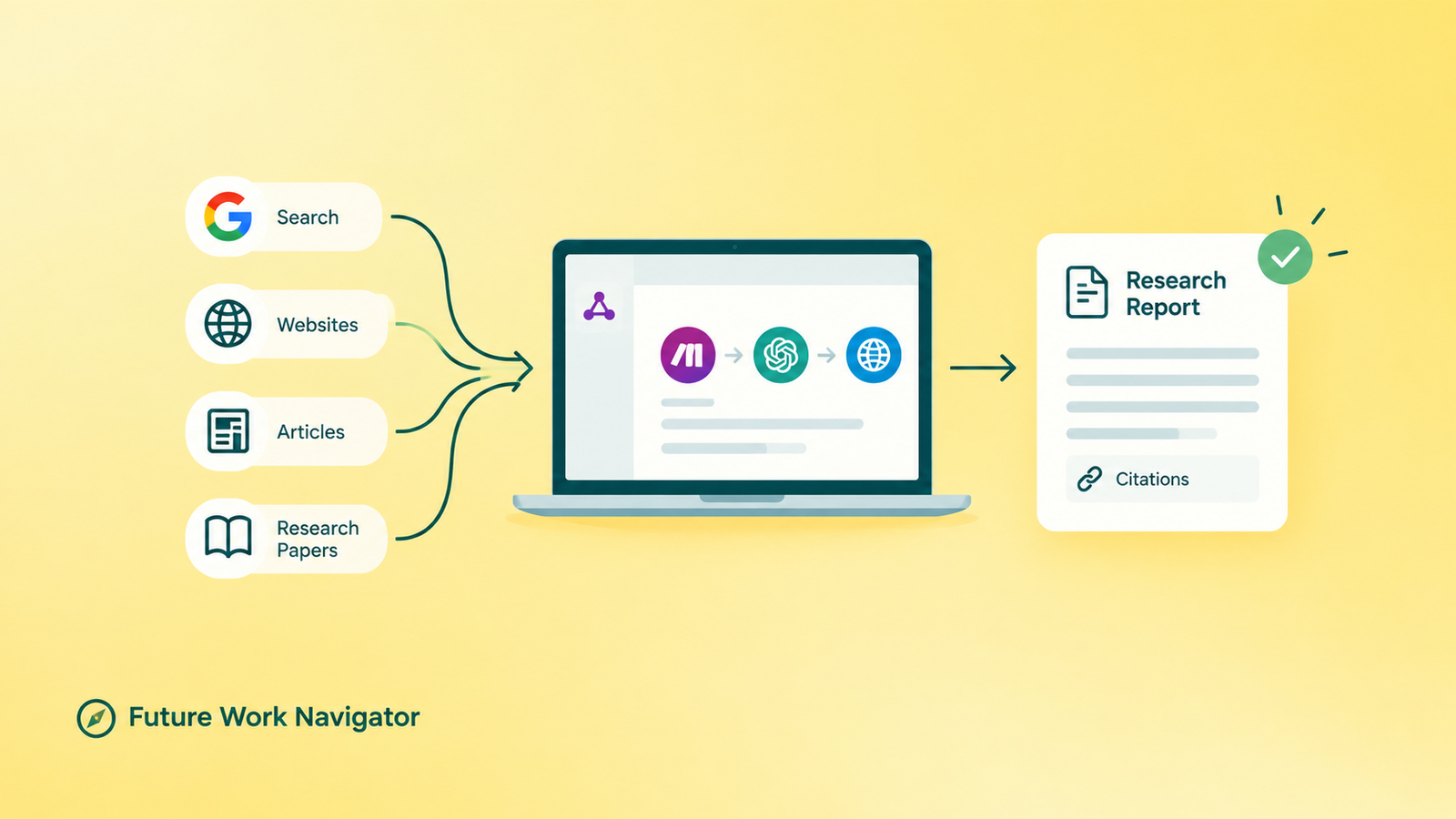
TL;DR An AI research assistant isn’t a chatbot — it’s a small automated workflow that takes a research question, searches several sources, cross-checks what it finds, and hands you back a structured report with real citations attached. In this guide, you’ll build a simple version with Make.com, no coding required. You’ll also learn exactly why you can’t just let it run unsupervised — and what to check before you trust anything it writes.
Picture this: you need to research something — maybe “the best beginner-friendly AI tools in 2026” or “what automation opportunities exist for small businesses right now.” So you open a dozen browser tabs, skim through pages, copy quotes into a notes app, lose track of which source said what, and three hours later you have a messy pile of half-formed thoughts instead of an actual answer.
Here’s the thing — that entire process, the searching, the comparing, the note-taking, can be turned into an automated workflow.
Not a magic “ask AI and trust whatever it says” shortcut, but a real, repeatable system that searches multiple sources, checks them against each other, and hands you a structured report with the sources attached so you can verify anything that actually matters.
That’s what we’re building today: an AI research assistant, using Make.com, with zero coding involved.
By the end of this guide, you’ll understand how a research assistant like this actually works, you’ll know how to build a simple version yourself, and — just as important — you’ll know exactly what it can’t do yet. Being honest about the limits of these tools matters just as much as showing you how to build them.
A research assistant isn’t a chatbot that answers one question. It’s a workflow that searches, checks, and shows you where every claim came from.
What Is an AI Research Assistant, Exactly?
An AI research assistant is an automated workflow — not a single chatbot reply — that takes a research question, generates several search queries, gathers information from multiple sources, compares what it finds, and produces a structured report with citations attached.
It combines an AI model with search access, clear instructions, and a fixed output format.
If you’ve already read our guide on what AI agents actually are, this will feel familiar — a research assistant is essentially an AI agent with one specific job: research, verify, report.
It’s a great first project if you’re following along from our post on how to build your first AI agent without code and want something more concrete to practice on.
Here’s the simplest way to picture how it flows:
Research Question
↓
Generate Search Queries
↓
Search the Web
↓
Collect & Structure Sources
↓
Analyze & Compare
↓
Write the Report
↓
Add Citations
↓
Human Review
How Is This Different From Just Asking ChatGPT to “Research This”?
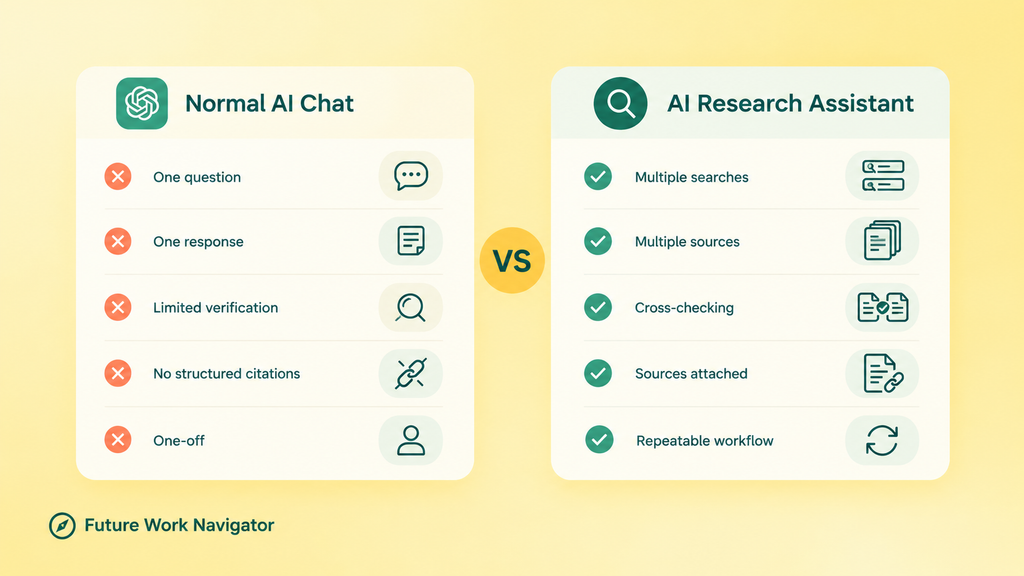
A normal AI chat looks like this: you ask a question, the AI answers from what it already knows (or a quick search), and you move on.
A research assistant workflow looks different: you give it a topic, it runs several searches, reads multiple sources, cross-checks them against each other, and only then writes something — with the sources still attached.
Some AI products now include their own built-in “deep research” modes that browse and synthesize automatically, and they’re genuinely useful. So it’s fair to ask: why bother building your own?
- You want a repeatable workflow you can run the same way every time, not a one-off chat.
- You want a specific, consistent output format — not whatever structure the AI feels like using that day.
- You want to connect the results directly to Google Sheets, Notion, Slack, or email.
- You want to control exactly which sources it’s allowed to trust.
- You want to automate research for a real business process, not just your own curiosity.
- You want a project you can actually show someone — which matters a lot if you’re building toward AI freelancing.
Key Takeaways
An AI research assistant is a workflow, not a single AI answer — it searches, cross-checks, and cites its sources. You can build a working first version with Make.com and zero code. The output should always include real, traceable sources. Never let the AI invent a citation. A human review step isn’t a nice-to-have — it’s part of the design, not a fallback for when things go wrong. This project doubles as a portfolio piece if you’re exploring AI automation freelancing.
What Will You Actually Build?
Let’s make this concrete before we touch any tools. Say you type in:
“Research the top AI automation opportunities for small businesses in 2026.”
Here’s what the assistant does with that:
- Understands the research question.
- Generates several different search queries around it — not just one.
- Searches the web using those queries.
- Collects the sources it finds and pulls out the relevant information.
- Compares the findings across sources.
- Produces a structured report.
- Includes the source links for every claim.
- Flags anything that needs a human to double-check it.
That’s a real, useful project — and it’s the kind of thing that’s genuinely hard to fake your way through, which is exactly why it’s worth building.
What Tools Do You Need to Build This?
You don’t need a big toolbox here. One beginner-friendly path is enough to get a working version running.
Option A — Make.com (the path we’ll use)
This fits naturally if you’ve already gone through our
This fits naturally if you’ve already gone through our complete beginner’s guide to Make.com.
A simple stack looks like this: Make.com, an AI model module, a web-search tool, and somewhere to store the output — Google Sheets or Google Docs work fine to start, and you can push the final report to Gmail, Slack, or Notion from there.
Quick disclosure, in the interest of honesty: I use Make.com for my own automation projects, and this is my referral link — if you sign up through it, I may earn a small commission at no extra cost to you. I only recommend tools I’d actually build my own projects on.
Option B — n8n (a solid alternative)
If you’d rather self-host or you’re more comfortable with a visual node-based builder, our guide to learning n8n from scratch walks you through the fundamentals. n8n has templates for research-style workflows that combine AI agents with web search and scraping.
If you’re still deciding between the two platforms, our Zapier vs Make vs n8n comparison breaks down which one actually fits a beginner’s budget and skill level.
For this guide, I’ll build the Make.com version — it gives you a natural next step from the automation content you’ve probably already read here.
How Does an AI Research Assistant Work, Step by Step?
Here’s the full build, broken into steps you can follow in order.
Step 1: Create Your Research Input
Start simple. Use a Google Form (or even a manual trigger in Make while you’re testing) that asks for: the research topic, the specific question, how deep the research should go, and how many sources to pull. You can add complexity later — don’t start there.
Step 2: Send the Question to the AI
Feed the research question into an AI module and ask it to identify what the user actually wants to know, the important subtopics, and useful search angles. This is where understanding prompt engineering pays off — vague instructions produce vague research plans.
Step 3: Generate Multiple Search Queries
Don’t search only the exact question. If the topic is “AI automation for small businesses,” generate several angles: AI automation use cases for small businesses, common repetitive tasks small businesses automate, AI customer-service automation examples, small-business automation trends for 2026. One search query rarely tells you enough — that’s a real research principle, not just a technical trick.
Step 4: Search the Web
This is where the assistant is only as good as its sources. Point it at a proper web-search tool or search API rather than letting it guess from memory — an AI model’s training data goes stale, but a live search doesn’t.
Step 5: Collect and Structure the Sources
Have the workflow pull out, for every source: the source name, the key finding, the supporting evidence, and the URL. Building this structured table before you write anything is what turns “AI summarizing pages” into an actual research process.
Step 6: Analyze and Compare
This is the step that makes it a research assistant instead of a summarizer. Ask the AI to identify where sources agree, where they disagree, what’s repeated across multiple sources (a good signal of reliability), what’s missing, and what looks outdated.
Step 7: Generate the Report — in a Fixed Format
Give it a consistent structure every time: research question, executive summary, key findings, detailed analysis, areas of agreement, conflicting information, practical implications, limitations, and sources. A fixed format is what makes the output usable instead of a wall of text.
Step 8: Add Real Citations
Every claim should carry its source name and URL, pulled directly from what was actually retrieved — never invented. This is worth its own section, because it’s the single easiest place for this kind of workflow to quietly go wrong.
Step 9: Build in Human Review
The workflow should end at human review, not at automatic publishing. Someone should check the important claims, statistics, dates, and citations before anything from this report gets used or shared. That’s not a limitation of the system — it’s the system working as intended.
How Do You Stop the AI From Inventing Sources?
If there’s one section in this whole guide to take seriously, it’s this one. AI models can produce citations that look completely real and aren’t. So the rule is simple: a citation is only valid if it’s tied to a source the workflow actually retrieved — with a real URL attached. If the AI can’t produce that link, the claim doesn’t go in the report.
It also helps to teach the workflow a rough source hierarchy, so it weighs information the way a careful human researcher would:
- Primary sources: government sites, official documentation, original research, company reports, raw data.
- Strong secondary sources: established publications, industry research, expert analysis.
- Lower-confidence sources: random blogs, forums, unsourced articles, other AI-generated pages.
None of this makes the output perfect. It just makes it honest about where the information came from — which is the whole point.
What Can You Actually Use an AI Research Assistant For?
Once the basic version works, the same workflow adapts to a handful of genuinely useful projects:
- Competitor research — pull together a comparison report on what competitors offer, price, and claim.
- Content research — gather sources and stats to back up a blog post before you write it.
- Market research — get a first-pass overview of an industry or customer segment.
- Job research — collect roles, required skills, and application links into one organized list.
- AI tool research — compare tools on features, pricing, integrations, and limitations, which fits neatly with our AI Tool Reviews content.
If you want more starter projects in the same spirit — small, buildable, and genuinely useful rather than just impressive-sounding — our roundup of 15 AI projects beginners can build is a good next stop.
How Do You Turn This Into a Portfolio Project?
If you’re exploring AI automation as a way to earn income — freelancing, client work, or just building proof that you can actually do this — this project is a strong one to document properly.
Lay it out simply: the problem (manual research takes hours and is easy to lose track of), the solution (an automated workflow that searches, cross-checks, and reports with citations), the tools used, the workflow diagram, and — importantly — what you learned and what its limitations are. Being upfront about the limits actually makes you look more credible, not less.
Our guide on building an AI automation portfolio walks through exactly how to present a project like this.
And once you have it documented, this guide to finding businesses that actually need AI automation is the natural next step — a research assistant is an easy workflow to pitch, because almost every business does some form of research manually right now.
If your bigger goal is figuring out whether AI can realistically become a source of income for you as a complete beginner, that’s exactly the question our pillar guide, Can You Actually Earn Money With AI as a Beginner?, is built to answer honestly.
What Goes Wrong (and How Do You Fix It)?
A few problems come up often enough that it’s worth knowing the fix before you hit them:
- The AI gives generic results → tighten the research instructions and generate more specific search queries.
- It pulls from weak sources → add explicit source-quality rules to the workflow.
- It invents citations → require every citation to come directly from a retrieved source, with no exceptions.
- The workflow gets expensive to run → cap the number of searches, sources, and AI calls per run.
- The report is too long to actually read → lock in a fixed output structure and a word limit.
- It misses something important → add more search queries and require cross-checking across sources before writing.
What Are the Real Limitations of an AI Research Assistant?
This only works if you’re honest about what it can’t do yet:
- Search results are often incomplete.
- Websites change or go offline.
- Some sources aren’t accessible to a scraper or search tool at all.
- The AI can misread or misunderstand a source.
- It can draw a conclusion that isn’t actually well-supported.
- Search tools and APIs often have usage limits or costs attached.
- The whole thing is only as good as the sources it’s allowed to pull from.
- Human verification is still necessary — always.
What I’d Actually Build First, as a Beginner
If I were starting this from scratch, I wouldn’t reach for a fully autonomous, multi-agent research system on day one. I’d build the simple version: a workflow that takes a research question, searches a handful of sources, summarizes them, and produces a short report with real citations attached.
Once that runs reliably — and I trust the output enough to actually use it — I’d add more search queries, more source-checking, and more automation on top.
That’s the honest, learning-in-public way to approach this. There’s no reason to pretend otherwise, and beginners reading this deserve the real starting point, not the impressive-sounding end state.
Frequently Asked Questions
What’s the difference between an AI agent and an AI research assistant?
An AI research assistant is essentially an AI agent with one narrow job: research a topic, check sources against each other, and report back with citations. If you want the broader picture of how agents work in general, our beginner’s guide to AI agents covers that.
Do I need to know how to code to build this?
No. The version in this guide uses Make.com’s visual, no-code interface. You’re connecting modules together rather than writing scripts.
Is Make.com free to use for a project like this?
Make.com has a free tier that’s enough to build and test a workflow like this. Costs scale with how many operations you run — check current pricing directly on Make.com before you commit to a paid plan.
Can I connect the research assistant to Google Sheets or Notion?
Yes — that’s one of the main advantages of building this as a workflow instead of a one-off chat. Once the report is generated, you can route it into Sheets, Notion, Slack, or email automatically.
Can this replace tools with built-in “deep research” modes?
Not necessarily replace — but it gives you something those built-in modes usually don’t: a repeatable, customizable workflow you fully control, with output routed exactly where you need it.
Disclosure: this post includes a referral link to Make.com. If you sign up through it, I may earn a small commission at no extra cost to you — I only recommend tools I use for my own projects.
Could you expand on the passage beginning “TL;DR An AI research assistant isn’t a chatbot — it’s a small…” with a concrete example? I have a separate question about “A fixed format is what makes the output usable instead…”: what should a reader look at next to understand that point more fully?
For context, I’m affiliated with Invosmith. Website link: Invosmith's invoice generator .
Absolutely! Think of an AI research assistant as a workflow rather than just a chatbot. For example, if you want to research the latest trends in AI automation, the assistant can automatically search multiple sources, extract key findings, cross-check information, and organize everything into a structured report with source links, key insights, and takeaways. Instead of simply answering a question, it handles the research process from start to finish, with human verification where needed.
Regarding the fixed format, the key idea is to make the output consistent and actionable. Rather than receiving a different style of response every time, you get the same structure for each research task, such as topic, key findings, supporting sources, confidence level, and recommended next steps. I’d suggest looking at the article’s sections on structuring the workflow and formatting the output to see how this can be implemented in practice.