

You’ve spent a few weekends inside Make.com. You’ve connected your first apps, watched data move from one box to another, and felt that little spark of “wait, I just automated that?” Now you’re staring at the scenario builder wondering something else: could someone actually pay me to do this?
I asked myself the same question. And the honest answer is yes — but not in the “quit your job by Friday” way the internet likes to promise. Real businesses, especially small ones, are drowning in repetitive tasks they don’t have time to fix themselves.
They don’t need a developer. They need someone who can look at a clunky process and rebuild it in an afternoon using a tool like Make.com.
If you didn’t sign up yet on make.com, sign up here.
This post walks through six specific, sellable services you can offer with the Make.com skills you already have (or are building right now), what people are actually charging for them, and how to land your first paying client without pretending you’re an expert you’re not.
Recommended to read: How to Become an AI Automation Specialist in 2026 (Even If You’re Starting from Zero)
Why This Skill Is Actually Worth Something Right Now
Let’s be honest — “automation” sounds like a buzzword until you look at who’s hiring for it. In the US, full-time automation specialists earn somewhere between roughly $76,000 and $104,000 a year on average, depending on which 2026 salary survey you check. That’s the in-house, employee version of this skill.
The freelance version looks different — and for beginners, more accessible. According to Fiverr’s 2026 pricing data on AI and automation services, process automation specialists charge anywhere from about $20 to $125 an hour depending on experience, while AI integration work runs roughly $15 to $80 an hour.
Simpler, well-defined projects — like setting up a single marketing automation workflow — often go for a flat fee somewhere in the $85 to $116 range instead of hourly billing.
(Sources: Glassdoor and Salary.com 2026 salary data; Fiverr’s 2026 AI & automation cost guide.)
None of those numbers mean you’ll land at the top of the range on day one. But they tell you something important: this isn’t a hobby skill. Businesses are budgeting real money for exactly the kind of work Make.com makes possible.
A Quick Reality Check on What You’re Actually Selling
Here’s the thing nobody explains clearly enough: you’re not selling “Make.com.” Your client doesn’t care what tool you use. You’re selling the outcome — the hours they get back, the leads that stop slipping through the cracks, the report that shows up on its own instead of someone copying and pasting it every Monday.
Make.com just happens to be a genuinely good, affordable way to deliver that outcome. As of 2026, Make runs on a credit system — every action a scenario takes (sending data, checking a sheet, sending a message) uses one credit. The free plan gives you 1,000 credits a month, which is fine for testing but disappears fast once you’re running real automations.
The Core plan, which runs around $9–10 a month when billed annually, gives you 10,000 credits and unlimited active scenarios — usually enough to build and run a few client automations while you’re getting started. Pricing and credit limits shift from time to time, so it’s worth double-checking Make’s current pricing page before you quote anyone.
Why does this matter for you? Part of your job, even as a beginner, is helping a client see that a $9-a-month tool plus your time is often replacing a task that was quietly costing them hours every single week.
6 Real Services You Can Offer Clients and Make Money with Make.com
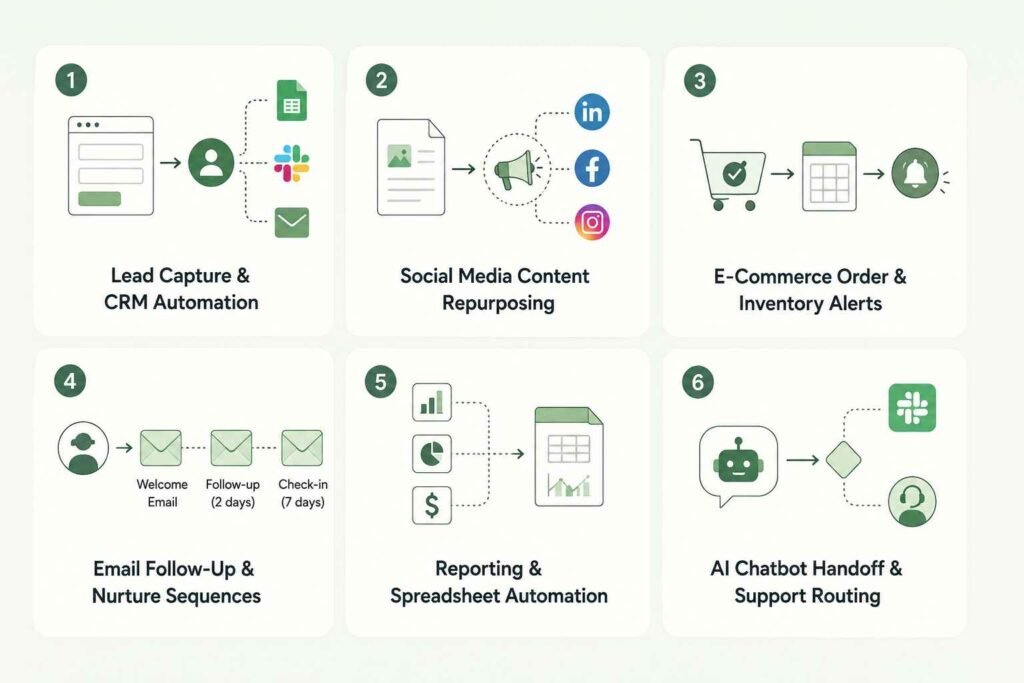
1. Lead Capture & CRM Automation
The problem: Leads come in through a website form, a Facebook ad, or a booking link — and then just sit in an inbox until someone remembers to follow up.
What you build: A scenario that grabs every new lead the moment it comes in, adds it to a CRM (or even a simple Google Sheet), tags it, and pings the business owner on Slack or email instantly.
Who needs it: Real estate agents, coaches, local service businesses — basically anyone running ads without a system behind them.Typical range: $40–123 per project
2. Social Media Content Repurposing
The problem: A business writes one blog post or records one video, then never reuses it anywhere else.
What you build: A scenario that takes one piece of content and automatically reformats and schedules it across platforms — a blog post becomes a LinkedIn post, a Facebook update, and a short caption, on autopilot.
Who needs it: Coaches, consultants, and course creators who are producing content but not multiplying it. Typical range: $85–116 per project
3. E-Commerce Order & Inventory Alerts
The problem: A small store owner finds out they’re out of stock only after a customer has already paid for something.
What you build: A scenario connecting their store to their inventory sheet and a Slack or email alert, so low-stock and new-order notifications happen instantly instead of during a weekly check.
Who needs it: Small e-commerce sellers, Etsy shops, dropshippers. Typical range: $40–80 per project to start
4. Email Follow-Up & Nurture Sequences
The problem: Someone downloads a freebie or fills out a form, and then… nothing happens. No welcome email, no follow-up, no second chance to convert them.
What you build: A scenario that triggers a sequence the moment someone takes an action — a welcome email, a follow-up two days later, a check-in a week after that — all without the business owner lifting a finger.
Who needs it: Solopreneurs and small service businesses with an email list but no real nurture system. Typical range: $85+ per project
5. Reporting & Spreadsheet Automation
The problem: Someone manually pulls numbers from three different tools every Monday morning to build a report nobody actually asked them to assemble by hand.
What you build: A scenario that pulls data on a schedule and drops it into a clean, pre-formatted spreadsheet or dashboard automatically, every time.
Who needs it: Agencies, small teams, and solo business owners juggling multiple platforms. Typical range: $40–123 per project
6. AI Chatbot Handoff & Support Routing
The problem: A business is using ChatGPT or a simple chatbot for customer questions, but there’s no system connecting it to where the human team actually works — so urgent questions get missed.
What you build: A scenario that connects an AI chat tool to the business’s helpdesk or Slack, routing flagged conversations to a real person and logging the rest.
Who needs it: Small businesses dipping a toe into AI customer service without an IT department. Typical range: $15–80 per hour
(Pricing ranges above are based on Fiverr’s 2026 AI & automation services cost guide. Treat these as a starting reference, not a guarantee — your actual rate will depend on your market, your portfolio, and the project’s complexity.)
Recommended to read: Zapier vs Make.com vs n8n: Which Automation Tool Should You Choose?
How to Land Your First Paying Client
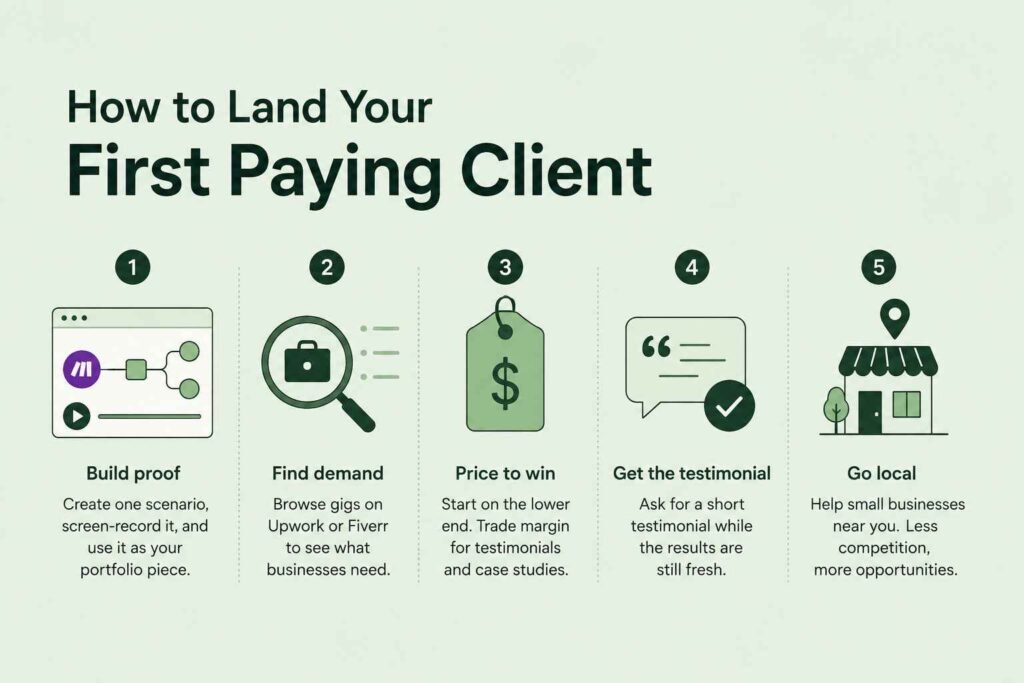
- Build one proof scenario before you pitch anyone. Pick a fictional (or your own) small business and build one of the six services above. Screen-record it. This becomes your portfolio piece — far more convincing than a resume line that says “knows Make.com.”
- Start where the demand already is. Browse automation gigs on Upwork or Fiverr to see what real businesses are asking for right now. It’s free market research, and you’ll start noticing patterns in what people actually need.
- Price your first project to get the win, not the windfall. On your first one or two projects, price closer to the lower end of the ranges above. You’re trading margin for a real testimonial and a case study — both worth more than an extra $50 right now.
- Ask for the testimonial before you ask for the next client. The moment a client says “this is great,” ask if they’d be willing to put that in two sentences. That’s the proof that gets your next client to say yes faster.
- Go local before you go global. Small businesses in your own town often need exactly this kind of help and have never heard of Make.com. A coffee shop, a local gym, a small law office — they’re not your competitor’s first stop, which means less competition for you.
You may also read: How to Get Your First AI Automation Client in 2026 (Even With No Portfolio)
The Honest Part Nobody Tells You
I’m not going to pretend this turns into a six-figure agency in 90 days — that’s the kind of claim that gets thrown around in this space, and it’s just not how it usually works. Building real client automations takes troubleshooting time, testing time, and the patience to handle the inevitable “wait, why did this break” moment.
You’ll also need to factor Make’s credit costs into your pricing. If a client’s scenario runs thousands of times a month, that’s real money on their plan, and part of being trustworthy is flagging that upfront instead of letting them get surprised by a bill later.
What’s actually true is this: businesses are spending real budget on exactly this kind of work, the entry point is genuinely low — you can start on Make’s free or roughly $9-a-month plan — and a lot of the competition either overcharges and underdelivers, or undercharges and burns out. There’s room in the middle for someone honest, clear, and willing to start small.
You may also read: 5 Make.com Automation Workflows Every Beginner Should Build First (2026)
Key Takeaways
- Automation freelance work pays real, documented rates — typically $20–125 an hour or $40–125+ per project, depending on complexity, per 2026 marketplace data.
- You don’t need to be an expert to start. Six services — lead capture, content repurposing, e-commerce alerts, email sequences, reporting, and AI chatbot routing — cover most small-business needs.
- Make’s Core plan, around $9–10 a month, is enough to deliver real client work while you’re starting out.
- Your first one or two clients are about proof, not profit. Price to get the testimonial.
- Local small businesses are an underrated place to find your first paying client.
If you want a deeper walkthrough on getting comfortable inside Make.com before you pitch anyone, my beginner’s guide to Make.com is the natural next step. And if you’re trying to decide whether Make.com or n8n is the better tool to build your services around, you can read my beginner’s guide to n8n.
I’m sharing more of this build-in-public journey through the newsletter — if you want it in your inbox, you can join below.