

TL;DR You don’t need six months of courses to prove you can work with AI — you need one finished thing. This 30-day challenge takes you from zero AI experience to a real, working automation project you can show a client or employer: seven days learning the fundamentals, seven days learning automation, seven days building a portfolio project, five days turning it into a case study, and four days reaching out for real opportunities. No coding, no degree — just 30–60 minutes a day.
If you’ve spent the last few weeks bouncing between AI YouTube videos, half-finished courses, and a growing list of tools you’ve bookmarked but never actually opened — I want you to know something: you are not behind. You are stuck in the same place almost every beginner gets stuck, and it isn’t a knowledge problem.
I was there too. I’d watch someone build an AI automation in a 90-second video, feel that jolt of “I could do that,” open a new tab to try it myself, and then quietly close the tab twenty minutes later because I didn’t know what I was actually supposed to build. Not a tutorial. A real thing. Something with my name on it.
Here’s the thing: watching AI content isn’t the same as having proof you can use AI. And proof — one real, working, documented project — is what actually opens doors, whether you’re aiming for freelance clients, a new role at work, or your first income online.
That’s what this challenge is built around. Not another 40-hour course. A 30-day, 30-to-60-minutes-a-day path that ends with something concrete: a working AI-powered automation, documented as a case study, published somewhere a real person can see it.
“You don’t need to become an AI expert in 30 days. You need one finished thing you can point to and say, ‘I built this.’”
By day 30, here’s what you’ll actually have: basic AI literacy you can rely on, one completed automation project, a simple portfolio page, a written case study, and a clear next step toward freelancing, a new role, or your first client. Let’s break down exactly how you get there.
Key Takeaways
- A finished project beats another tutorial — proof of work is what actually gets you noticed.
- You only need three free-to-cheap tools: an AI chat assistant, Google Docs/Sheets, and one automation platform like Make.com.
- The challenge is split into four phases: learn the fundamentals (days 1–7), learn automation (days 8–14), build a real project (days 15–21), and turn it into a case study you can show people (days 22–30).
- Documentation is not optional — screenshots and short write-ups at every stage are what turn practice into a portfolio.
- Day 30 isn’t the finish line. It’s the point where you switch from “I’m learning AI” to “I build AI solutions that solve a specific problem.”
What Is the 30-Day AI Career Challenge?
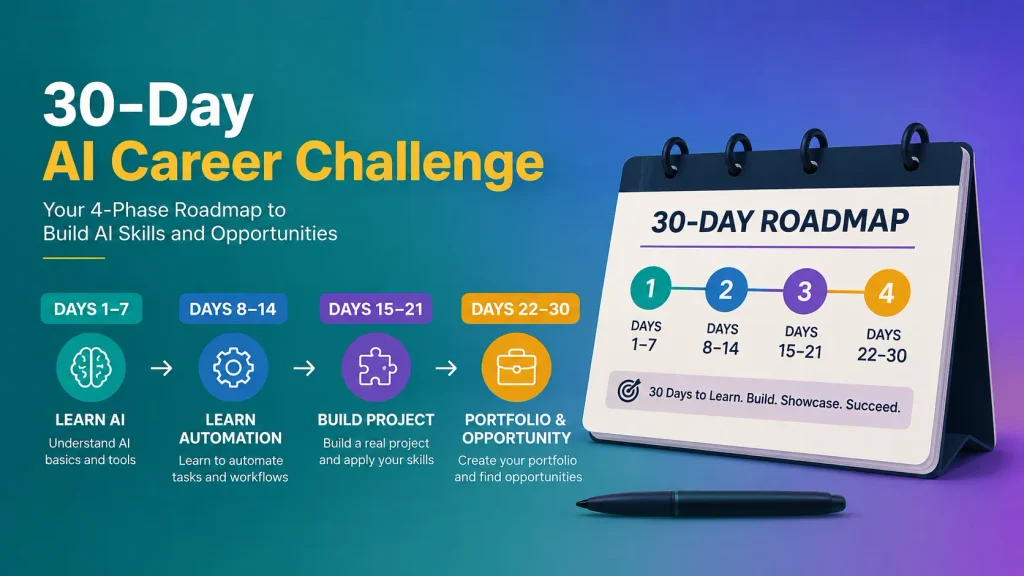
The 30-Day AI Career Challenge is a structured, beginner-friendly path that takes you from knowing almost nothing about AI to having one finished, documented AI automation project you can show to a client, employer, or your own network. It replaces passive tutorial-watching with a small, real, weekly build — so by the end, you have proof of skill, not just a list of videos watched.
Who This Challenge Is Actually For
This is built for the reader I hear from most: someone who is not technical, has never written a line of code, and has probably already tried to “learn AI” once or twice before getting overwhelmed and stopping. If that’s you — in Kigali, Lagos, Nairobi, Manila, Karachi, or anywhere else — this challenge assumes zero prior experience and keeps every step small enough to actually finish.
What Do You Actually Need Before You Start?
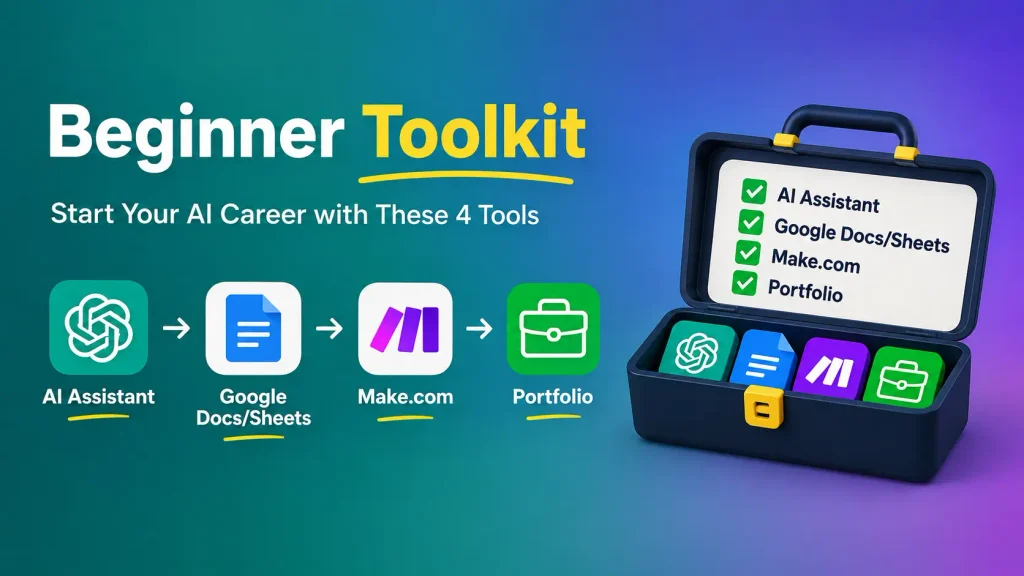
You need three low-cost tools, 30 to 60 minutes a day, and nothing else. Beginners consistently over-prepare — buying subscriptions, bookmarking courses, researching “the best” tool — before ever building anything. This challenge is deliberately low-barrier so preparation can’t become another form of procrastination.
What You Need
- A capable AI chat assistant (ChatGPT, Claude, or Gemini — the free tier is enough for this challenge)
- Google Docs and Google Sheets, or any free equivalent
- One automation platform — this challenge uses Make.com, because its visual, canvas-style builder is one of the easiest starting points for total beginners
- A free portfolio platform (a simple Notion page or a single-page website works fine)
- 30–60 minutes a day for 30 days
What You Don’t Need
- Coding experience
- A computer science degree
- Ten paid AI subscriptions
- Advanced math
- To become an AI engineer — this challenge is about applying AI, not building it
Quick heads up: some Make.com links in this guide, including the one above, are my referral link. If you sign up through it, I earn a small commission at no extra cost to you — it’s one of the ways I keep this site running. I only recommend tools I actually use myself, and Make.com is the automation tool I use for everything you’ll build in this challenge.
Days 1–7: How Do You Learn the AI Fundamentals?
You learn the AI fundamentals in week one by working through one focused daily topic — what AI actually is, how to talk to a chatbot effectively, prompting structure, research, writing, and everyday business use — then closing the week with a small 2-hour mini project. Each day builds directly on the last, so nothing is wasted.
Day 1 — Understand What AI Actually Is
Spend today getting comfortable with three terms you’ll see everywhere: AI, machine learning, and generative AI. In plain language — AI is the broad idea of machines doing tasks that normally need human thinking. Machine learning is how many modern AI systems learn patterns from data instead of being told exact rules. Generative AI, the kind you’ll use most in this challenge, creates new text, images, or code based on what you ask it. Spend a few minutes exploring where AI genuinely helps (writing, summarizing, brainstorming, organizing) and where it still falls short (facts it can get wrong, nuance it can miss).
Day 2 — Learn How to Work With Chatbots
Today is about the skill nobody teaches directly: how to actually talk to an AI assistant. Practice giving it real context about your situation, asking follow-up questions instead of accepting the first answer, and treating a conversation as a back-and-forth rather than a single, giant, perfectly-worded prompt.
Day 3 — Prompting Fundamentals
Learn the six building blocks of a strong prompt: the role you want the AI to take on, the context it needs, the specific task, any constraints (length, tone, format), examples if helpful, and the output format you want back.
If you want a deeper walkthrough of this exact framework, my full prompt engineering guide for beginners breaks down each piece with examples you can copy directly.
Day 4 — Use AI for Research
Practice using AI to find information, summarize long articles, compare sources, and — critically — fact-check what it tells you. AI is genuinely useful for research, but it can also state incorrect things with total confidence. Today is about building the habit of verifying, not just accepting.
Day 5 — AI for Writing and Content
Use AI to brainstorm ideas, build outlines, edit your own writing, and repurpose one piece of content into three different formats (a paragraph into three social posts, for example). This is one of the most immediately useful skills you’ll build all month.
Day 6 — AI for Everyday Business Tasks
Apply what you’ve learned to practical, unglamorous work: drafting emails, organizing information, summarizing documents, and putting together a simple report. These are the tasks that show up in almost every job and every freelance niche — which makes them some of the most valuable AI skills you can practice.
Day 7 — Your First Mini Project
Pick one repetitive task you personally do every week, and spend two hours building an AI-assisted way to do it faster. Document it in three lines: what it looked like before, what the AI-assisted workflow looks like now, and roughly how much time it saves. Save this — it’s your first small piece of evidence, and it sets up everything in week two.
Days 8–14: How Do You Learn AI Automation?
You learn AI automation in week two by understanding the trigger-action-AI-output pattern, then building your first real workflow in Make.com and gradually adding AI logic, conditions, and error handling to it. This is the part of the challenge that separates it from generic “learn AI” content, because automation is where AI skills start to look like a service someone would pay for.
Day 8 — What Is AI Automation?
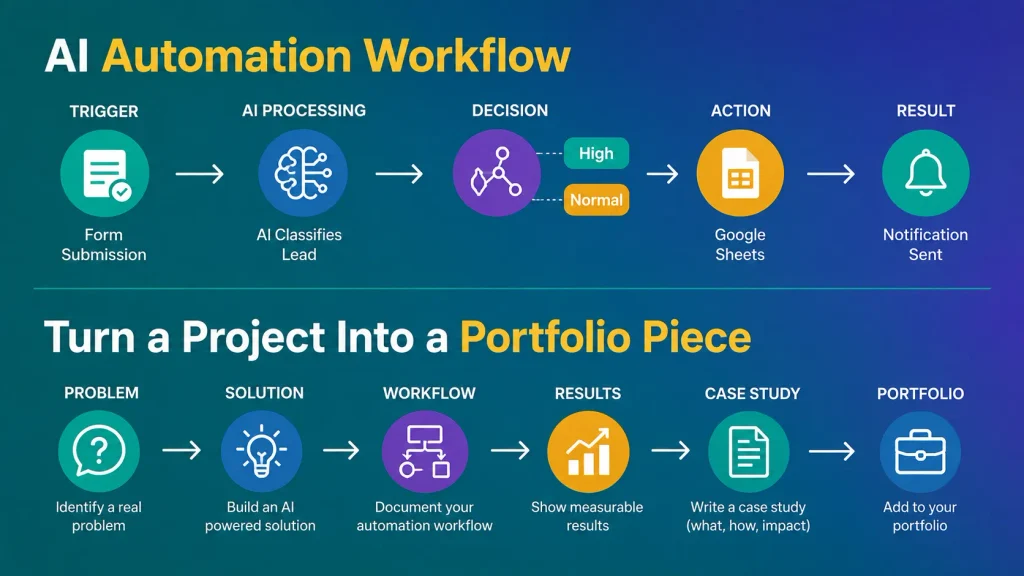
At its core, automation follows one pattern: something happens (a trigger), an action runs, AI does something useful in the middle — classifying, summarizing, or generating — and a result comes out the other end.
A simple example: a new form submission comes in, AI reads it and categorizes the lead, the result gets saved to a spreadsheet, and you get a notification. That’s it. Every automation you’ll build follows some version of this chain.
Day 9 — Learn Make.com
Spend today getting familiar with Make.com’s core vocabulary: scenarios (your automated workflows), modules (the individual steps), triggers (what starts the scenario), actions (what happens next), and how data moves between connected apps.
If you want the full walkthrough before building anything live, my Make.com beginner’s guide covers exactly this, step by step.
Day 10 — Build Your First Automation
Build one very simple workflow: a form submission that automatically adds a row to a Google Sheet. No AI yet — just get comfortable connecting two apps and watching data move between them.
Day 11 — Add AI to the Workflow
Now insert an AI step into that same workflow. Have it classify the submission, summarize it, extract specific details, or generate a short response. This is the moment your automation stops being a simple data pipe and starts doing something genuinely useful.
Day 12 — Add Conditions
Introduce basic logic: if a lead is marked high priority, send yourself a notification. Otherwise, add it to a normal list. This single addition is what makes an automation feel intelligent instead of just mechanical.
Day 13 — Make It More Useful
Tighten up what you’ve built: add basic error handling for when something doesn’t work as expected, improve your AI prompts inside the workflow for more consistent output, and test it with a handful of different inputs to see where it breaks.
Day 14 — Document the Workflow
Screenshot the finished scenario in Make.com. Write a short explanation: the problem it solves, the tools involved, how the workflow runs, and the result. This becomes the first real piece of your portfolio.
If you want a deeper framework for what makes a documented project actually convincing to a stranger, my guide to building an AI automation portfolio with no client experience is worth reading before day 15.
Days 15–21: How Do You Build a Real Portfolio Project?
You build a real portfolio project in week three by picking one specific, realistic problem, mapping the workflow before touching any tools, building a working first version, testing it against realistic examples, and then calculating the actual business value it creates. This is the difference between a practice exercise and something a stranger would trust.
Day 15 — Pick a Real Problem
Use this formula: a specific audience, plus a repetitive problem they actually have, plus an AI-powered solution. A few starting points: real estate agents and lead qualification, local businesses and review responses, recruiters and resume screening, content creators and content repurposing, or e-commerce sellers and product descriptions. Pick whichever one you find genuinely interesting — you’ll do better work on something you actually care about.
Day 16 — Define the Workflow
Before opening Make.com, map the whole thing on paper or in a doc: input, processing, AI step, decision point, output. Ten minutes of planning here saves hours of rebuilding later.
Day 17 — Build Version One
Don’t aim for perfect. Aim for working. Build the simplest version of the workflow you mapped yesterday, even if it’s rough around the edges.
Day 18 — Test It
Create five to ten realistic test cases and run them through your workflow. Write down exactly what breaks — inconsistent outputs, missing information, formatting issues. This is normal, and it’s exactly what real automation work looks like.
Day 19 — Improve It
Fix what you found on day 18: bad or inconsistent AI outputs, missing information, and any unnecessary steps that are slowing the workflow down.
Day 20 — Make It Presentable
Create a simple workflow diagram, clean screenshots, a short written explanation, and — if you can manage it — a quick screen recording or GIF showing it running.
Day 21 — Calculate the Business Value
This is the step most beginners skip, and it’s the one that matters most to a future client or employer. Show the old process (for example, two hours a week) against the new one (twenty minutes a week), the time saved (one hour forty minutes a week), and a rough monthly value estimate. This single habit shifts how you present your work — from “I built an AI toy” to “I built something that saves real time and money.”
Days 22–26: How Do You Turn a Project Into a Portfolio Piece?
You turn a project into a portfolio piece by writing it up as a clear case study, publishing it on a simple portfolio page, recording a short demo, and sharing it publicly — then getting one honest person to test whether it’s actually useful.
Day 22 — Write the Case Study
Use a simple four-part structure: the problem, the solution, the process, and the result. Keep it honest and specific — real numbers and real screenshots beat polished language every time.
Day 23 — Create Your Portfolio Page
Keep it simple: who you are, what you do, the project, how it works, the results, and how to reach you. A single Notion page or one-page site is more than enough for your first project.
Day 24 — Create a Project Demo
Record a 60–90 second screen capture showing the problem, the workflow running, and the result. This is often what actually convinces someone to reach out — seeing it work is more persuasive than reading about it.
Day 25 — Create Your “Proof of Work” Post
Turn the project into a short LinkedIn or X post using this structure: I built X to solve Y. Here’s how it works. It reduced [metric] from A to B. Here’s what I learned. Keep it human, not salesy.
Day 26 — Get Real Feedback
Show the project to a friend, a small business owner, a creator, a colleague, or someone in an online community, and ask one direct question: “Would this actually be useful to you?” Their honest answer matters more than your own opinion of the work.
Days 27–30: How Do You Turn AI Skills Into Real Opportunity?
You turn AI skills into opportunity by choosing one clear direction, identifying ten realistic prospects with a genuine repetitive problem, reaching out with a short and specific message, and then publishing everything you’ve built. This final stretch is where the challenge connects directly to freelancing, a new role, or your first client.
Day 27 — Choose Your Direction
There are three realistic paths from here. Path A: AI freelancer, selling implementation and automation services directly. Path B: AI-powered employee, using these skills to become measurably more productive in your current job. Path C: AI builder, continuing to develop increasingly useful automations and, eventually, products. None of these is more “legitimate” than the others — pick the one that fits where you are right now.
If you’re leaning toward freelancing and want help narrowing down a specific lane instead of trying to offer everything at once, my guide to choosing an AI freelance niche walks through exactly how to do that.
Day 28 — Find Ten Realistic Prospects
Don’t randomly message businesses. Instead, look specifically for repetitive manual work, manual data entry, slow customer response times, repetitive reporting, or businesses that are already spending money trying to solve the problem you can automate.
Day 29 — Reach Out
Keep your first message short and specific: “I noticed you [specific problem]. I built a small workflow that can [specific result]. I made a quick example showing how it could work for your business — would you like me to send it?”
If you want a more complete outreach framework, including realistic response rates and what to say when you haven’t built exactly what someone asks for, my guide to getting your first AI automation client covers the full roadmap.
Day 30 — Publish Everything
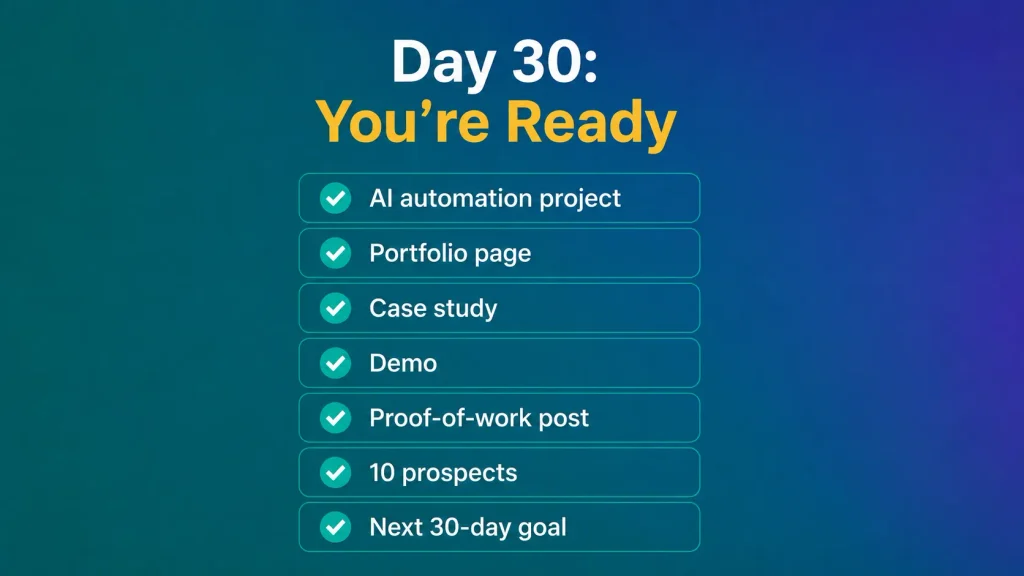
Run through this final checklist before you call the challenge complete:
☐ Portfolio page is live
☐ Completed AI automation project
☐ Clean screenshots
☐ Written case study
☐ Short demo video or GIF
☐ Public “proof of work” post
☐ List of 10 potential clients, prospects, or employers
☐ Your next 30-day goal written down
What Happens After Day 30?
Day 30 is not the finish line — it’s the point where your framing changes. In month two, build two more projects in the same niche so you have a small, focused body of work instead of one isolated example. In month three, start contacting prospects, applying to relevant roles, offering small paid projects, collecting testimonials, and improving your portfolio based on what you learn.
The market data backs this shift: according to Upwork’s 2026 In-Demand Skills report, demand for skills tied directly to applying AI within existing work grew 109% year over year in 2025 — based on what clients actually paid for, not job postings or surveys. That’s the market you’re stepping into with a finished project in hand.
The goal isn’t to say “I’m learning AI” anymore. It’s to say: “I build AI solutions that solve [specific problem] for [specific type of person or business].”
Frequently Asked Questions
Do I need coding experience for the 30-Day AI Career Challenge?
No. Every tool used in this challenge — ChatGPT, Claude, Gemini, and Make.com — is built for non-technical users. You’ll build real automations using visual, drag-and-drop tools, not code.
How much does the 30-Day AI Career Challenge cost?
You can complete it almost entirely free. A free AI chatbot tier, free Google Docs and Sheets, Make.com’s free plan, and a free Notion page cover everything you need. The only likely upgrade is Make.com’s Core plan if your automation needs more monthly operations than the free tier allows.
What if I miss a day or fall behind schedule?
Keep going from where you are. The 30-day structure is a helpful rhythm, not a hard deadline — what matters is finishing one real project, not hitting an exact calendar date.
Can I really get a client after just one 30-day project?
It’s possible, but not guaranteed, and I won’t pretend otherwise. What one solid project reliably gives you is proof of skill you didn’t have before — something concrete to show, instead of a list of courses you’ve watched. From there, reaching an actual paying client typically takes ongoing outreach over weeks or months, not a single post.
Which automation tool should beginners start with?
This challenge uses Make.com because its visual canvas makes the whole workflow easy to see and understand as a beginner. If you’re curious how it compares to alternatives before committing, my Zapier vs Make vs n8n comparison breaks down which tool fits which situation.
Want the Next Step After This Challenge?
I share practical, no-hype AI and automation guides like this every week — the same ones I wish someone had handed me when I started. Join the newsletter and I’ll send them straight to your inbox.
Have questions about any part of this challenge? Drop them in the comments below — I read every single one.
Hilfreich! Audio-zu-Text Smart/Verbatim: Gem Transcribe unter . Gem Transcribe
Klar erklärt. Probiere MiniMax H3 Video Generator (/). MiniMax H3 Video Generator
Obrigado! Muse Voice Transcribe: para legendas SRT/VTT. Muse Voice Transcribe
Useful write-up. We have been testing a freemium decision-label API at https://jevapi.pro for routing support tickets — playground plus API keys.