
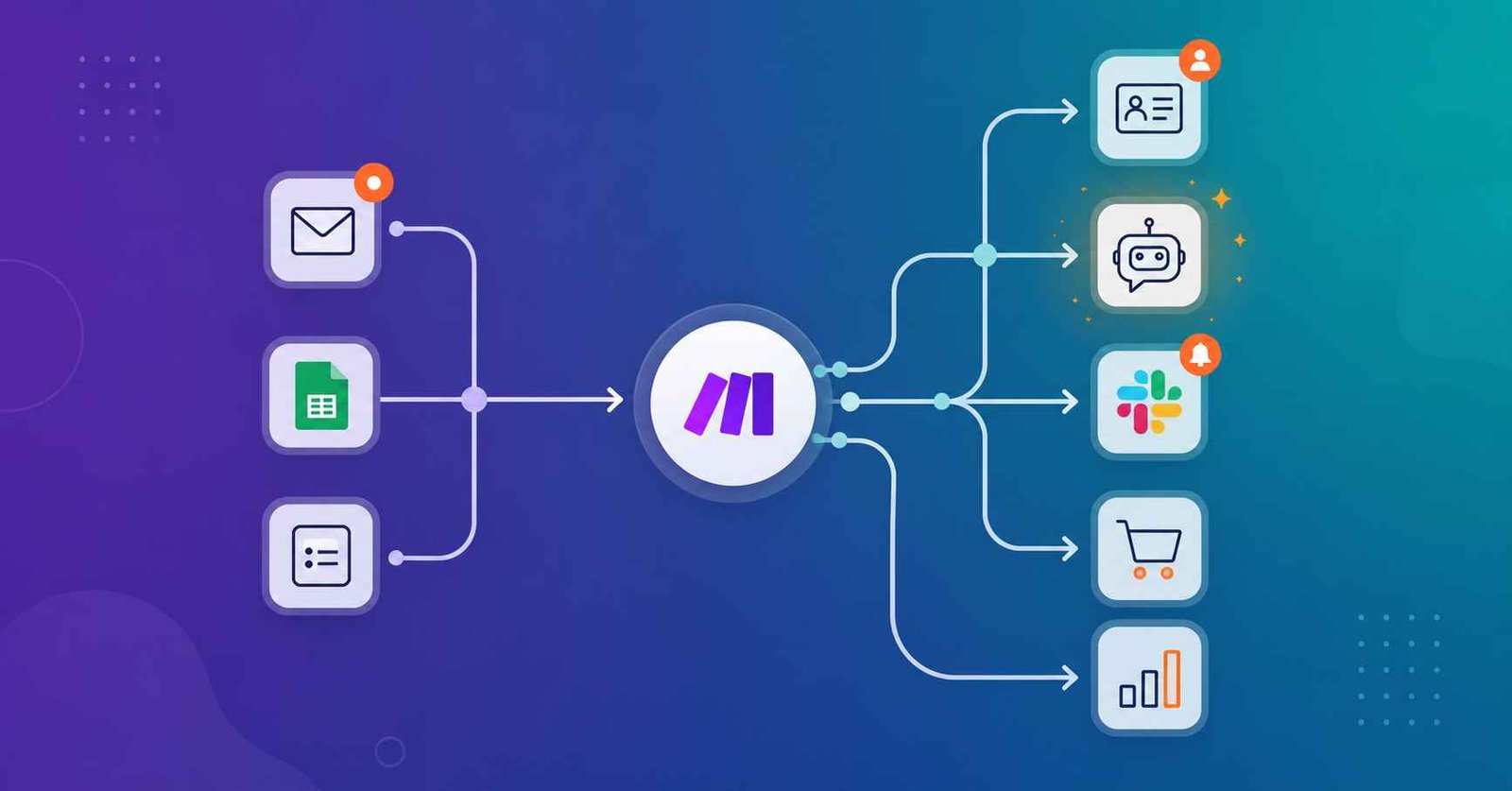
TL;DR: Make.com lets you connect apps like Gmail, Google Sheets, Slack, and ChatGPT so they talk to each other automatically — no coding required. Real businesses use it to handle leads, marketing, customer support, e-commerce orders, and even AI-powered research.
Below, you’ll see exactly what those workflows look like, who benefits most, what Make.com can’t do, and why understanding this stuff is genuinely useful whether you’re learning automation for your own projects or thinking about freelancing or a career in AI automation.
Here’s a scenario I bet you’ve lived through: a customer fills out your contact form, and then you — a real human with a life — have to copy their name into a spreadsheet, add them to your email list, and send yourself a Slack reminder to follow up. Three separate actions, one tiny task.
Multiply that by fifty leads a week, twenty support tickets, a dozen orders, and a handful of reports, and suddenly your “quick five-minute task” is eating half your afternoon.
I was skeptical of automation tools for a long time too. It sounded like something only “technical people” got to use.
Then I actually opened Make.com for the first time and realized the whole point of the tool is that you don’t need to be technical — you just need to know what task you’re tired of doing manually.
In this guide, I’m not going to give you theory. I’m going to walk you through real, concrete examples of how businesses actually use Make.com — for sales, marketing, support, finance, e-commerce, and AI-powered workflows — so you can see exactly what this looks like in practice, and figure out where it might fit into your own work.
“The best automations aren’t the most complicated ones. They’re the ones that quietly remove one annoying task you didn’t even realize was costing you hours.”
What Is Make.com, in Plain English?
Make.com is a visual automation platform that connects different apps so they can pass information to each other automatically. You build a “scenario” — a simple flow that says: when this happens (a trigger), do this (an action). No code is required, and you can watch the data move step by step on screen as it runs.
A basic scenario looks like this: Trigger → Processing → Action. For example: a customer fills out a website form → Make.com adds their details to your CRM → they automatically receive a welcome email. You set it up once, and it keeps running in the background every time it happens again.
If you haven’t set up your first scenario yet, my complete beginner’s guide to Make.com walks through the account setup, the terminology, and your first automation step by step.
And if you’re still deciding between tools, I compared Make.com against Zapier and n8n in this honest breakdown — worth reading before you commit to one.
Key Takeaways
- Make.com connects apps so repetitive tasks (data entry, follow-ups, reports) happen automatically.
- Real businesses use it most for lead management, marketing, customer support, e-commerce, and finance.
- AI-powered workflows — combining Make.com with tools like ChatGPT — are the fastest-growing use case right now.
- It’s genuinely beginner-friendly, but complex workflows still take patience to build correctly.
- Understanding these real use cases is useful whether you’re automating your own work or exploring automation as a freelance skill.
How Do Businesses Actually Use Make.com Day to Day?
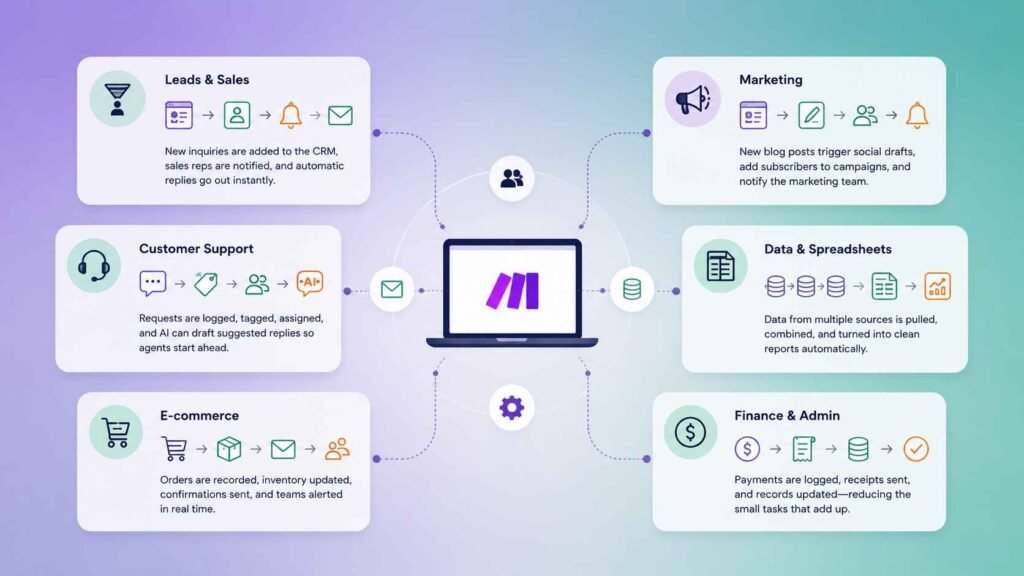
Businesses mainly use Make.com to handle repetitive, rules-based work: moving new leads into a CRM, notifying teams, updating spreadsheets, sending follow-up emails, and syncing customer or order data between tools. The goal isn’t replacing people — it’s removing the manual, forgettable steps between one app and another.
Leads & Sales
A new inquiry comes in from a website form, ad, or social post. Make.com adds it to the CRM, notifies the sales rep, and sends an automatic reply — so no lead sits untouched for hours.
Marketing
A new blog post goes live. A workflow can draft a social post, add new subscribers to a campaign, and notify the marketing team — without anyone repeating the same five steps by hand.
Customer Support
A support request arrives. Make.com can log it, tag the category, notify the right teammate, and even draft a suggested reply using AI — so the human only has to review, not start from scratch.
Data & Spreadsheets
Sales numbers come in from three different sources. Instead of copy-pasting each one, Make.com pulls the data, combines it, and sends a clean summary to managers automatically.
E-commerce
A customer places an order. The workflow records it, updates inventory, sends a confirmation email, and alerts the fulfillment team — all within seconds of checkout.
Finance & Admin
A payment comes through. Make.com logs the transaction, sends a receipt, and updates the records — cutting down the small admin tasks that pile up unnoticed.
HR & Employee Onboarding
A new employee joins the company. Make.com can automatically create user accounts, send a welcome email, notify the IT team, create onboarding tasks, and schedule introductory meetings.
Instead of manually coordinating everything, each department receives the information it needs automatically.
Appointment Booking
A customer books an appointment online. Make.com adds the booking to a calendar, sends a confirmation email, reminds the customer before the appointment, and updates the team’s schedule. This reduces missed appointments and saves hours of administrative work.
Social Media Management
Content is published once and shared everywhere. When a new article or YouTube video goes live, Make.com can publish or schedule posts across LinkedIn, X, Facebook, and other platforms while notifying the marketing team that everything has been published successfully.
Invoice & Accounting Automation
A client pays an invoice. Make.com records the payment in accounting software, updates the CRM, sends a receipt, and notifies the finance team. Businesses spend less time reconciling payments and more time serving customers.
Document Approval Workflows
A document needs approval. Contracts, proposals, or expense reports can automatically move between managers for review. Once approved, Make.com stores the document, notifies everyone involved, and updates the project status.
Project Management
A new project starts. Make.com creates tasks in project management software, assigns team members, sets deadlines, creates folders in cloud storage, and sends kickoff notifications. Everyone starts with the same information without repetitive setup work.
Customer Feedback & Surveys
A customer submits feedback. Make.com collects survey responses, categorizes them by sentiment using AI, alerts the appropriate team about urgent issues, and updates dashboards automatically.
Managers can quickly identify recurring problems without manually reviewing every response.
Inventory & Supply Chain
Stock levels change after every sale. Make.com can automatically update inventory across your online store, warehouse software, and accounting system.
If stock runs low, it can notify the purchasing team or even create a reorder request, helping businesses avoid overselling products or running out of popular items.
Reporting & Business Intelligence
Managers need up-to-date performance reports. Instead of manually exporting data from different tools, Make.com collects information from CRMs, marketing platforms, accounting software, and spreadsheets, then builds daily or weekly reports automatically.
Teams receive dashboards or summary emails without anyone spending hours preparing them.
What Do AI-Powered Make.com Workflows Look Like?
AI-powered workflows pair Make.com with tools like ChatGPT to add “thinking” steps into an automation — summarizing, analyzing sentiment, or drafting content — instead of just moving data around.
For example, a scenario can collect hundreds of customer reviews, have AI analyze the sentiment and complaints, and deliver a summary report a person never had to read line by line.
This is genuinely one of the more interesting parts of learning Make.com right now, because it sits right at the intersection of automation and AI — two skills that are far more valuable together than either one alone.
Who Actually Benefits Most From Learning This?
Small businesses, agencies, freelancers, and startups benefit most, because they typically can’t afford custom software or a technical team. Make.com lets them build lightweight systems — lead capture, reporting, onboarding — using tools they already have, at a fraction of the cost of hiring a developer.
If you’re building toward freelance income rather than a 9-to-5, automation is one of the more practical skills to learn, because clients are actively looking for people who can set this up for them. I broke down where to actually find that kind of work in this guide to AI freelance platforms for beginners.
What Are Make.com’s Real Limitations?
Make.com is not the right fit for every situation. Complex, multi-step workflows can require real technical thinking to build correctly, poorly designed automations can quietly create errors that go unnoticed, and some advanced business processes genuinely need custom software instead. It rewards starting small.
Let’s be honest about this, because most content online won’t be: I’ve seen automations built with good intentions that quietly sent duplicate emails or pulled the wrong data, simply because a filter or condition wasn’t set up correctly.
The fix isn’t avoiding automation — it’s testing every scenario carefully before letting it run unattended, and starting with one simple workflow before stacking on complexity.
One more practical note: Make.com’s pricing runs on credits (the platform’s current term, replacing the older “operations” language), and how many credits a scenario uses depends on how many steps and how much data it processes — so a workflow that looks simple on paper can still use more credits than you’d expect once it’s running daily.
Is Learning Make.com Worth It for a Career or Freelance Income?
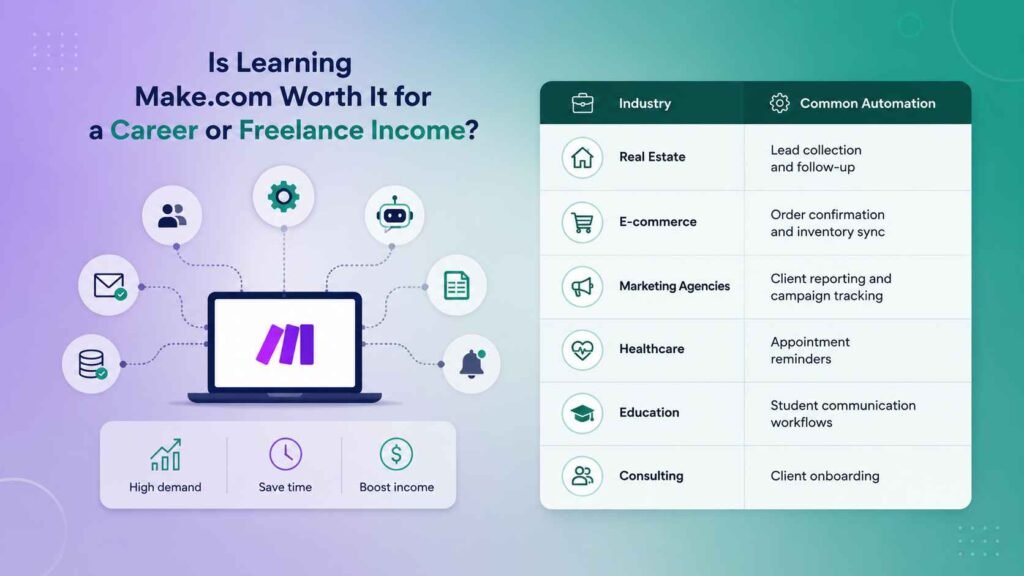
Yes, for the right person — automation skills are in real demand from small businesses and agencies who don’t have in-house technical teams, and Make.com is one of the more accessible ways to build that skill without learning to code.
It works well alongside AI tools, which makes it more valuable, not less, as AI adoption grows.
If this is a direction you’re seriously considering — not just as a hobby, but as an actual income path — I wrote a full breakdown of what the role looks like, what it pays, and how to get your first client in how to become an AI automation specialist.
And if you’re still at the very beginning of figuring out how AI fits into an income plan at all, my guide to earning money with AI as a complete beginner is the right place to start.
| Industry | Common Automation |
|---|---|
| Real Estate | Lead collection and follow-up |
| E-commerce | Order confirmation and inventory sync |
| Marketing Agencies | Client reporting and campaign tracking |
| Healthcare | Appointment reminders |
| Education | Student communication workflows |
| Consulting | Client onboarding |
Frequently Asked Questions
Do I need to know how to code to use Make.com?
No. Make.com is built as a visual, drag-and-drop tool specifically so people without a coding background can build working automations. You’ll pick up its own vocabulary — scenarios, modules, triggers — but none of it requires programming knowledge.
Is Make.com free to use?
Make.com offers a free plan with a limited number of monthly credits, which is enough to test simple personal workflows. Paid plans increase your credit allowance and unlock more advanced features once you’re running automations regularly.
What’s the difference between Make.com and Zapier?
Zapier is simpler and more linear, with more app integrations overall, while Make.com offers a visual canvas, more flexibility per workflow, and is generally more affordable for the same amount of automation. I compare them directly, along with n8n, in a separate guide linked above.
Can Make.com work with ChatGPT?
Yes. Make.com has direct integrations with AI tools like ChatGPT, so you can add steps that summarize text, analyze sentiment, draft replies, or generate content as part of a larger automated workflow — not just move data between apps.
Is automation a realistic freelance skill for a complete beginner?
Yes, but it takes real practice first. Most beginners start by automating their own small tasks, build a couple of working examples, then offer simple automation audits or setups to small businesses as their first paid projects.
If you take one thing away from this: the businesses getting the most value out of Make.com aren’t running the most complex workflows. They’re the ones who found one repetitive task, built a simple scenario to remove it, and then slowly stacked more automations on top as they got comfortable.
That’s exactly the approach I’d recommend if you’re starting from zero — and it connects directly to the bigger question I answer in can you actually earn money with AI as a complete beginner, because automation is one of the more realistic paths into that.
Want beginner-friendly AI and automation tips in your inbox?
I send practical, no-hype guides like this one every week — no fluff, no fake income promises.
