

TL;DR: You don’t need to code to start an AI automation agency in 2026. You need one tool (Make.com or n8n), one niche, and one workflow you can build reliably — like connecting a contact form to a CRM or automating email follow-ups. Beginners typically charge $100–$700 for a simple setup and grow from there. This guide walks you through the exact steps: what skills to learn, how to pick a niche, what to charge, and how to land your first client with zero portfolio.
Recently, my friend messaged me asking, “Do I need to learn Python before I can start an automation agency?” I get some version of this question a lot. And I get why — “automation agency” sounds like something only developers do.
Here’s the thing: it isn’t. Tools like Make.com and n8n were built specifically so that non-technical people could connect apps and automate repetitive tasks without writing a single line of code.
If you can drag, drop, and follow a logical sequence of “when this happens, do that” — you already have the core skill.
By the end of this guide, you’ll understand exactly what an AI automation agency does, whether it’s realistic for a complete beginner to start one, and the specific steps to take — from learning the tools to landing your first paying client.
“Clients don’t pay you for using AI. They pay you for solving a problem they don’t have time to solve themselves.”
What Is an AI Automation Agency?
An AI automation agency is a small service business that builds automated workflows for other businesses — using no-code tools like Make.com or n8n, often paired with AI tools like ChatGPT. Instead of writing custom software, you connect existing apps so tasks like lead follow-up, invoicing, or customer replies happen automatically, without anyone touching a keyboard.
It’s different from a marketing agency (which focuses on getting attention) and different from software development (which builds new applications from scratch).
An automation agency sits in between: you’re not creating anything new, you’re removing friction from processes that already exist.
Clients are usually small business owners, coaches, real estate agents, and local service providers — people who know exactly what’s eating their time but have no idea how to fix it.
Here’s what a typical automation actually looks like once it’s built:
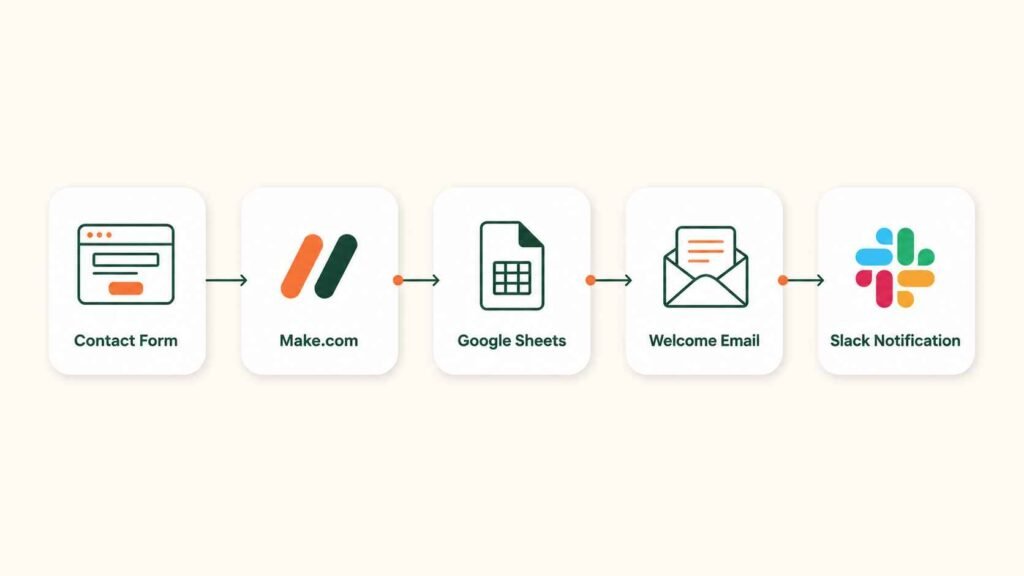
Five apps, connected once, running forever. That’s the entire product you’re selling — not complexity, just reliability.
Why AI Automation Is a Genuine Opportunity Right Now
Small businesses waste hours every week on tasks that follow the exact same pattern every time: a lead comes in, someone has to manually add it to a spreadsheet, send a welcome email, and remind themselves to follow up three days later.
Multiply that across dozens of leads, invoices, or customer messages, and you can see why business owners are desperate for help — but most can’t afford to hire a developer, and most developers aren’t interested in projects this small.
That gap is exactly where a beginner-friendly automation agency fits. Common starting-point automations include:
- Lead capture — form submission → CRM entry → welcome email
- Invoice generation and payment reminders
- Automated email follow-up sequences
- CRM updates triggered by customer actions
- Simple AI-powered customer support replies
A Real Example: A Local Dentist’s Office
A small dental practice gets around 20 appointment requests a week through their website. Here’s what changes when that gets automated.
Before Automation
- Copy each request from email
- Paste into spreadsheet manually
- Send confirmation email
- Set manual reminder
- ~2 hours/week
After Automation
- Patient submits form
- Appointment saved automatically
- Confirmation email sent instantly
- Reminder scheduled
- ~5 minutes/week
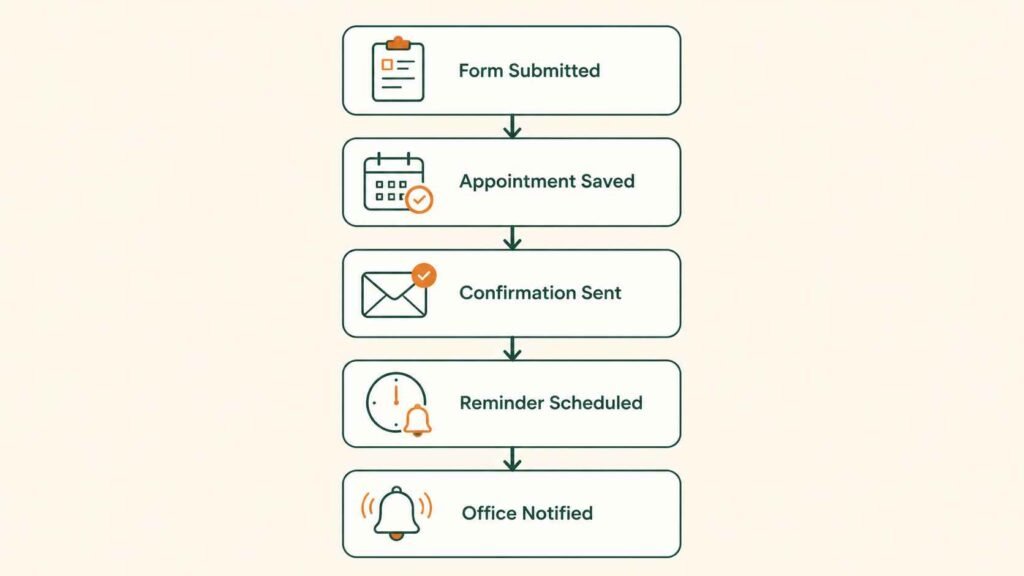
That’s roughly 100 hours saved a year, for a workflow that might take you an afternoon to build. That gap — between what it’s worth to them and what it costs you to build — is where your pricing comes from.
Can a Complete Beginner Actually Start One?
Yes. You don’t need a coding background, a computer science degree, or years of experience. What you need is one working automation you can build reliably and explain clearly. Most beginners start by rebuilding a single workflow — like a contact-form-to-CRM setup — a few times as practice before ever pitching a client.
Let’s be honest about expectations, though: clients pay for solved problems, not for the novelty of AI. Nobody hires you because you know what Make.com is.
They hire you because their leads are falling through the cracks and you can fix that, reliably, without them having to think about it again.
Key Takeaways So Far
- An automation agency connects existing business tools — it doesn’t require building software from scratch.
- No-code platforms like Make.com and n8n make this genuinely accessible to non-technical beginners.
- Small businesses are an underserved market — too small for developers, too busy to fix it themselves.
- Your first goal isn’t mastering every tool. It’s building one automation you can deliver confidently.
Step 1: Learn the Right Skills First
You don’t need to learn everything at once — that’s actually one of the most common mistakes beginners make (more on that later). Focus on:
- One automation platform — start with Make.com, since it’s the most beginner-friendly of the major tools
- ChatGPT — for drafting emails, chatbot logic, and client communication
- Google Sheets or Airtable — most workflows need somewhere to store data
- Basic webhook and API concepts — you don’t need to write them, just understand what they do
If you’re deciding between automation tools, this comparison of Zapier, Make.com, and n8n breaks down which one fits your starting point.
And once you’re comfortable with the basics, this n8n roadmap is worth bookmarking for when you’re ready to handle more advanced, self-hosted workflows.
Step 2: Choose a Niche Instead of Staying General
Specializing in one type of business — real estate agents, coaches, or restaurants, for example — makes you easier to find, easier to trust, and easier to refer.
A generalist competes with every automation freelancer online. A specialist becomes “the person who fixes X for real estate agents,” which is a much smaller, much less competitive lane.
| Niche | Common Automation Needs | Beginner Difficulty |
|---|---|---|
| Real Estate | Lead follow-up, showing reminders | Easy |
| Coaches & Consultants | Booking, onboarding emails | Easy |
| Restaurants | Reservation confirmations | Easy |
| Ecommerce | Order notifications, inventory alerts | Medium |
| Recruitment Agencies | Candidate tracking, interview scheduling | Medium |
If you’re still weighing options, this guide on choosing your AI freelance niche walks through the exact questions to ask yourself before committing.
Step 3: Master 5 Core Automations Before You Pitch Anyone
Rather than trying to learn every possible workflow, get genuinely good at these five first — they cover the majority of what small businesses actually need:
Lead Capture
Form → CRM → welcome email, fully automatic.
Email Automation
Follow-up sequences triggered by customer actions.
CRM Updates
Keeping customer records current without manual entry.
AI Content Generation
Drafting replies, summaries, or reports using ChatGPT inside a workflow.
Appointment Booking
Calendar syncing with automatic reminders.
For hands-on practice, these 5 Make.com workflows every beginner should build first are a genuinely good starting checklist — build each one for yourself before you ever offer it to a client.
Step 4: Build a Portfolio Before You Have Clients
You can — and should — build demo automations before landing your first paying client. Set up a Gmail-to-Google-Sheets workflow, a contact-form-to-CRM pipeline, or an AI email drafter using your own accounts, then record a short screen capture showing it in action.
This becomes proof of skill even with zero client history.
If you want a structured approach to this, this guide on building an AI freelance portfolio with no experience covers exactly how to present demo work convincingly.
Step 5: Choose Your Core Toolkit
| Tool | Best For | Difficulty | Free Plan? | Typical Starting Price |
|---|---|---|---|---|
| ChatGPT | Drafting text, chatbot logic, client communication | Easy | Yes | Free / $20 mo (Plus) |
| Make.com | Core automation and app connections | Easy–Medium | Yes | Free / from ~$9 mo |
| n8n | Advanced or self-hosted automation | Medium–Hard | Yes | Free (self-hosted) / from ~$20 mo |
| Airtable | Lightweight databases and tracking | Easy | Yes | Free / from ~$10 mo |
| Google Sheets | Simple data storage and reporting | Easy | Yes | Free |
| Calendly | Booking and scheduling automation | Easy | Yes | Free / from ~$10 mo |
Pricing shown reflects publicly listed entry-level tiers as of this writing and can change — always confirm current pricing directly with each provider before quoting a client.
Not sure whether n8n is worth the extra learning curve at this stage? This honest review of n8n for beginners lays out exactly when it makes sense and when it doesn’t.
Step 6: Decide What Services You’ll Actually Offer
Keep your initial service menu narrow. A few solid starting points: workflow automation setup, AI chatbot configuration, CRM automation, email sequence setup, and simple reporting dashboards.
You can always expand — but a focused offer is easier to explain, price, and sell than a vague “I do AI automation” pitch.
How Much Should Beginners Charge?
Beginners typically charge $100–$300 for a simple single workflow, $300–$700 for a CRM setup, and $500–$2,000+ for a full multi-step automation system, plus $100–$500/month for ongoing support.
These are illustrative starting ranges — actual pricing depends heavily on your market, the client’s budget, and how complex the workflow is.
| Service | Illustrative Price Range |
|---|---|
| Simple single workflow | $100–$300 |
| CRM setup | $300–$700 |
| Full automation system | $500–$2,000+ |
| Monthly maintenance/support | $100–$500/month |
Treat these as a rough compass, not a guarantee — your actual rates will depend on your market and the complexity of what you’re building.
A useful rule of thumb: price based on the value the workflow creates for the client — hours saved, leads no longer lost — rather than the number of hours it took you to build it.
That dentist’s office example above saved roughly 100 hours a year from an afternoon of work; that’s the math worth pricing against, not your build time.
If you want a deeper breakdown of specific services and their pricing, this guide on 6 real services you can offer with Make.com is a useful next read.
Step 7: Where Do You Actually Find Your First Client?
Most beginners land their first client through LinkedIn outreach, local business referrals, Upwork or Fiverr profiles, or simply asking people they already know.
Cold outreach works best when it’s specific — naming the exact workflow you’d automate for that business, rather than a generic “I do automation” message.
I’ve written a full, step-by-step breakdown of this exact problem: how to get your first AI automation client, even with no portfolio.
It covers outreach scripts, where to look, and how to handle the “but I have no experience” objection. You might also find this comparison of the best AI freelance platforms for beginners useful for deciding where to set up your first profile.
Step 8: Deliver Results That Earn You a Referral
A simple, repeatable delivery process protects you and the client: start with a short discovery call, map the exact process you’re automating, build it, test it thoroughly, document how it works in plain language, and train the client on it.
Then follow up two weeks later to check it’s still running smoothly. That follow-up alone is often what turns a one-off project into a referral or a retainer.
Step 9: Grow Beyond Your First Few Clients
Once you’ve delivered a handful of projects, growth usually comes from templating what already worked — turning your best workflow into a reusable package, building simple SOPs so you’re not reinventing the process each time, and asking happy clients for referrals.
Some agency owners eventually bring on freelancers to help deliver, but that’s a stage-two problem, not something to worry about on client one.
What Does a Day Running an AI Automation Agency Actually Look Like?
Most days split into three simple blocks: checking in with current clients and answering messages, building or refining a workflow in Make.com or n8n, and testing what you built before it touches real client data.
There’s no dress code, no office, and no fixed hours — the structure is entirely yours to set.
- Morning: Check client messages, respond to any workflow questions, review overnight automation runs for errors.
- Midday: Build or refine a workflow — connecting a new app, adjusting logic, or writing the AI prompts inside a scenario.
- Afternoon: Test everything with sample data before it goes live, then document how it works in plain language for the client.
- Evening (occasionally): Outreach — a few messages to potential clients in your niche, or following up on a proposal.
Common Mistakes Beginners Make
- Trying to learn Make.com, n8n, Zapier, and five AI tools all at once instead of going deep on one
- Underpricing out of fear, then resenting the work
- Trying to automate a client’s entire business instead of one clear process
- Skipping documentation, so nobody (including you) remembers how the workflow works six months later
- Skipping testing and letting a broken automation reach a real client
- Overpromising what AI can actually do, then losing trust when reality doesn’t match the pitch
Frequently Asked Questions
Do I need to know how to code to start an AI automation agency?
No. Tools like Make.com and n8n use visual, drag-and-drop builders specifically so non-coders can build real automations. Basic comfort with logic (“when X happens, do Y”) is far more important than any programming language.
Can I start an AI automation agency for free?
Yes, at the very beginning. Make.com and n8n both offer free tiers generous enough to build and test demo workflows. You’ll likely need to upgrade to a paid plan once you’re running real client workflows at volume.
Should I learn Make.com or n8n first?
Most beginners should start with Make.com — it has a gentler learning curve and a more visual interface. n8n offers more power and lower long-term costs but expects more technical comfort, so it’s often a strong second tool rather than a starting point.
How long does it take to learn enough to get a first client?
Many beginners can build a working demo automation within a few weeks of consistent practice. Landing an actual paying client depends more on outreach effort and niche choice than on technical mastery.
Is the AI automation space already too saturated?
The broad, generalist positioning is getting crowded — but specific niches (like automation for real estate agents or churches) remain genuinely underserved, especially outside major markets. Specializing is your best defense against saturation.
Final Thoughts
Starting an AI automation agency isn’t about mastering every tool on the market. It’s about learning one platform well enough to solve one clear, recurring problem for one type of business — then repeating that, client after client.
If you’ve been putting this off because it feels technical, I’d gently push back: the tools were built for people exactly like you.
If you’re still figuring out your very first move into earning money with AI more broadly, my full guide to earning money with AI as a complete beginner is a good place to zoom out and see how this path fits into the bigger picture.
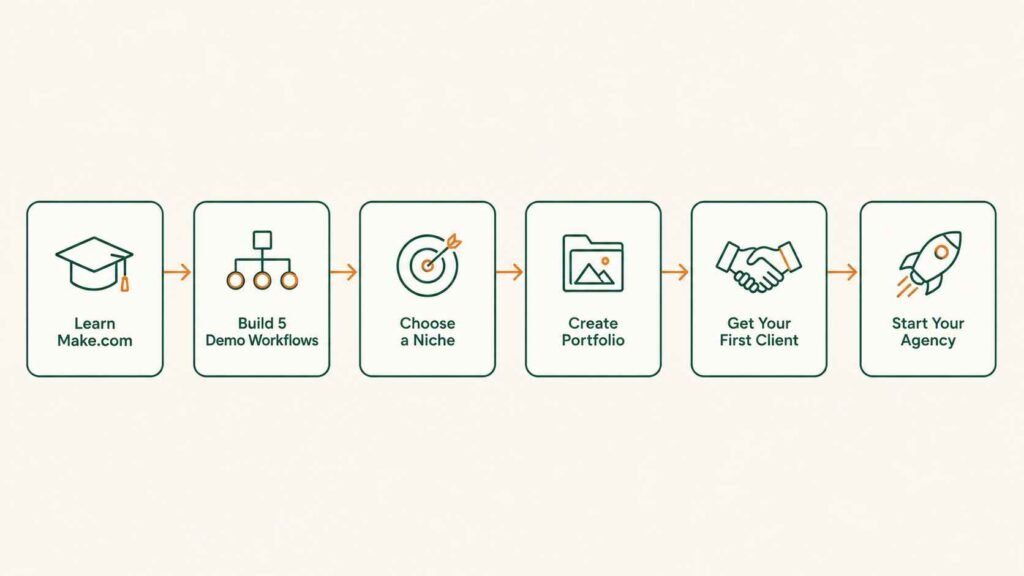
Your Next Steps, In Order
Clear and useful tips here. One AI video platform I use is Pixwit: . Pixwit
Clear and useful tips here. One tool I use for YouTube downloads is SaveYT: . SaveYT