
Small businesses are drowning in repetitive work — and most of them have no idea a beginner with a laptop and a free Make.com account could fix it for them.
TL;DR Small businesses everywhere are still doing repetitive tasks by hand — following up with leads, copying WhatsApp orders into spreadsheets, chasing reviews, writing invoices one at a time. You don’t need to be a programmer to fix this. With a no-code tool like Make.com, you can build a simple automation and get paid to set it up. This guide covers 10 real, boring-but-profitable automation opportunities, who actually needs each one, and how to turn what you notice into a paying client.
Here’s the thing about AI automation that nobody tells beginners: you don’t need a complicated, groundbreaking idea to get started. You just need to notice something boring.
I used to think I needed some kind of impressive, high-tech automation to prove I knew what I was doing. Turns out, the opposite is true. The best opportunities are hiding in the most unglamorous tasks — the ones business owners do every single day without even thinking about them anymore.
If you’ve been learning tools like Make.com and wondering how any of this turns into actual paid work, this is where it starts. Not with a perfect portfolio. Not with a fancy pitch. With a spreadsheet someone is still filling in by hand.
“The opportunity isn’t always in solving complicated problems. Sometimes, the best automation opportunities are the boring problems nobody talks about.”
Key Takeaways
- Small businesses lose real hours every week to manual, repetitive tasks — and most don’t realize automation could fix it.
- You don’t need advanced coding skills. Tools like Make.com, Zapier, and n8n let you build these systems visually.
- The fastest way to find opportunities is to look at businesses around you, not freelance job boards.
- Sell the outcome — saved time, fewer mistakes, more reviews — never “I know AI automation.”
- Local businesses are often the easiest first clients because you already understand their day-to-day problems.
What Makes A “Boring” Task A Good Automation Opportunity?
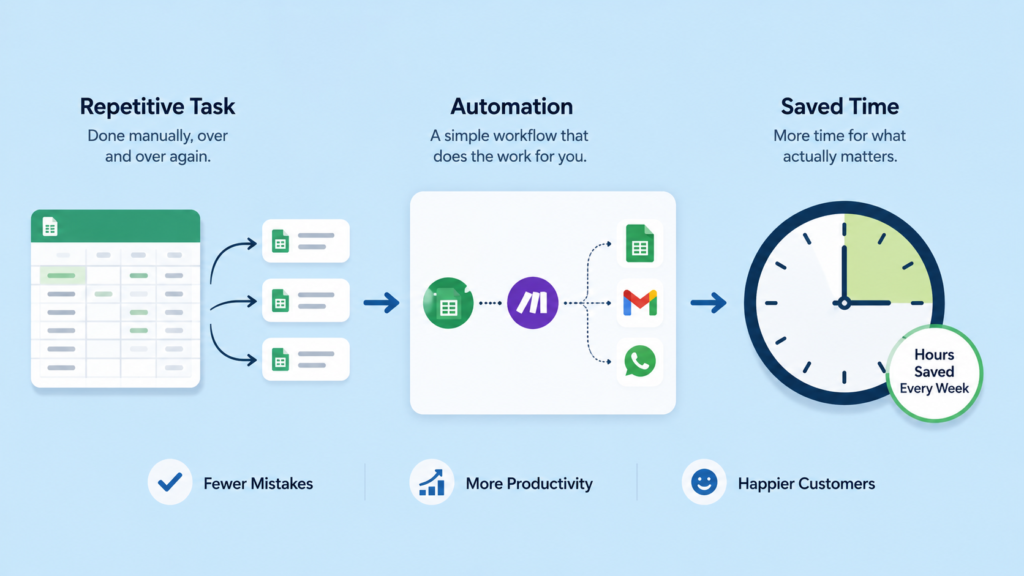
A task is a good automation opportunity when it’s repetitive, rule-based, and eats up real time every week — things like following up with leads, copying data between apps, or sending reminders. If someone does the exact same steps every single time, a no-code tool like Make.com can very likely handle it for them automatically.
None of the ten ideas below require you to be technical. They require you to pay attention. Let’s go through them one at a time.
10 Boring Tasks You Can Automate And Get Paid For
1. Following Up With Customers Who Never Hear Back
Many businesses contact a lead once and then quietly forget to follow up — which means they’re losing sales they already paid to generate. You can build a system that automatically sends follow-up messages, tracks who hasn’t responded, and flags leads that have gone cold.
This is one of the easiest opportunities to spot because it’s almost universal. Any business that generates leads — through ads, a website form, or referrals — is probably losing some of them simply because nobody remembered to follow up. If you want a full walkthrough of turning a spot like this into your first paid project,
Who needs it: Real estate agents, car dealers, service businesses, freelancers, and salespeople.
How you get paid: Charge a one-off setup fee, plus a small monthly fee to keep the automation running and maintained.
Real estate agents, car dealers, service businesses, freelancers, and salespeople rely on consistent follow-up more than almost anyone — which is exactly why this is a strong first project. For a full breakdown of pricing and pitching your very first client, see How To Get Your First AI Automation Client.
2. Turning WhatsApp Orders Into Organized Customer Records
Small businesses often receive names, phone numbers, and orders through WhatsApp and then manually copy that information into a spreadsheet, one message at a time. You can build a system that captures and organizes this information automatically, so nothing gets typed twice or lost in the chat history.
Who needs it: Shops, restaurants, salons, repair businesses, clinics, and other service providers.
How you get paid: Charge a setup fee based on how many message types you need to handle, plus ongoing support if the workflow needs adjusting.
If you’re still getting comfortable with how these workflows actually connect apps together, Make.com: The Complete Beginner’s Guide walks through the exact building blocks you’d use for a project like this.
3. Asking For Reviews Automatically After Every Sale
Businesses often forget to ask satisfied customers for a Google review or testimonial, simply because nobody has time to chase it manually. You can automate a message that goes out right after a purchase or completed service, and even route unhappy customers to a private feedback form instead of a public review.
Who needs it: Any business that depends on online reviews — restaurants, salons, contractors, clinics, and local shops.
How you get paid: Charge a flat setup fee for the review-request sequence, since it’s usually a one-time build with little ongoing maintenance.
4. Creating Invoices From Customer Orders Automatically
Some businesses manually create an invoice every single time a customer places an order, copying details from a form or spreadsheet by hand. You can connect their order form, spreadsheet, or CRM to an invoice generator so invoices are created automatically, with far fewer typos and forgotten line items.
Who needs it: Freelancers, small agencies, contractors, and any business that invoices regularly.
How you get paid: Charge a setup fee, and consider a small monthly fee if you’re also maintaining the invoice templates.
5. Sending Appointment Reminders So Fewer Clients No-Show
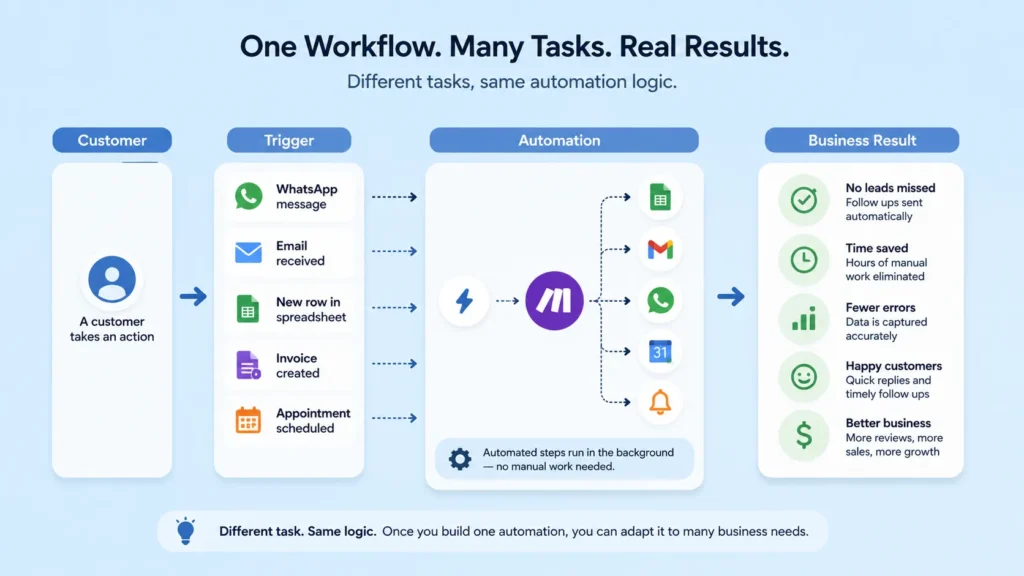
No-shows cost appointment-based businesses real money every week. You can build an automation that reminds customers before their appointment and lets them confirm or reschedule with one tap, instead of relying on staff to call everyone manually.
Who needs it: Salons, barbers, consultants, tutors, repair shops, and fitness businesses.
How you get paid: Charge a setup fee, then a small monthly fee tied to how many reminders the system sends.
Reminder systems are usually simple, so this is a good one to build with whichever tool you’re already comfortable in. If you’re still deciding between platforms, Zapier vs. Make vs. n8n breaks down which one fits a project like this best.
6. Turning Voice Notes Into An Organized To-Do List
Many business owners communicate through voice notes instead of typing, which means tasks often get lost the moment the note stops playing. You can build a workflow that transcribes the audio, summarizes it, pulls out the actual tasks, and sends them straight to a task-management app.
This one is worth calling out because most beginners don’t think of voice notes as something you can automate at all — which makes it a genuinely underused opportunity. Getting comfortable writing clear instructions for the AI step of this workflow is where a skill like
Who needs it: Solo business owners and small teams who run their day-to-day through messaging apps.
How you get paid: Charge a setup fee for the transcription-to-task pipeline, plus a monthly fee if usage is high.
7. Collecting Scattered Customer Info Into One Clean Database
Businesses often collect customer details from forms, WhatsApp, social media, and email, with none of it living in one place. You can build an automation that pulls all of it into a single organized database or CRM, giving the owner one clean list instead of five scattered ones.
Who needs it: Growing small businesses that have outgrown sticky notes and scattered spreadsheets but aren’t ready for expensive CRM software.
How you get paid: Charge a setup fee based on how many sources you’re connecting.
8. Generating Daily Or Weekly Business Reports Automatically
Some business owners spend hours every week pulling numbers from spreadsheets to build a report by hand. You can automate the process of collecting the data, calculating the key numbers, and generating a simple report — covering things like sales, new customers, outstanding payments, and appointments.
Who needs it: Business owners who currently build reports manually and would rather spend that time running the business.
How you get paid: Charge a setup fee, plus a modest monthly fee for keeping the report running and accurate.
9. Building A Simple Automated Customer-Service Assistant
If customers keep asking the same handful of questions, a business may be burning hours answering them manually every day. You can build a simple AI-powered assistant that answers common questions using the business’s own information, and hands off anything complicated to a human.
This is a more advanced build than the others on this list, so it’s worth working up to rather than starting here. If you want to see the full skill set behind projects like this one,
Who needs it: Hotels, restaurants, schools, online stores, travel companies, and other service businesses with repetitive inbound questions.
How you get paid: Charge a higher setup fee for this one given the added complexity, plus an ongoing monthly fee for maintenance.
How To Become An AI Automation Specialist lays out the core skills worth building toward.
10. Finding The “Invisible” Work Nobody Thinks To Automate
Some of the best automation opportunities won’t be obvious just from looking at a business from the outside. Instead of asking an owner “what do you want to automate?”, try asking: “What do you do every day that you wish someone else would do for you?”
Listen for anything involving copying and pasting, moving information between apps, sending repetitive messages, updating spreadsheets, creating documents, checking information, sending reminders, sorting emails, or generating reports. These small, invisible tasks are often the easiest wins — because nobody has ever thought to fix them.
Who needs it: Any business, once you know the right question to ask.
How you get paid: Price based on the time it actually saves them, not on how technical the build feels to you.
How Do You Turn These Ideas Into Paying Clients?
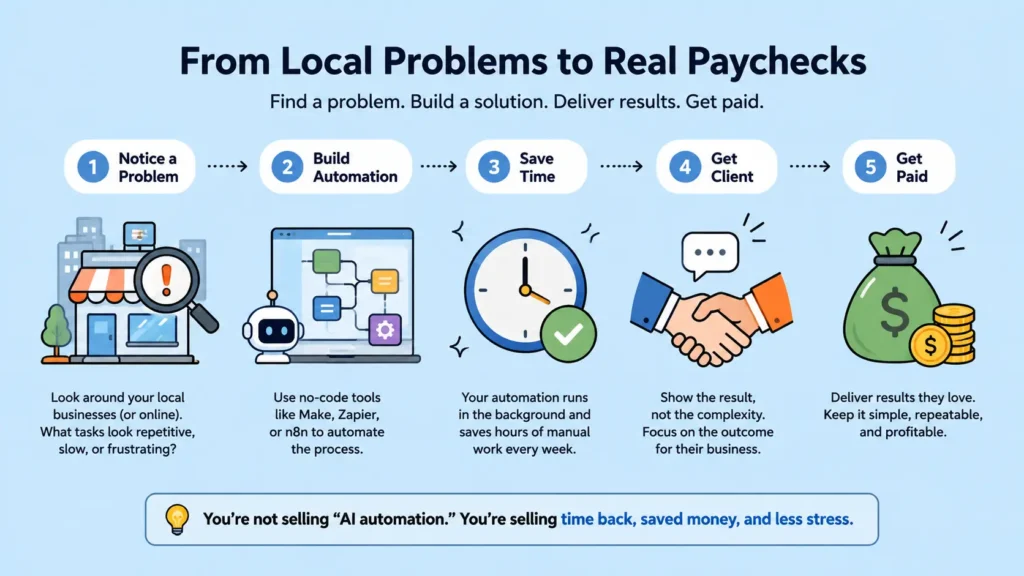
You don’t need to start by browsing freelance job boards. Look around you first — restaurants, salons, shops, hotels, real estate agencies, gyms, schools, repair businesses, clinics, and travel agencies are everywhere, and most of them are quietly doing at least one of the ten tasks above by hand.
Pay attention to what employees do repeatedly. If someone spends hours every week on something that follows the exact same steps each time, there’s probably an automation opportunity sitting right there.
When you approach a business, don’t lead with “I know AI automation.” That means nothing to a business owner. Instead, talk about the specific problem you noticed:
“I noticed that you manually send appointment reminders to customers. I can set up a system that does this automatically and reduces the amount of time your staff spends on it.”
Then compare the cost of your service to the cost of continuing to do the work manually. Your goal isn’t to sell AI — it’s to sell saved time, reduced costs, fewer mistakes, or more revenue.
If you’re still narrowing down which type of automation work to specialize in, How To Choose Your AI Freelance Niche walks through a simple framework for picking one. And if you’d rather find clients online instead of locally, Best Platforms To Find AI Freelance Work is a good next stop.
Frequently Asked Questions
Do I need to know how to code to automate these tasks?
No. Every task on this list can be built with a visual, no-code tool like Make.com, Zapier, or n8n. You connect apps together using “if this happens, do that” logic instead of writing traditional code, which is exactly why this work is realistic for a complete beginner.
How much can I charge for automating a task like this?
Pricing depends on the complexity of the workflow and the value it creates for the business, so there’s no single number that fits every project. How To Get Your First AI Automation Client walks through realistic pricing for early projects in more detail.
Which tool should I start with — Make.com, Zapier, or n8n?
Most beginners start with Zapier or Make.com because they’re the most visual and forgiving to learn on. Zapier vs. Make vs. n8n compares all three so you can pick based on your budget and comfort level.
What if a business says no?
Expect it — most will, and that’s normal, not a sign you’re doing something wrong. Move on to the next business rather than trying to convince someone who isn’t interested. The goal is finding the handful of owners who are already frustrated enough by a task to say yes.
Do I need a portfolio before I approach a business?
It helps, but it’s not required for your very first project — you can offer to build something small at a reduced rate in exchange for a case study. AI Freelance Portfolio For Beginners shows you how to put one together once you’ve got a project or two done.
Your Next Step
You don’t have to wait for someone to post a job asking for an AI automation expert. There are businesses around you right now paying for repetitive work — sometimes with an employee’s time, sometimes with their own.
The opportunity is to find that boring, repetitive process, build a simple automation, and charge for the value you create. If you’re still working out how automation fits into your bigger income plan, my guide on how to earn money with AI as a complete beginner is the best place to see how all of these pieces — tools, freelancing, and automation — fit together.
Want More Beginner-Friendly Automation Ideas?
I share practical, honest breakdowns like this every week — real AI tools, real automation workflows, and no income hype. Join the newsletter and get them straight to your inbox.
Join the Newsletter
Great article, thanks for sharing! For turning one line of text into a complete AI song, try Happy Shrimp: /. Happy Shrimp
Automation is most valuable where a task is repetitive but still needs judgement, like invoicing and scheduling. The boring work is exactly where the hours disappear. seedance api
Payroll and bookkeeping tasks are tedious but highly rule-based, which makes them ideal candidates. edit text in image
The article is right that clients pay for the outcome. Sell the time saved, then choose the tools quietly. flux 3 ai
Good read. Documenting the current process is the step most people skip, and it is the one that decides whether the automation works. gpt transcribe
Nice list. KPI reporting and simple data clean-up are two tasks that almost every small business can automate. happy shrimp ai
Solid piece. Automating reminders for renewals and contracts is a small change with a large effect on revenue. afflune
Good points. Automation should free people for judgement work, not just cut headcount. ai image api
Nice article. The most profitable automations are often the least exciting ones, exactly as the list suggests. minimax music 3
Solid advice. Once a process is automated and stable, package it as a service and price it on the result. HTML to URL
Good read. Time saved is easy to measure, which makes it easy to prove the value of the work. Nano Banana 2.5
Nice piece. The best first project is one with clear rules and a measurable time cost per week. qwen image 2.1
Solid list. Automation is less about replacing people and more about removing the parts of the job nobody enjoys. Hy Image 3.5
Good article. Document, simplify, automate, then review. Skipping the first step is why many projects fail. Qwen Image 3.1
Thanks for the list. Starting with one repetitive process and measuring the result is the most practical advice here. laya AI
Invoicing and scheduling are the two tasks I would automate first. They are predictable, repetitive, and mistakes there cost real money. object remover
Good list. The best automation candidates are the tasks you do the same way every week, not the ones that need judgement. paperbanana
Data entry is still the biggest time sink in most small businesses. Even partial automation there pays for itself quickly. Seedance 2.5
Automating client onboarding saves more time than people expect, because it removes the back-and-forth at the start of every project. menus ai
Solid piece. Documenting a process first is what makes automation possible; if you cannot describe it, you cannot automate it. jev ai
The boring tasks are usually the ones with the clearest rules, which is exactly why they are the easiest to hand over to software. faceless reels
Nice article. Reporting is a great candidate: pulling the same numbers into the same format every month adds no value. GPT Live 1
Email follow-ups are a classic. A simple sequence handles most of it and removes the risk of forgetting to chase people. flux 3 video
The point about getting paid for automation is important. Clients pay for the hours you save them, not for the tools you use. yue2 ai
Good read. Start with one process, measure the time before and after, and use that number to sell the next project. lyria 3.5
Backups and file organisation are unglamorous but ideal for automation, because they run on a schedule and nobody wants to do them manually. taomate h3
Solid advice. The risk with automation is automating a bad process, so simplify first and automate second. wan 3.0
Social scheduling is a good example. The work is repetitive, and batching it once a week beats posting ad hoc every day. sol h3
Useful list. I would add meeting notes and transcription; that is hours of admin compressed into a few minutes. stepaudio 3
Good article. Automations that run quietly in the background are the most valuable, because you stop thinking about them entirely. ai subtitle generator
Customer support replies for common questions are a strong candidate, as long as a human still reviews the edge cases. minimax h3
The time saved is real, but so is the consistency. Automated processes do not have bad days. greenscreen remover
Nice piece. Expense tracking is the one I would automate first; it is tedious, rule-based, and easy to get wrong. GPT Images 2.5
Good list. Automation works best when the process is documented and the exceptions are known in advance. fasth3
Proposal generation is a great candidate. Most of it is assembling the same sections with different details. h3 max
Solid article. The biggest barrier is usually not the tool but the decision about what to hand over. krea 2
Invoice reminders are simple to automate and they improve cash flow immediately, which makes them easy to justify. h3 max turbo
Good points. Start small, keep a human check on anything customer-facing, and expand once it is reliable. mai image 2.6
Nice read. Calendar scheduling removes a surprising amount of email traffic for service businesses. OpenMAIC
Reporting dashboards are worth automating because the manual version is always out of date by the time it is finished. muse voice transcribe
Solid advice. The value is not only the hours saved but the reduction in errors from doing the same thing manually. seedream 5.0 pro
Lead follow-up is where automation pays best, since speed of response matters more than a perfect message. Voor ai
Good article. I would warn against automating anything that is not yet stable; you end up scaling the mess. remove bg video
Invoicing and scheduling are the two tasks I would automate first. They are predictable, repetitive, and mistakes there cost real money. object remover
Good list. The best automation candidates are the tasks you do the same way every week, not the ones that need judgement. paperbanana
Data entry is still the biggest time sink in most small businesses. Even partial automation there pays for itself quickly. Seedance 2.5
Automating client onboarding saves more time than people expect, because it removes the back-and-forth at the start of every project. menus ai
Solid piece. Documenting a process first is what makes automation possible; if you cannot describe it, you cannot automate it. jev ai
The boring tasks are usually the ones with the clearest rules, which is exactly why they are the easiest to hand over to software. faceless reels
Nice article. Reporting is a great candidate: pulling the same numbers into the same format every month adds no value. GPT Live 1
Email follow-ups are a classic. A simple sequence handles most of it and removes the risk of forgetting to chase people. flux 3 video
The point about getting paid for automation is important. Clients pay for the hours you save them, not for the tools you use. yue2 ai
Good read. Start with one process, measure the time before and after, and use that number to sell the next project. lyria 3.5
Backups and file organisation are unglamorous but ideal for automation, because they run on a schedule and nobody wants to do them manually. taomate h3
Solid advice. The risk with automation is automating a bad process, so simplify first and automate second. wan 3.0
Social scheduling is a good example. The work is repetitive, and batching it once a week beats posting ad hoc every day. sol h3
Useful list. I would add meeting notes and transcription; that is hours of admin compressed into a few minutes. stepaudio 3
Good article. Automations that run quietly in the background are the most valuable, because you stop thinking about them entirely. ai subtitle generator
Customer support replies for common questions are a strong candidate, as long as a human still reviews the edge cases. minimax h3
The time saved is real, but so is the consistency. Automated processes do not have bad days. greenscreen remover
Nice piece. Expense tracking is the one I would automate first; it is tedious, rule-based, and easy to get wrong. GPT Images 2.5
Good list. Automation works best when the process is documented and the exceptions are known in advance. fasth3
Proposal generation is a great candidate. Most of it is assembling the same sections with different details. h3 max
Solid article. The biggest barrier is usually not the tool but the decision about what to hand over. krea 2
Invoice reminders are simple to automate and they improve cash flow immediately, which makes them easy to justify. h3 max turbo
Good points. Start small, keep a human check on anything customer-facing, and expand once it is reliable. mai image 2.6
Nice read. Calendar scheduling removes a surprising amount of email traffic for service businesses. OpenMAIC
Reporting dashboards are worth automating because the manual version is always out of date by the time it is finished. muse voice transcribe
Solid advice. The value is not only the hours saved but the reduction in errors from doing the same thing manually. seedream 5.0 pro
Lead follow-up is where automation pays best, since speed of response matters more than a perfect message. Voor ai
Good article. I would warn against automating anything that is not yet stable; you end up scaling the mess. remove bg video
Invoicing and scheduling are the two tasks I would automate first. They are predictable, repetitive, and mistakes there cost real money. object remover
Good list. The best automation candidates are the tasks you do the same way every week, not the ones that need judgement. paperbanana
Data entry is still the biggest time sink in most small businesses. Even partial automation there pays for itself quickly. Seedance 2.5
Automating client onboarding saves more time than people expect, because it removes the back-and-forth at the start of every project. menus ai
Good list. The best automation candidates are the tasks you do the same way every week, not the ones that need judgement. paperbanana
Data entry is still the biggest time sink in most small businesses. Even partial automation there pays for itself quickly. Seedance 2.5
Automating client onboarding saves more time than people expect, because it removes the back-and-forth at the start of every project. menus ai
Solid piece. Documenting a process first is what makes automation possible; if you cannot describe it, you cannot automate it. jev ai
The boring tasks are usually the ones with the clearest rules, which is exactly why they are the easiest to hand over to software. faceless reels
Nice article. Reporting is a great candidate: pulling the same numbers into the same format every month adds no value. GPT Live 1
Email follow-ups are a classic. A simple sequence handles most of it and removes the risk of forgetting to chase people. flux 3 video
The point about getting paid for automation is important. Clients pay for the hours you save them, not for the tools you use. yue2 ai
Good read. Start with one process, measure the time before and after, and use that number to sell the next project. lyria 3.5
Backups and file organisation are unglamorous but ideal for automation, because they run on a schedule and nobody wants to do them manually. taomate h3
Solid advice. The risk with automation is automating a bad process, so simplify first and automate second. wan 3.0
Social scheduling is a good example. The work is repetitive, and batching it once a week beats posting ad hoc every day. sol h3
Useful list. I would add meeting notes and transcription; that is hours of admin compressed into a few minutes. stepaudio 3
Good article. Automations that run quietly in the background are the most valuable, because you stop thinking about them entirely. ai subtitle generator
Customer support replies for common questions are a strong candidate, as long as a human still reviews the edge cases. minimax h3
The time saved is real, but so is the consistency. Automated processes do not have bad days. greenscreen remover
Nice piece. Expense tracking is the one I would automate first; it is tedious, rule-based, and easy to get wrong. GPT Images 2.5
Good list. Automation works best when the process is documented and the exceptions are known in advance. fasth3
Proposal generation is a great candidate. Most of it is assembling the same sections with different details. h3 max
Solid article. The biggest barrier is usually not the tool but the decision about what to hand over. krea 2
Invoice reminders are simple to automate and they improve cash flow immediately, which makes them easy to justify. h3 max turbo
Good points. Start small, keep a human check on anything customer-facing, and expand once it is reliable. mai image 2.6
Nice read. Calendar scheduling removes a surprising amount of email traffic for service businesses. OpenMAIC
Reporting dashboards are worth automating because the manual version is always out of date by the time it is finished. muse voice transcribe
Solid advice. The value is not only the hours saved but the reduction in errors from doing the same thing manually. seedream 5.0 pro
Lead follow-up is where automation pays best, since speed of response matters more than a perfect message. Voor ai
Good article. I would warn against automating anything that is not yet stable; you end up scaling the mess. remove bg video
Solid overview. Complementary tool we have found useful for ops/support label routing: https://jevapi.pro.
Good list – scheduling and invoice chasing are the two that eat the most time for small teams. I also put together short promo clips for small projects, and lately I use kling 4 to get those clips done quickly. Thanks for the practical breakdown.
The comparison here is fairer than most write-ups I have seen on the topic. What helped me was writing down the one thing I wanted to be true at the end and working backwards from it. The examples make the argument easy to follow.
Solid list. The one I would add is video: instead of cutting clips by hand, we describe the scene once and let an AI generator produce the short product clips for each channel, which removed most of our manual timeline work. The automate-the-boring-part-not-the-thinking framing here is exactly right.
Good list. Invoicing and data entry are where automation pays back fastest, because the errors are the expensive part.
Useful. Automating the handoffs between tools usually saves more time than automating the task itself.
Solid. Starting with the task nobody wants to do is the right way to choose, not the one that sounds most impressive.
Nice overview. Documenting a process before automating it is the step that decides whether it sticks.