

| TL;DR You don’t need to know how to code to build an AI agent. Using free, visual tools like Make.com, you can build an agent that reads information, makes a decision, and acts on its own — no programming required. This guide covers the exact process, plus a real example prompt and workflow you can copy today. |
If you’ve assumed that building an AI agent means learning to code, you’re not alone — it’s one of the most common misconceptions beginners have about this topic. The truth is simpler: with today’s no-code tools, building an AI agent without coding is something almost anyone can do in an afternoon.
This guide walks through exactly how to build an AI agent without coding, step by step, using free tools — no programming language, no computer science degree, and no prior experience required.
What Is an AI Agent?
An AI agent is a system that can complete a multi-step task on its own — deciding what to do, using tools, and acting — instead of just answering a single question the way a chatbot does. Ask ChatGPT to “summarize this email” and it summarizes it. Hand the same email to an agent, and it can read it, decide what matters, draft a reply, and log the result, all without you directing each step.
This is the same distinction we cover in more depth in our beginner’s guide to AI agents, so if any of this still feels fuzzy, that’s a good place to start.
Do You Need Coding Skills to Build an AI Agent?
No. Modern no-code platforms let you build a working AI agent using visual, drag-and-drop building blocks instead of programming languages. You’ll still need to think clearly about the steps involved — what should trigger the agent, what it should decide, and what it should do next — but you won’t write a single line of code to get it live.
“You don’t need to be a programmer to build an AI agent. You need to be someone who can describe, step by step, what you want done — the tools handle the rest.”
AI Agent vs. Automation vs. Chatbot: What’s the Difference?
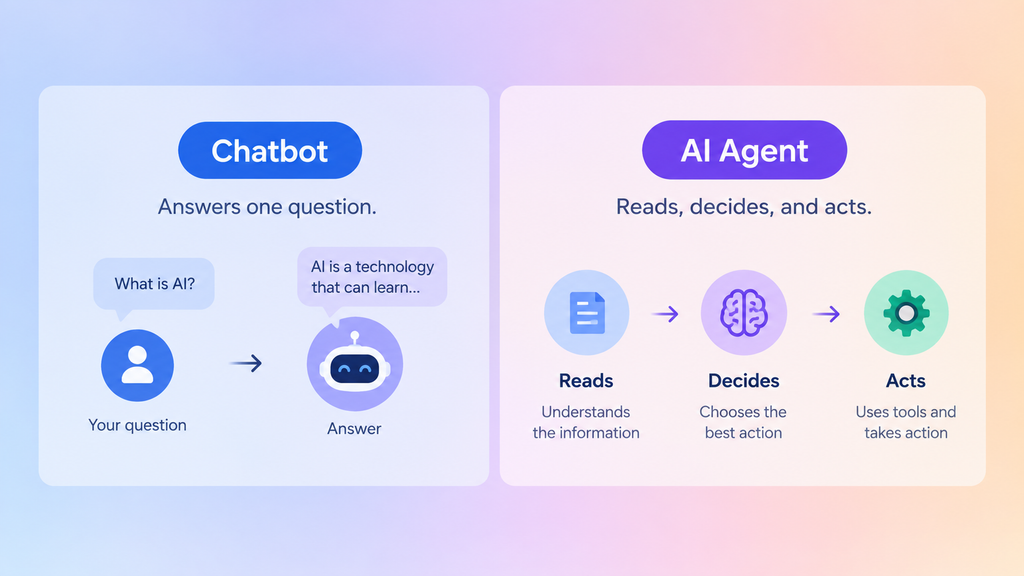
These three terms get used interchangeably, but they’re not the same thing. Here’s the quick comparison:
| Chatbot | Automation | AI Agent | |
| Answers questions | Yes | Sometimes | Yes |
| Follows fixed steps | Sometimes | Yes | Sometimes |
| Makes AI-driven decisions | Sometimes | Usually no | Yes |
| Uses outside tools | Limited | Yes | Yes |
| Handles changing situations | Limited | Limited | Better |
If there’s no decision-making involved — just a fixed sequence of steps — you probably just need automation, not an agent. Our AI automation workflow patterns post covers that simpler category well.
Best No-Code Tools for Building an AI Agent Without Coding
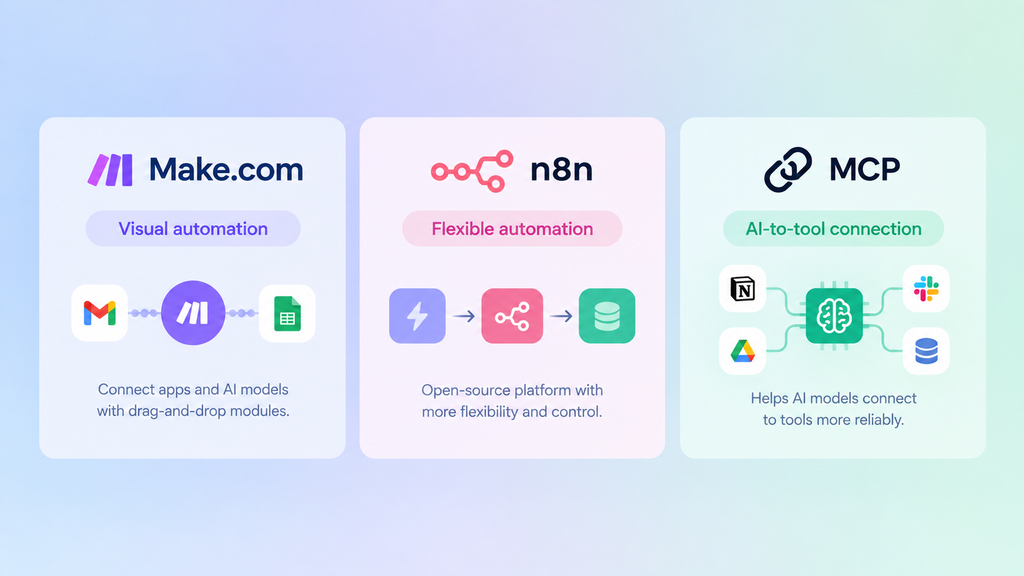
A handful of platforms have made agent-building accessible to complete beginners:
| Tool | Beginner Difficulty | Best For |
| Make.com | Easy | Visual automation, fastest to start |
| n8n | Medium | More flexibility once you know the basics |
| MCP | Advanced concept | Connecting AI models to tools reliably |
Make.com
A visual scenario builder where you connect apps and AI models with drag-and-drop “modules.” It’s the tool we use in the walkthrough below, and we cover it fully in our complete Make.com beginner’s guide.
n8n
An open-source alternative that’s a little more flexible once you’re comfortable with the basics. See how to learn n8n from scratch if you want to compare the two, or how to run n8n without hosting it yourself if the self-hosting part is what’s holding you back.
What About MCP?
MCP (Model Context Protocol) is a newer standard that helps AI models connect to tools more reliably. You don’t need it for your first agent, but our MCP beginner’s guide is worth bookmarking for when you’re ready to go further. n8n’s own AI Agent documentation is also a solid technical reference if you want to see how these pieces fit together under the hood.
How to Build an AI Agent Without Coding (Step by Step)
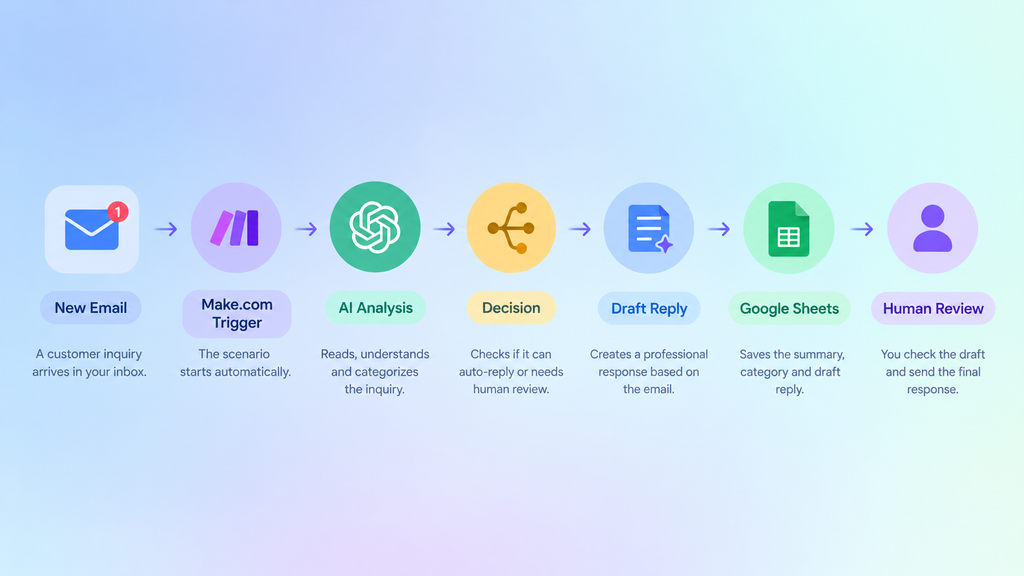
Let’s build something real: an agent that reads a new customer inquiry email, drafts a reply, and saves a summary to a spreadsheet. Here’s the workflow at a glance, then each step in detail, using Make.com.
| New email → Make.com → AI model → Decision → Draft reply → Google Sheets → Human review |
1. Pick One Small, Repetitive Task
Don’t start with your most complicated process — start with something you do the same way every time, like responding to a common type of email.
2. Choose Your Trigger
In Make.com, this is the event that starts the scenario — for example, “a new email arrives” or “a form is submitted.”
3. Connect an AI Model
Add a ChatGPT or Claude module and give it clear instructions: what to read, what to decide, and what to write. Vague instructions produce vague results — be specific. Here’s an example prompt structure you can adapt:
| Read the customer inquiry below. 1. Identify the customer’s main question. 2. Classify the inquiry as sales, support, billing, or other. 3. Draft a short, professional response. 4. Do not make promises about refunds or pricing. 5. Return the category, a one-line summary, and the draft reply. |
4. Add an Action
This is what the agent actually does with the AI’s output — send a reply, update a spreadsheet, or post a Slack message.
5. Add a Condition
A basic “if this, then that” filter keeps the agent from acting when something looks unusual — for example, only auto-replying if the inquiry matches a known topic.
6. Test Your AI Agent
Run the scenario manually with dummy data a few times before letting it run automatically. Check the AI’s output against what you’d actually want to send — don’t assume it’s right on the first try.
You can create a free Make.com account and start building here: Sign up for Make.com.
Can You Build an AI Agent for Free?
Yes, at least to start. Make.com and n8n both offer free tiers that are enough to build and run a small agent without paying anything up front. As your agent handles more volume — more emails, more runs per month, more complex AI calls — you may eventually bump into free-tier limits and need a paid plan to keep it running smoothly.
What Can This Actually Do in Real Life?
Once you understand the pattern, the same structure applies to dozens of situations. A small business owner might use one to summarize customer inquiries and draft first-pass replies for their team to review.
A freelancer might build one that monitors job boards and flags gigs that match their skills — a useful addition to an AI automation portfolio. A solo content creator might set one up to pull weekly analytics and draft a plain-English summary.
Common Mistakes Beginners Make When Building Their First Agent
- Trying to automate something too complex right away, instead of starting with one small, repetitive task.
- Skipping testing with real data before switching the agent to fully automatic.
- Not adding a human-review step for anything involving money, sensitive data, or customer-facing communication.
- Confusing an agent with a simple automation — if there’s no AI decision-making involved, you may not need an agent at all, just a basic workflow.
How This Fits Into an AI Career or Income Path
Once you can build a simple agent, you have a genuinely marketable skill. Small businesses everywhere have repetitive tasks they’d happily pay someone to automate — our guide on how to become an AI automation specialist and how to get your first automation client walk through exactly how to turn this into income.
If you want a structured way to build momentum, the 30-Day AI Career Challenge is a good next step. And if you’re still asking whether any of this can realistically become income at all, start with our pillar guide: Can You Earn Money With AI As a Beginner?
| Key Takeaways An AI agent completes multi-step tasks on its own; a chatbot just answers questions and automation just follows fixed steps.You can build an AI agent without coding — Make.com and n8n both use visual, drag-and-drop building blocks.Start small: one task, one trigger, one action.A specific AI prompt (what to read, decide, and write) makes a huge difference in output quality.Always test with dummy data before letting an agent run automatically.This skill can become the foundation of automation freelancing or a broader AI career. |
Frequently Asked Questions
What’s the difference between an AI agent and automation?
Traditional automation follows the same fixed steps every time. An AI agent uses an AI model to make decisions along the way, so it can handle situations that weren’t explicitly programmed in advance.
Is building an AI agent free?
You can start for free. Make.com and n8n both offer free tiers, and free-tier AI models can power a basic agent, though heavier use may eventually require a paid plan.
Do I need to know Python or JavaScript?
No. No-code platforms handle the technical execution for you. Some advanced agents use small code snippets for edge cases, but you can build a fully functioning agent without ever opening a code editor.
How long does it take to build a first AI agent?
Most beginners can build and test a simple agent in under an hour once they’ve picked a clear, small task to automate.
What is MCP, and do I need it for this?
MCP (Model Context Protocol) is a standard that helps AI models connect to tools more reliably. You don’t need to understand it to build your first agent, but it’s worth learning as you go further — see our MCP beginner’s guide when you’re ready.
Start Building Your First AI Agent
Here’s the thing: the biggest barrier to building an AI agent without coding was never the technology. It’s the belief that you need to be technical to try. You don’t. Pick one small, annoying, repetitive task in your week, open a free Make.com account, and build something that handles it for you.
That’s the whole first step. If this gave you a clearer picture of how agents actually work, you might also enjoy our full guide to AI agents for beginners — it goes a little deeper into where this technology is headed next.